Link URL in Swap Image screen | Community
Skip to main content
Matt_Reenstra
Level 2
Jun 27, 2018 7:28 PM UTC
Solved

Link URL in Swap Image screen

Hello,

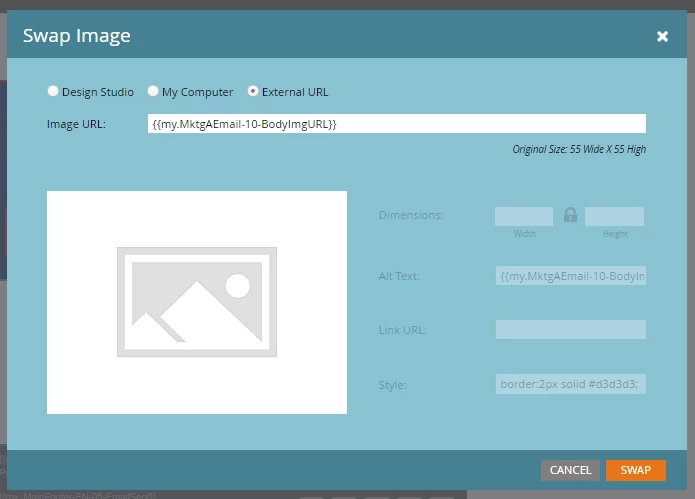
Does anybody know how I can get the Link URL section editable? I can edit the Alt Text and Style, but Link URL is always grayed out so I can't enter anything.

Sorry if this has been asked before but I can't seem to find an answer on previous threads.
Thanks,

Matt

This post is no longer active and is closed to new replies. Need help? Start a new post to ask your question.
Dan_Stevens_
Dan_Stevens_Accepted solution
Level 10
Jun 27, 2018 7:34 PM UTC

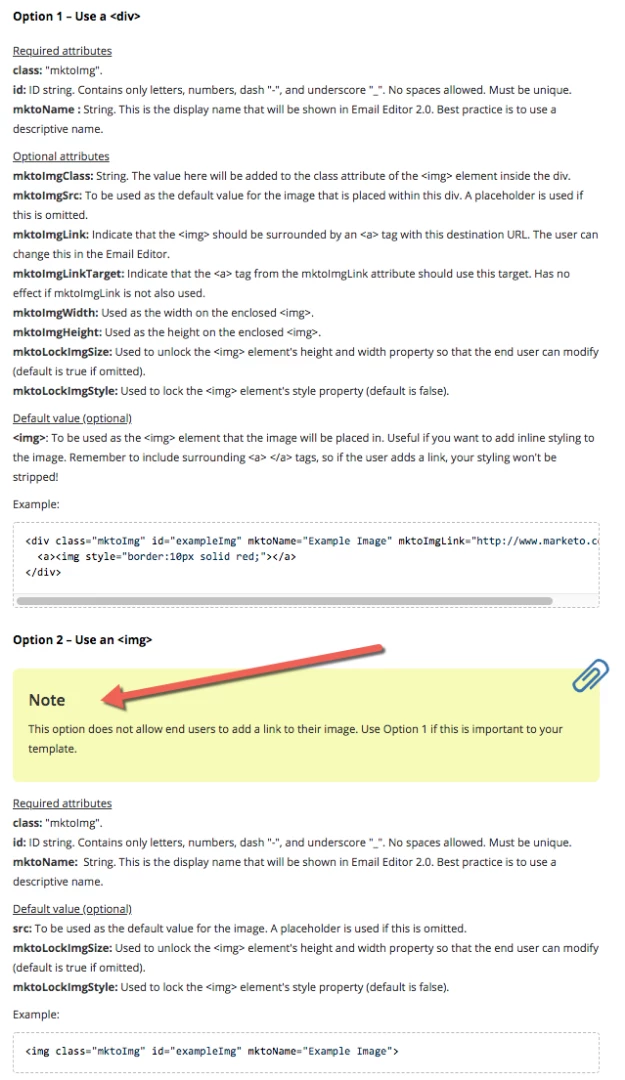
Check your email template.  If editable image elements are coded with an <img> tag, this is not editable.  You'll need to use a <div> instead.  More information here: Email Template Syntax - Marketo Docs - Product Documentation

2 replies

Matt_Reenstra
Level 2
Jun 27, 2018 7:42 PM UTC

Thanks for this Dan.

Translate
Dan_Stevens_
Dan_Stevens_Accepted solution
Level 10
Jun 27, 2018 7:34 PM UTC

Check your email template.  If editable image elements are coded with an <img> tag, this is not editable.  You'll need to use a <div> instead.  More information here: Email Template Syntax - Marketo Docs - Product Documentation

Translate