Look at my trigger campaign and can you set an end date to a trigger campaign? | Community
Skip to main content
February 17, 2015
Solved

Look at my trigger campaign and can you set an end date to a trigger campaign?

  • February 17, 2015
  • 8 replies
  • 3245 views
I have a survey that I want to go out automatically 1 week after a PDF download. 

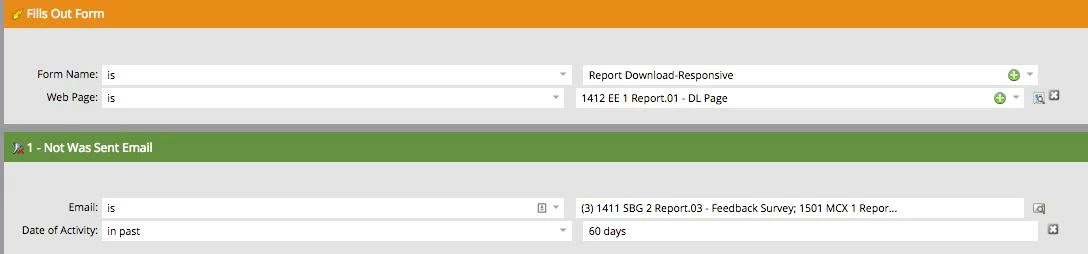
Does this look right to you? I've set up my smart list for fills out form and not sent the survey already for any other PDF they might have downloaded.


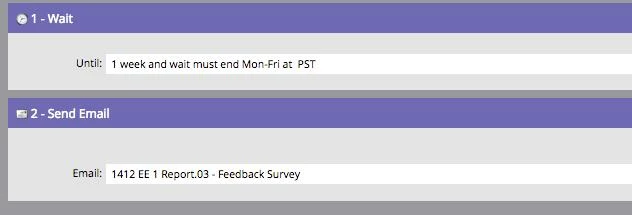
So I want to wait a week, then send the survey out any time M-F

How do I set it up so that this trigger campaign automatically ends in 90 days?
This post is no longer active and is closed to new replies. Need help? Start a new post to ask your question.
Best answer by ronaksanghvi

Hi ,

In addition to unpublishing landing pages, deactivating trigger campaigns, and stopping recurring batch campaigns, you now have the option of setting an expiration date/time. Please find attached the document.
 

8 replies

Vinay_Kumar
Community Manager
September 6, 2022
ronaksanghviAccepted solution
New Participant
September 6, 2022

Hi ,

In addition to unpublishing landing pages, deactivating trigger campaigns, and stopping recurring batch campaigns, you now have the option of setting an expiration date/time. Please find attached the document.
 
February 17, 2015
Hey Christine, definitely that would work!
February 17, 2015
Justin, interesting point about the criteria being evaluated at the time of download, not later. Thanks for the reco. It might be easier for me to just exclude anyone who has downloaded the other reports, instead of getting the follow up survey email. Right?

Jeff, that makes sense. What a simple suggestion! I like your other suggestion about adding verbiage to follow up page, and our thank you email.
February 17, 2015
Hey Christine,

You can add a date constraint to the "Fills out form" trigger. This will not deactivate the campaign, but it will not allow anyone to be admitted past your 90 day window. Also, you can modify the campaign setup so that a record can only go through once. This will mitigate folks filling out the form again. You might also want to add verbiage to your follow up page that they can expect the email in 7-10 days.

Hope that helps!
February 17, 2015
What you have will work, but one potential "gotcha" is that the filter criteria are checked prior to the week wait period and not before sending. What this means is that if I download two papers the same day I could get two surveys a week later because I was eligible for both at the time the criteria was evaluated. To get around this you can have your wait step in its own campaign then request a seperate survey send campaign and put the filters in the smart list of that one. That will ensure your survey is only sent once.
Michelle_Tizian
New Participant
February 17, 2015
I believe you'd have to do it as a batch campaign.  Instead of using the trigger filter fills out form (orange), use the green one, filled out form. Then you can set it to end on the date you want it to expire.  

Or you can deactivate your trigger campaign after 90 days.  Mark it in your calendar.  
February 17, 2015
The set up looks right but I do not believe there is a way to automatically end a triggered campaign.