
Looking for Marketo Event Check-In App Guidance | Community
Skip to main content
Danielle_Wong
Community Manager
April 11, 2018
Solved

Looking for Marketo Event Check-In App Guidance

  • April 11, 2018
  • 3 replies
  • 5867 views

Have I set up the program correctly for the Marketo Event Check-In App to work?

Here is my program setup:
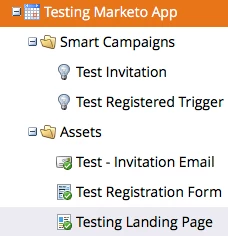
Assets:
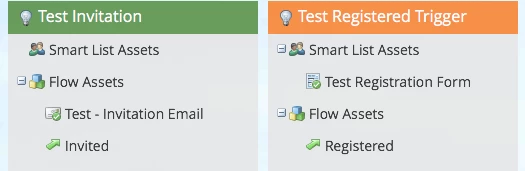
I plan to send an invitation email that has the landing page link. Customers will fill out the form on the landing page and go through the triggered Registered flow.

Did I miss any steps in the setup? Also, if I have someone that attends the trade show that wasn't in my program and not in my database, would I be able to add that person?

Thanks

Danielle

This post is no longer active and is closed to new replies. Need help? Start a new post to ask your question.
Best answer by Nicholas_Manojl

Hi Danielle,

Adding to Cody's response. The check-in app will specifically show people who have a status of 'Registered' and once checked-in, advance them (without the need for a smart campaign) to 'Attended'.

In Admin -> Tags -> Channels you can match up the statuses 'Registered' and 'Attended' for other bespoke statuses in your campaign: ie., 'Attends booth' might match up with 'Attended', meaning when someone checks-in, they'll reach the status of 'Attends booth'.

So a couple of things from your original post,

1) you don't need a smart campaign to move people to attended

2) anyone who gets checked in will become 'attended'

3) this includes people added as a walk-in

A couple of other things..

1) make sure you have scheduled the dates for the event to be within 4 days of using the check-in app, or they won't appear

2) make sure you have a smart campaign that makes people 'registered' for an event, or they won't appear

3 replies

Danielle_Wong
Community Manager
April 13, 2018

Is there a way to edit the form when I add someone to the check in list that isn't in the program already? I want to add a specific field to the form for them to opt-in to receiving emails.

Thanks!

Veronica_Holme4
New Participant
April 16, 2018

Hate to say it but the answer to that is a flat no. You could vote it up, but honestly Marketo have made very few changes to this app for amlooooooong time. https://nation.marketo.com/ideas/7413#comment-18062

Most people who need that scenario build a custom landing page and form and use that to register walk-ins instead (remembering to build a page that switches off munchkin tracking).

Danielle_Wong
Community Manager
April 16, 2018

Hi Veronica,

I appreciate your help! That's a good idea!! So if I go the custom landing page route, I would just have the form open on a browser on the tablet/computer for people to complete. The only drawback I see is that if for some reason we do not have internet connection at a show, then the form would not save the form submissions, right?

Thanks!

Danielle

Nicholas_Manojl
Nicholas_ManojlAccepted solution
New Participant
April 12, 2018

Hi Danielle,

Adding to Cody's response. The check-in app will specifically show people who have a status of 'Registered' and once checked-in, advance them (without the need for a smart campaign) to 'Attended'.

In Admin -> Tags -> Channels you can match up the statuses 'Registered' and 'Attended' for other bespoke statuses in your campaign: ie., 'Attends booth' might match up with 'Attended', meaning when someone checks-in, they'll reach the status of 'Attends booth'.

So a couple of things from your original post,

1) you don't need a smart campaign to move people to attended

2) anyone who gets checked in will become 'attended'

3) this includes people added as a walk-in

A couple of other things..

1) make sure you have scheduled the dates for the event to be within 4 days of using the check-in app, or they won't appear

2) make sure you have a smart campaign that makes people 'registered' for an event, or they won't appear

Danielle_Wong
Community Manager
April 12, 2018

Thank you for all the great information you provided. I will keep all this in mind.

Cody_Haener
New Participant
April 12, 2018

Hi Danielle,

Did you go through the setup steps in Product Docs guide? Prepare for Your Event - Marketo Docs - Product Documentation

If you did, when a lead registers they should show up on the registration list in the app. If a lead that isn't on the registration list is manually entered through the app at the tradeshow, they'll automatically be added to your database and the Event program with an Attended status when the app syncs.

Veronica_Holme4
New Participant
April 12, 2018

Please remember that the Event needs to be scheduled within the next 7 days to show up in the app.

Danielle_Wong
Community Manager
April 12, 2018

Thank you for the tip Veronica! This is the first time I'm using the app!