mailto link not working on Mac Outlook but is working fine in PC Outlook | Community
Skip to main content
July 28, 2016
Solved

mailto link not working on Mac Outlook but is working fine in PC Outlook

  • July 28, 2016
  • 2 replies
  • 5082 views

I have set up a mailto link in my email...

<a class="main" style="color: #ffffff; text-decoration: none;" href="mailto:mforrest@uptimeinstitute.com?subject=Help me Register | Fall Network Conference" target="_blank">Help me Register »</a>

but upon sending a test to myself the code changes to this along with all the other links in my email on the Mac...

<a style="color:#ffffff;text-decoration:none" href="go.the451group.com/he0d10Y00D0000oPg010Yv0" target="_blank" data-saferedirecturl="google.com/url?hl=en&q=http://go.the451group.com/he0d10Y00D0000oPg010Yv0&source=gmail&ust=1469805079206000&usg=AFQjCNEmoG4MV3hNz_BztyFEk-4QsZCDFA">Help me Register »</a>

but on the PC it works fine...what is causing the HTML code to switch like this and how can I fix it so it works on both Mac and PC?

This post is no longer active and is closed to new replies. Need help? Start a new post to ask your question.
Best answer by Grégoire_Miche2

Hi Nio,

This cannot be on your mac and not on your laptop.

Marketo is rebranding all the links before sending the email, unless you tell it not to do so. And it does so regardless of the email client that will be used to read the email. go.the 451group.com is your Marketo click detection server.

So the HTML has to be the same on both mac and PC, unless you did not send the email to yourself through the same mechanism. it may now happen that the way outlook for mac and outlook for PC do not decode the redirection from the click detection server to the final destination of the link the same way.

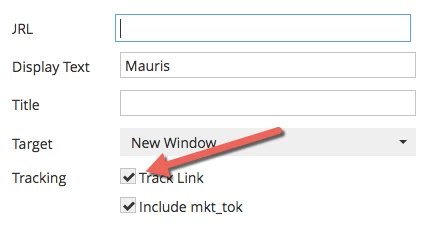
to prevent marketo from rebranding the link, edit the link in the editor and uncheck the "track link" chekcbox:

or add a class="mktNoTrack" in the HTML on the <a> tag.

-Greg

2 replies

SanfordWhiteman
New Participant
July 28, 2016
July 28, 2016

Thanks Sanford

Grégoire_Miche2
Grégoire_Miche2Accepted solution
New Participant
July 28, 2016

Hi Nio,

This cannot be on your mac and not on your laptop.

Marketo is rebranding all the links before sending the email, unless you tell it not to do so. And it does so regardless of the email client that will be used to read the email. go.the 451group.com is your Marketo click detection server.

So the HTML has to be the same on both mac and PC, unless you did not send the email to yourself through the same mechanism. it may now happen that the way outlook for mac and outlook for PC do not decode the redirection from the click detection server to the final destination of the link the same way.

to prevent marketo from rebranding the link, edit the link in the editor and uncheck the "track link" chekcbox:

or add a class="mktNoTrack" in the HTML on the <a> tag.

-Greg

July 28, 2016

Thank you Grégoire!

Grégoire_Miche2
New Participant
July 29, 2016

You are welcome