Make it make sense - click numbers | Community
Skip to main content
New Participant
March 19, 2024
Solved

Make it make sense - click numbers

  • March 19, 2024
  • 1 reply
  • 1405 views

Sent an email campaign last week. Here's the number of clicks as reported on the dashboard:
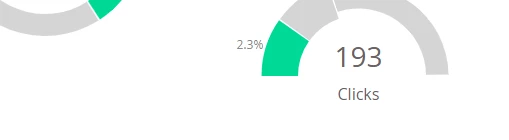
 

But the email link performance report reads:

Yes, I get that the first bolded number (299) is supposed to be total link clicks where as the second number (233) is invidual people that clicked. So where does 193, as reported in the Dashboard number, even come from?

This post is no longer active and is closed to new replies. Need help? Start a new post to ask your question.
Best answer by Darshil_Shah1

In Email Link performance, each row of the people column, shows the number of unique people who clicked on that link, and the total is a sum of each of those rows.  This means that it shows the total number of unique clicks among all links in an email, and not the total number of people who clicked a link. A person could have clicked a link multiple times so they would be counted 2x in the total, unlike the email send program’s dashboard, which shows the number of people who have clicked one or more links in the email. I hope this clarifies your question. Please let us know if you have questions.

1 reply

Darshil_Shah1
Darshil_Shah1Accepted solution
Community Manager
March 20, 2024

In Email Link performance, each row of the people column, shows the number of unique people who clicked on that link, and the total is a sum of each of those rows.  This means that it shows the total number of unique clicks among all links in an email, and not the total number of people who clicked a link. A person could have clicked a link multiple times so they would be counted 2x in the total, unlike the email send program’s dashboard, which shows the number of people who have clicked one or more links in the email. I hope this clarifies your question. Please let us know if you have questions.

ayaspanAuthor
New Participant
March 20, 2024

Got it, makes much more sense now. Guess it's hard to uniquely label such a column succinctly, but that explanation helps a lot.