
Marketo Best Practice for organising marketo assets and programs
This post states the best practices we follow in our marketo instance.
Best Practices for organising in folders:
- Never mix the Operational Folders with Marketing Activities Folders
- Always keep the seperate folders for Learning and testing and should never be mixed in with Marketing Activities.
- Name the folders in such a manner so that they gets arranged in chronological order automatically. Use digits for month, date instead of words (Ex. Use 08 instead of August/Aug)
- Always have a Archive Folder for the assets and programs that are no longer active.
Folders help in grouping similar assets/programs, but often using too many folder and partitioning too much causes confusion and clutter in the folder tree. Hence it is advisable to have five main folders hierarchy:-
- Active Marketing Programs
a.1) Emails
a.2) Events
a.2.1) Live Events
a.2.2) Trade Shows
a.2.3) Webinars
a.3) List Imports
a.4) NewsLetters
a.5) Nurture
a.6) Web Content
a.7) Web Forms
- Marketo Program Templates
- Operational Programs
- Sales Insights
- _Archived
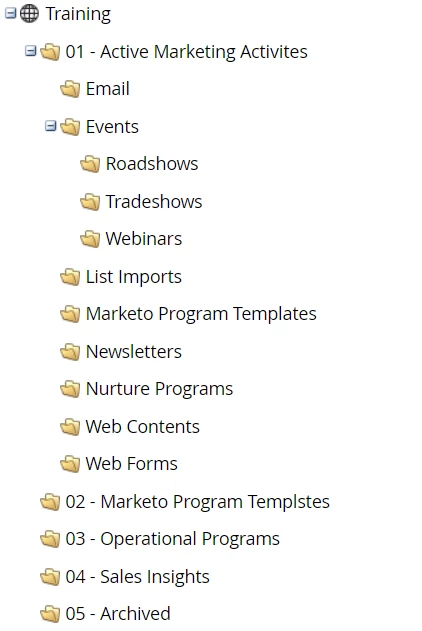
Fig 1. Sample Folder Structure for Effectively Organising Assets and Programs in Marketo
Folder Structure for Design Studio:
Design Studio
1. Landing Pages
a.1 Templates
a.2 Global Landing Pages
a.3 _Archive
2. Forms
b.1 Global Forms
b.2 _Archive
3. Emails
c.1 Templates
c.2 Global Emails
c.3 _Archive
4. Images and Files
d.1 Logos
d.2 Template Graphics
Always Include a “Global” folders for re-usable Forms, and Emails, and Landing Pages.
Folder Structure for Organising Lead Database:
Lead Database
- System Smart Lists
- My Smart Lists
b.1 Exclusion Lists
b.2 Operational Lists
b.3 _Archive
- My Lists
c.1 Internal Lists
c.2 _Archive
- Segmentations
- Field Organiser
- Smart Lists and My Lists are organised by purpose of the lists e.g. Exclusion, Internal, Operational
- Archives will store the leads that are no-longer required.
Marketo Naming Conventions:
Naming inconsistencies reduce the reporting effectiveness, cause marketing inefficiencies and reduce the marketing automation power.
The need for following a standard best practices for naming of Programs and assets in Marketo becomes utmost importance when the same account is used by multiple marketers(users), as not following a common naming convention would lead to poor reporting and analysis.
Consistent program names make analysis and comparison easier. Consistent naming enables advanced filtering to gain custom insights.
When you have a naming convention, you can easily distinguish between marketing activities and compare results. Building and following naming convention would help in streamlining the overall marketo management.
Purposes of following a proper naming convention:
- Keep your instance free from any clutter.
- Find items quickly
- Easily select groups of assets
- Make reports easy to sort and read.
Best Practices for Naming Convention of Marketo Assets:
- Should allow easy references to the assets
- Should be such that the program, assets get sorted by date,program type and other attributes
- Should make the programs and assets easy to identify
- Should be as short as possible and as long as necessary.
Asset Naming Convention:
Following things are comprised under assets:
- Emails
- Forms
- Landing Pages
- PDFs
- Lists
Note:
- Always have a local Assets folder inside every program where you would have all the local assets pertaining to that program
- Also create sub-folders for each type of Local Assets
Abbreviations for the assets:
- Email : EMAIL
- Landing Page : LP
- Web Forms : FORM
- Alert Email : ALERT EMAIL
- Smart List : SLST
- List : LST
Format for naming the local assets:
[Abbreviation for the Asset] - [Brief Description of Asset’s Purpose]
Few Examples of naming an asset:
- EMAIL-Outbound
- EMAIL-Invitation
- Email-ThankYou
- Email-Reminder
- Email-SendPromoCode
- LP-SignUp
- FORM-WebinarRegistration
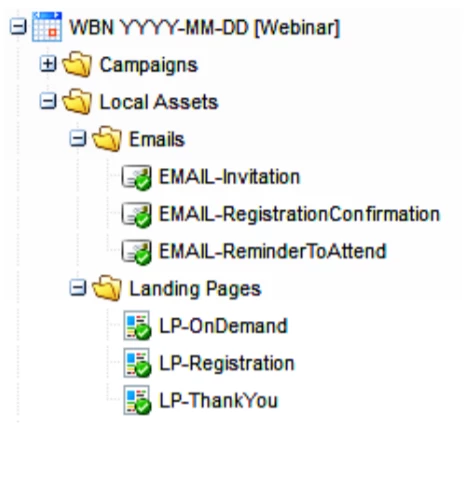
Fig 2: Managing and Organising the assets with naming convention illustration
Naming Convention for Campaigns:
Suggested Format for naming campaign:
[Campaign Serial Number]-[Brief Description of the campaign]
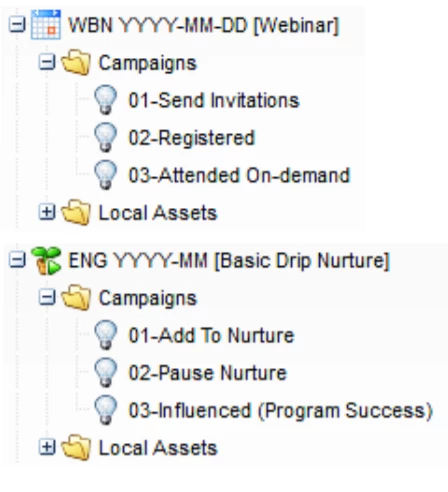
Fig 3: Figure illustrates various examples for campaign naming