
Marketo Form 2.0 Not Submitting for Users | Community
Skip to main content
Ayan_Talukder
New Participant
March 3, 2017
Question

Marketo Form 2.0 Not Submitting for Users

  • March 3, 2017
  • 2 replies
  • 5511 views

Hi everyone,

I thought I would reach out to the community to see if anyone else is having similar issues. We discovered a bug with the Marketo Form not submitting for some users. At first we thought it was a one off case but it started occurring for dozens of individuals for the last 3 months. Marketo Support is aware of the issue and they said they released a patch to solve this issue. However we sent out a promo email for a webinar yesterday and received over 20 emails letting us know the form is not working.

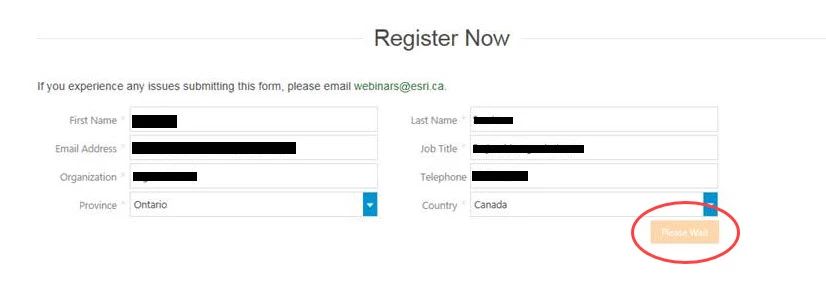
Basically what happens is when individuals fill out the form and submit, it does not complete the action and gets stuck on the "Waiting" label (which is Please Wait). See the below image for an example.
This post is no longer active and is closed to new replies. Need help? Start a new post to ask your question.

2 replies

Grégoire_Miche2
New Participant
March 3, 2017

A few cases similar issues have been reported to me today, only on Firefox v51 and v48, on windows. I have not been able to reproduce them, though.

-Greg

Ayan_Talukder
New Participant
March 7, 2017

Thanks for the reply Grégoire, this is very interesting. We have also been told by users on Firefox that the form does not even show up for them. I was able to reproduce this issue in Private Browsing mode in Firefox but not in the regular mode.

The issue of the form not submitting is too broad for us to pin down as users I have questioned let me know they have tried it in multiple browsers and are on either Windows 7, 8 or 10.

Dan_Stevens_
New Participant
March 7, 2017

Is this a form on a Marketo LP or embedded on a non-Marketo LP?  If the latter, it's important to use your CNAME within the embed code (vs. *.marketo.com).  See this discussion: Re: Firefox Private Browser Hiding ALL Marketo Embed Forms

SanfordWhiteman
New Participant
March 3, 2017

You need to provide a test URL as well as a browser+version with which I can repro the issue.

Ayan_Talukder
New Participant
March 7, 2017

Thanks for the reply Sanford, I am going to reproduce one of our forms in our sandbox and provide a test.

The strange thing is I am unable to reproduce the issue as well, but we have had even more users email us (about 35 now) letting us know they are unable to submit the form. The browsers are so wide that we are unable to pinpoint it exactly. It varies from Chrome, IE, and Firefox and on Windows 7, 8, and 10.

Marketo support says they are looking into it still.