
Marketo form display and input issue with iOS | Community
Skip to main content
MichaelOsborne
New Participant
March 23, 2022
Solved

Marketo form display and input issue with iOS

  • March 23, 2022
  • 1 reply
  • 2709 views

Hi Marketo community,


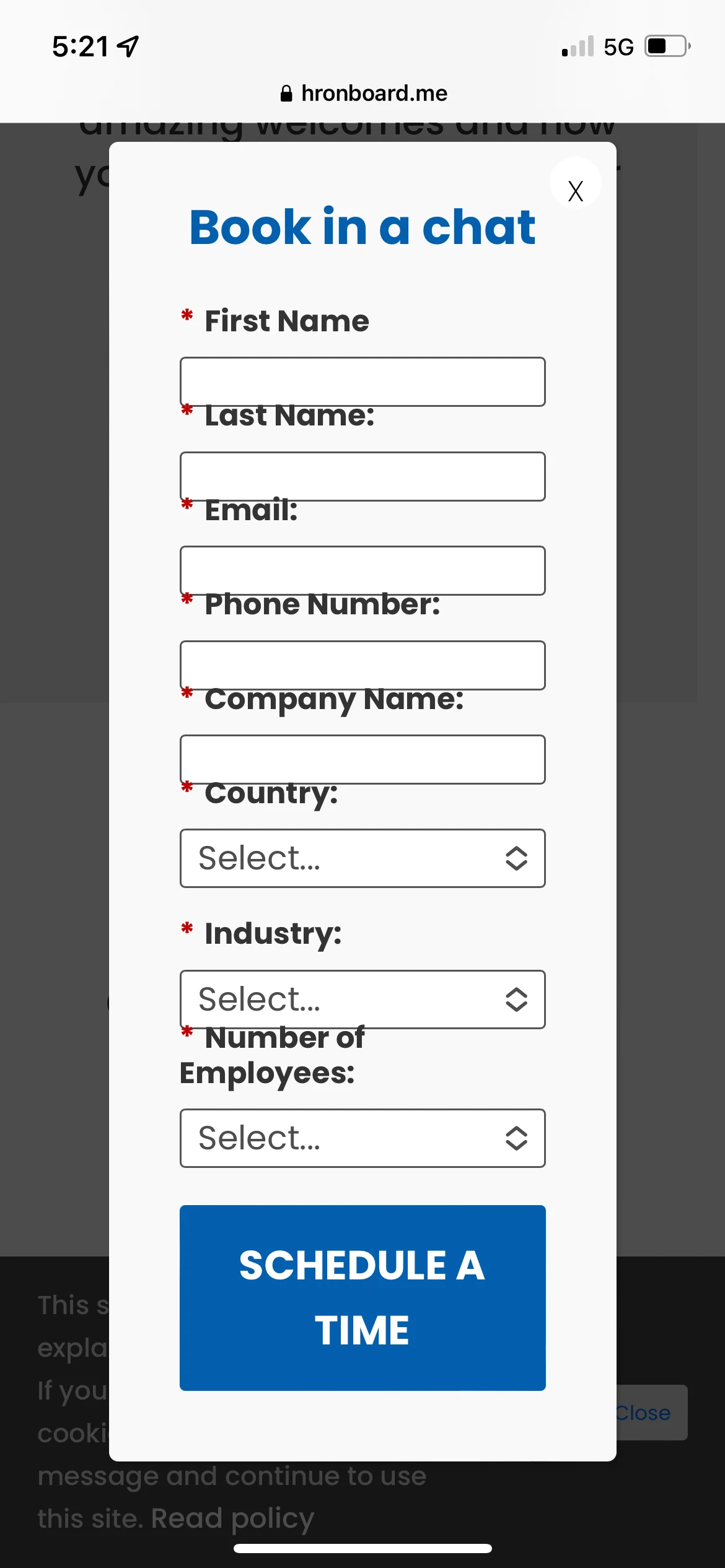
We have experienced a unique issue where an embedded Marketo form is not displaying and inputting text correctly on iOS only.  Been trying to work with a developer on the website but have not been able to crack it.


We can only see the issue on the iphone device itself, not when we are testing on responsive design mode on Firefox.


Here is a link to the form:

https://hronboard.me/book-a-demo/ 


This post is no longer active and is closed to new replies. Need help? Start a new post to ask your question.
Best answer by SanfordWhiteman

So remove that section in the CSS Form Editor and build a new style specifically for iOS?  Are there any recommendations on where to look for this?

You already have have something that only takes effect on iOS that makes it differ from Android — not something that was intended to be different but a style that in practice functions differently across the OSes.


So I think you need to replace one of your mobile-only styles after taking the margin-top out.

1 reply

SanfordWhiteman
New Participant
March 23, 2022

Simple, it’s right here in your Custom CSS (in Form Editor):

/* Reduce spacing between fields */ .mktoForm .mktoFieldWrap { margin-top:-20px; }

And this margin adjustment happens on desktop as well, it’s just less visually jarring because of the overall layout.


Start by removing this customization and then build out mobile styles as needed.

MichaelOsborne
New Participant
March 24, 2022

Thanks @sanfordwhiteman.


So remove that section in the CSS Form Editor and build a new style specifically for iOS?  Are there any recommendations on where to look for this?

SanfordWhiteman
SanfordWhitemanAccepted solution
New Participant
March 24, 2022

So remove that section in the CSS Form Editor and build a new style specifically for iOS?  Are there any recommendations on where to look for this?

You already have have something that only takes effect on iOS that makes it differ from Android — not something that was intended to be different but a style that in practice functions differently across the OSes.


So I think you need to replace one of your mobile-only styles after taking the margin-top out.
