Marketo form : How to pass custom values before submitting the form? | Community
Skip to main content
New Participant
July 7, 2022
Solved

Marketo form : How to pass custom values before submitting the form?

  • July 7, 2022
  • 1 reply
  • 1987 views

Hi All,

We are using custom fields in Marketo form ( CustomFieldA, CustomFieldB)
CustomFieldA assigned single checkbox and CustomFieldB assigned multiple checkboxes 
Like below image
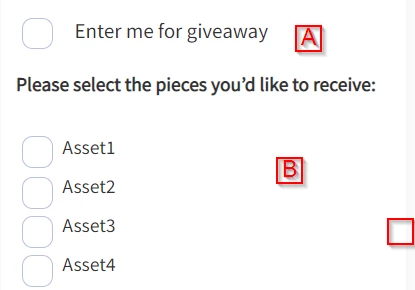
I would like to submit the form  as CustomFieldB = NULL (empty the field) if user checks only CustomFieldA and not CustomFieldB

Here is my code but it is not working. Please let me know how to make this work.

$(document).ready(function() { MktoForms2.whenReady(function(form) { form.onSubmit(function(form) { var vals = form.vals(); var giveaway = vals.CustomFieldA; var assets = vals.CustomFieldB; if(giveaway == "yes" && typeof assets === "undefined"){ form.setValues({"CustomFieldB":"NULL"}); }else if(giveaway == "no" && assets != ""){ form.setValues({"CustomFieldA":"NULL"}); } }); }); });


This post is no longer active and is closed to new replies. Need help? Start a new post to ask your question.
Best answer by SanfordWhiteman

Two problems here:


  1. (severity: fatal) You need to have a hidden NULL option. I wrote an extensive blog post on this a long time ago.
  2. (severity: unknown) You have a possible race condition. $document.ready() firing doesn’t necessarily mean the forms library has been loaded.  Depends on how how you’re loading the library.  If you’re injecting it via GTM, for example, you have a race condition. If it’s just a regular <script> tag in the page you’re fine.

1 reply

SanfordWhiteman
SanfordWhitemanAccepted solution
New Participant
July 7, 2022

Two problems here:


  1. (severity: fatal) You need to have a hidden NULL option. I wrote an extensive blog post on this a long time ago.
  2. (severity: unknown) You have a possible race condition. $document.ready() firing doesn’t necessarily mean the forms library has been loaded.  Depends on how how you’re loading the library.  If you’re injecting it via GTM, for example, you have a race condition. If it’s just a regular <script> tag in the page you’re fine.