Marketo Form select Custom Region(s) to show Locations - Javascript?
Hi All,
I am setting up a subscription/preference centre and have come across an issue while building the preferences form.
Our company provides a range of services across various regions in Australia NSW and QLD.
My Scenario:
When a customer fills out the form they can select one or more regions via a checkbox and a list of locations associated with that region is displayed. (Similar to a Country picker that shows States once Countries are selected, but our list of regions/sites)
Also note, this form will be hosted on a Marketo Landing page, but I will also have other versions that will be embedded on a WordPress website.
What I tried:
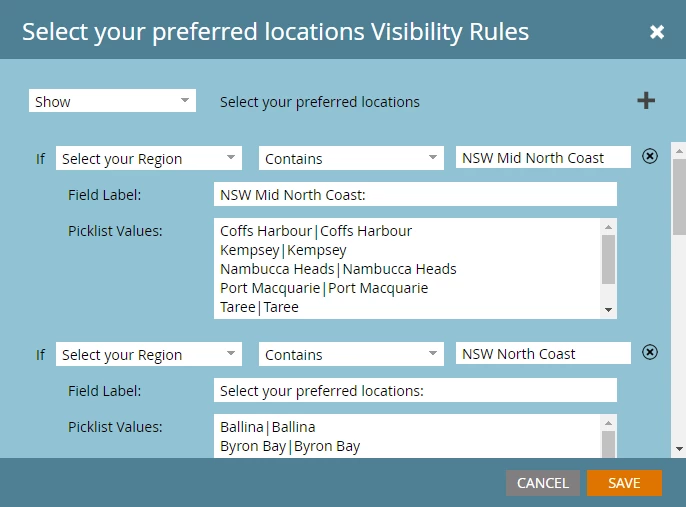
Created a Region custom field and added it to the form as Checkboxes. Created a Sites custom field and added it to the form as Checkboxes. Set up visibility rules so that when a selected Region contains the region name a list of sites associated with that region is shown. This works fine if I select just one Region, but a customer may choose multiple Regions, when they do this only Sites for the first region show and not all Sites for all selected regions. See my example setup in the image below:
I've researched the forums and think JavaScript may be the answer to my problem. Can anyone assist with providing a starting point for me to set up the JavaScript to achieve my scenario?