Marketo Form styling issues | Community
Skip to main content
New Participant
November 13, 2023
Question

Marketo Form styling issues

  • November 13, 2023
  • 1 reply
  • 2670 views

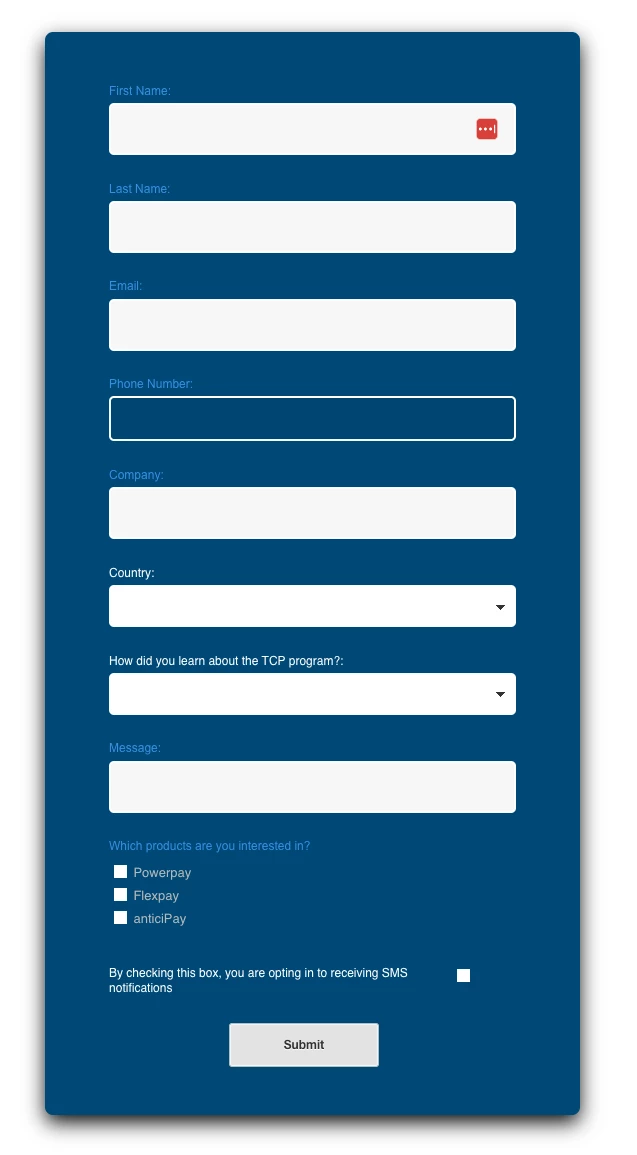
I am having issues with the text colors and the one box not being white. I am not sure where in the "edit CSS" I need to update this. I need the "First Name"/"Last Name"/etc. Field labels to be white as well as the one box to match the rest. I am not sure why "Country" and the next field are correct and the rest are not. In the preview mode it shows them all correctly but on the website it looks like below. 
 

1 reply

SanfordWhiteman
New Participant
November 13, 2023
You'd have to link to your page. It's not possible to debug a screenshot!
New Participant
November 13, 2023

I appreciate the feedback and am still figuring out what I am doing. 


Here is the link to the form on the website:
telarus.com/tcp-1/


Here is a link to the Marketo form itself. 

https://app-ab55.marketo.com/m#FOE1222-DET

michellechopin
Community Manager
November 13, 2023

@joshkessel Have you edited the CSS on the Marketo form itself? If not, you can do that from the field settings on the right side of the editor:


You will see a rich text editor pop up and you can adjust the colors as you would anywhere else in Marketo - either on the color palette or in the HTML of the box. 


We have to do the same on our forms as some are placed on dark backgrounds and the default text color doesn't show.


Hope that helps?

Michelle 😊