
Marketo Forms Not Collecting Hidden Fields on Known Visitor Submissions | Community
Skip to main content
MannyP98
New Participant
December 10, 2024
Solved

Marketo Forms Not Collecting Hidden Fields on Known Visitor Submissions

  • December 10, 2024
  • 1 reply
  • 983 views

Hey fellow community members,

I'm hoping someone out here can help me out with something that I came across recently. We had a lead come through as an MQL via a demo request form fill for a promo we're running. However when looking at it, the lead source had not been updated and still said they were a referral.

Person Source / Lead Source is a hidden field that I've added on all our forms with a default value filled in - in the case of our demo forms, this is set to 'Demo Request'.

I did some testing of my own which looked like this:

1. Cleared my cache & cookies
2. Filled out a Gated Content form to a) set the Person Source to 'Website Content' & b) to establish my known visitor record.
3. With the browser now knowing its me, I went to the same form the lead filled out (Demo Request). It properly displayed the KV HTML and I submitted.
4. I checked my test lead's Activity Details & got the same result as the earlier lead. See below.

Gated Content Form Fill - Initial Test - All fields
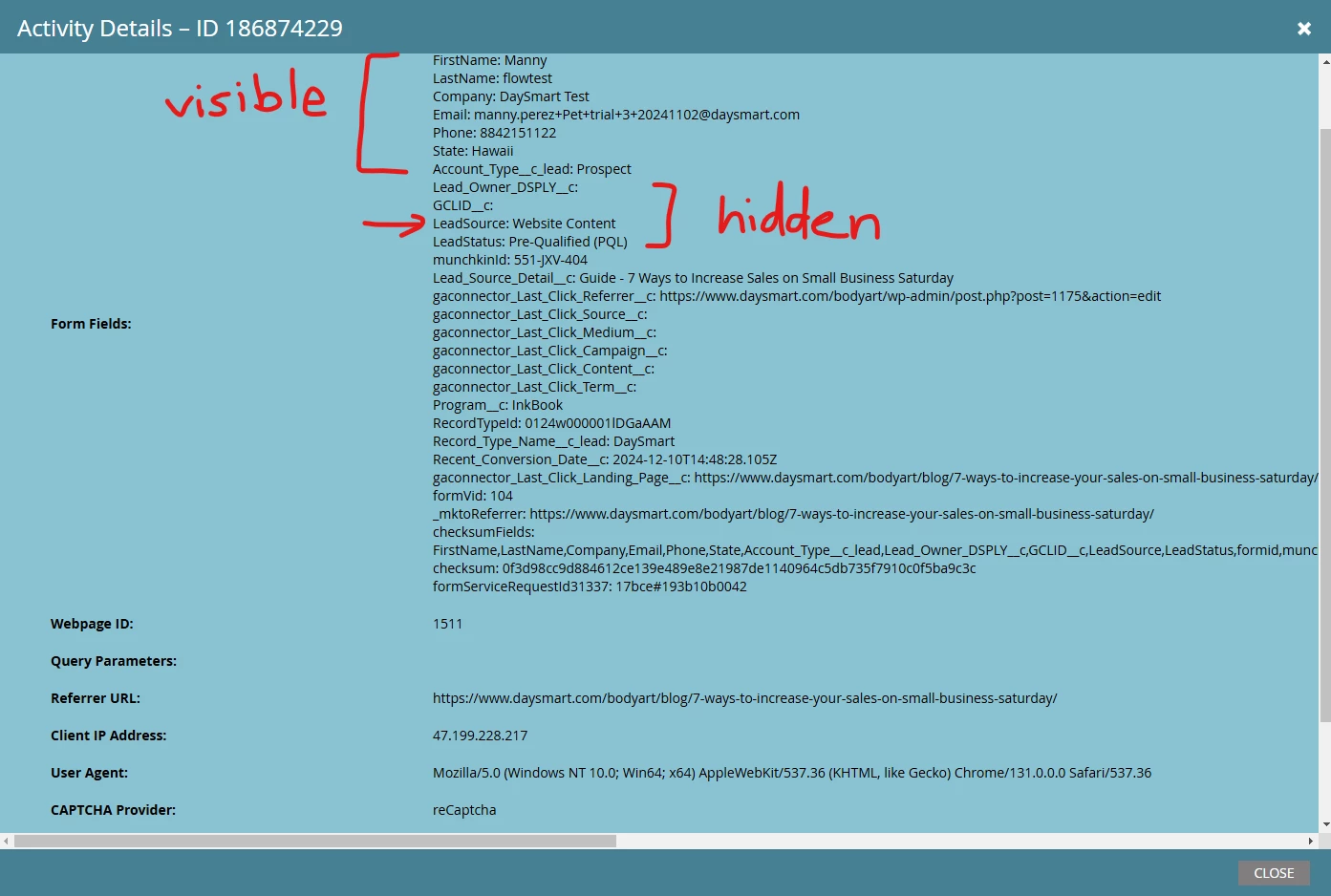

Demo Request Form Fill - 2nd Test - KV HTML

FYI The other fields seen in both cases are being added via additional JS on the page.

Am I being silly and this is just how the KV HTML enabled forms work or am I missing something else? If so, I'm guessing I just need to set the Person Source outside of the form to be able to use the KV behavior.

Thanks in advance!
Manny

Best answer by SanfordWhiteman

A quirk of KV HTML mode is it assumes you don’t want to updateany fields.


This doesn’t represent-world needs in many cases, but never fear: just use my FormsPlus::Auto-Fill w/Cascade code to get even better auto-fill than you get natively: CodePen Home MktoForms2 :: Auto-Fill w/Cascade v1.1.6+.


Upload the .js file linked in the HTML pane to your Design Studio, and call it as shown in the JS pane.

1 reply

SanfordWhiteman
SanfordWhitemanAccepted solution
New Participant
December 10, 2024

A quirk of KV HTML mode is it assumes you don’t want to updateany fields.


This doesn’t represent-world needs in many cases, but never fear: just use my FormsPlus::Auto-Fill w/Cascade code to get even better auto-fill than you get natively: CodePen Home MktoForms2 :: Auto-Fill w/Cascade v1.1.6+.


Upload the .js file linked in the HTML pane to your Design Studio, and call it as shown in the JS pane.

MannyP98
MannyP98Author
New Participant
December 10, 2024

Thanks Sandford!

The more I thought about it I was more convinced it was just the nature of KV so thanks for confirming.

Thats perfect! I already utilized your autofill cascade function for capturing UTMs so good to know I can just update that.

Best,

Manny