Marketo Landing Pages stuck on Please Wait | Community
Skip to main content
New Participant
June 19, 2018
Solved

Marketo Landing Pages stuck on Please Wait

  • June 19, 2018
  • 1 reply
  • 5588 views

Hey Marketo.

I recently inherited an existing instance of Marketo, as our resident Marketo expert resigned from our organization. During my initiation period, I realized some landing pages didn't have our Google Tag Manager code on it. I then went through every Marketo landing page we use, and updated the GTM codes across the board (both pages that were missing it and pages that already had it, but it was an older version of the GTM code). After I finished, we were collecting use behavior on all Marketo pages - victory! This was Friday the 15th of June.

However, I noticed two unusual bits:

  1. Our forms are stuck on "please wait" and never show users a thank you page. However, all of the data does pass into Marketo & ultimately SFDC. You can try this for yourself on our newsletter subscriber page.
    1. What would be causing this issue?
    2. Any ideas on fixes?
  2. GA's event tracking stopped working.
    1. What would cause this issue?
    2. Is it related to the "please wait" issue?

Here's the code that was on the subscriber page, and worked perfectly until Friday. We use this same bit of code, and just rename the eventLabel.

<script language="javascript">

  MktoForms2.whenReady(function(form) { 

    form.onSuccess(function(vals, tyURL) { 

      ga('send', 'event', { 

        eventCategory: 'marketo', 

        eventAction: 'form-fill', 

        eventLabel: 'subscribe', 

        hitCallback: function() { 

          document.location.href = tyURL; 

        } 

      }); 

      return false; 

    }); 

  });

</script>

Being new to Marketo, I have no clue what to troubleshoot. Any and all ideas would be GREATLY appreciated!

Cheers,

Steve
This post is no longer active and is closed to new replies. Need help? Start a new post to ask your question.
Best answer by SanfordWhiteman

Hi Steve,

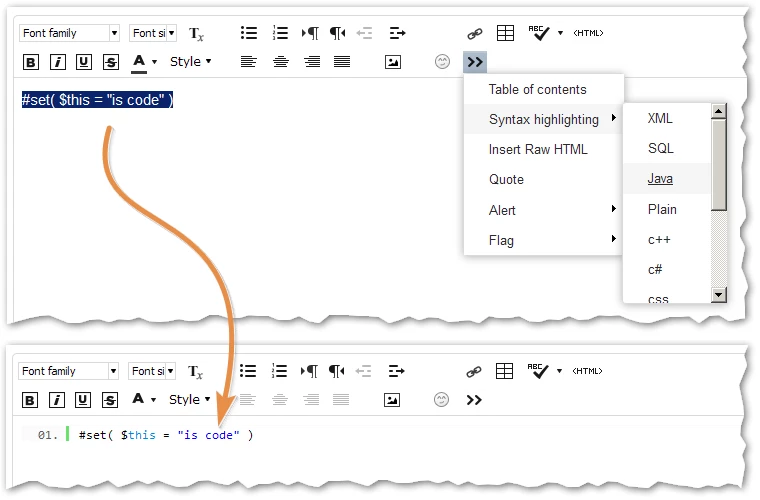
One thing to definitely do when posting code here is highlight it using the Advanced Editor's syntax highlighter (highlight as JavaScript in your case). Otherwise it isn't readable.

Anyway, your problem is indeed that you aren't initializing the Google (Universal) Analytics library correctly anymore.

Thus this call to ga("send") to send a hit fails to complete.

ga('send', 'event', { ... });

And the GA hitCallback function never fires.

And because it never fires, you never get redirected (document.location.href = ...) after successful form submission, though as you noted these errors do happen after the form is processed by Marketo.

1 reply

SanfordWhiteman
SanfordWhitemanAccepted solution
New Participant
June 19, 2018

Hi Steve,

One thing to definitely do when posting code here is highlight it using the Advanced Editor's syntax highlighter (highlight as JavaScript in your case). Otherwise it isn't readable.

Anyway, your problem is indeed that you aren't initializing the Google (Universal) Analytics library correctly anymore.

Thus this call to ga("send") to send a hit fails to complete.

ga('send', 'event', { ... });

And the GA hitCallback function never fires.

And because it never fires, you never get redirected (document.location.href = ...) after successful form submission, though as you noted these errors do happen after the form is processed by Marketo.

New Participant
June 19, 2018

Hi Sanford, thank you for looking at my question. I appreciate the help on both the ticket and on the syntax highlighter.

Your response gives me a few ideas, which I'll try right now. I shall update with my progress.

Cheers,

Steve