Marketo reporting - filtering time tests | Community
Skip to main content
New Participant
July 10, 2023
Solved

Marketo reporting - filtering time tests

  • July 10, 2023
  • 2 replies
  • 2361 views

hi all, am i missing something here? I'm trying to add data to our reporting spreadsheets and am backfilling from what we already have, on newsletters we were initialy just testing time of send, but im struggling to filter out the diff times of send on the email performance report, please do we know how? i've selected my email in setup of the report but its still bringing through muddled up data and i've not way of separating out the different sends based on the time test i did. anyone any ideas please?


sorry i'm such a nuisance! 


ta, Mike



This post is no longer active and is closed to new replies. Need help? Start a new post to ask your question.
Best answer by Chelsea_Stinnet

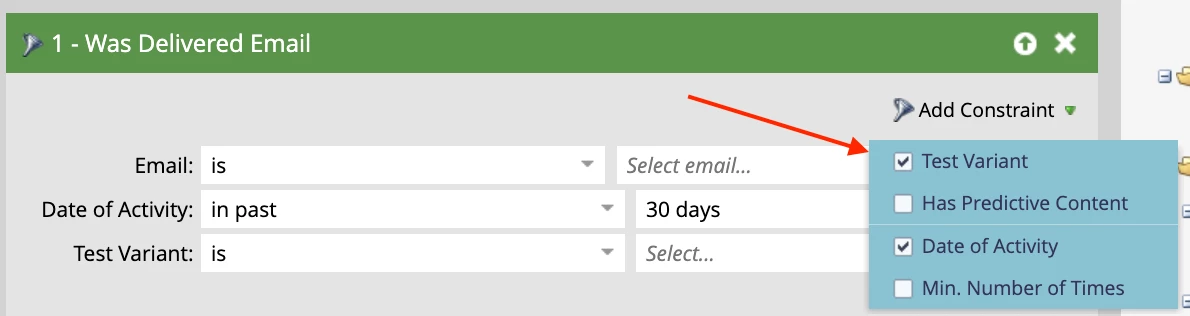
Hi Mike, did you use A/B testing functionality to test the time of send? If so, you can edit the Smart List section of your Email Performance Report and add a filter for "Email Was Delivered". Then select Add Constraint > Test Variant to drill down to a single version of your A/B test.

2 replies

Chelsea_Stinnet
Chelsea_StinnetAccepted solution
New Participant
July 10, 2023

Hi Mike, did you use A/B testing functionality to test the time of send? If so, you can edit the Smart List section of your Email Performance Report and add a filter for "Email Was Delivered". Then select Add Constraint > Test Variant to drill down to a single version of your A/B test.

Hoppers13Author
New Participant
July 10, 2023

ypu're a legend Chelsea thank you! sorry its something so simple! when i trained on the reporting it was all in theory so i couldnt learn properly!

Chelsea_Stinnet
New Participant
July 10, 2023

I love simple solutions! And we're all still learning 🙂

jacklaushway1
New Participant
July 10, 2023

Hi Mike,

What exact times are you looking to filter by? Marketo reports allow you to filter by a variety of different dates, but are restricted to time of day filtering. If you are looking to test via time of day (for example 7am vs 10am), you could compare engagement via an A/B test. Another option is to use the Email Performance Report by sending two whole emails (with the same content) at different times and add both of these emails to the report within Setup to directly compare performance.

If you can provide a bit more details, I should be able to provide a more definitive answer. Thanks

Hoppers13Author
New Participant
July 10, 2023

hi Jack, thanks for reply,


so we did a 6am send & a 6pm send splitting the database.