Marketo strips out mktoModule defined on TR | Community
Skip to main content
August 16, 2017
Solved

Marketo strips out mktoModule defined on TR

  • August 16, 2017
  • 3 replies
  • 4917 views

Hi Guys,

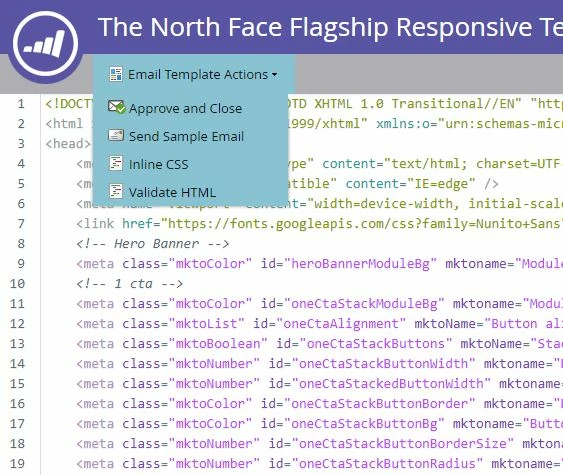
I'm trying to clean up our corporate template and one of the changes I want to do is using mktoModule on a TR Instead of TABLE and mktoContainer on the TBODY instead of TD, to reduce the amount of code. Following the Marketo syntax specs, that should be possible. The problem: when I preview the email is all fine, but when I send a test, Marketo strips out all TRs within mktoContainer. I've tried mktoContainer on the main table, same story.

Code extract:

<table width="100%" border="0" cellpadding="0" cellspacing="0">

        <tbody>

            <tr>

                <td>

                    <table width="600" border="0" align="center" cellpadding="0" cellspacing="0" class="table-responsive" style="table-layout: fixed; width:600px; min-width:600px;">

                        <tbody class="mktoContainer" id="main-container">

                            <tr class="mktoModule" mktoAddByDefault="true" id="pre-header" mktoname="Pre Header">

                                <td>

                                    <table width="100%" border="0" cellpadding="0" cellspacing="0">

                                        <tr>

                                            <td height="10" style="font-size:10px; line-height: 10px;"> </td>

                                        </tr>

                                        <tr>

                                            <td style="font-family: 'Nunito Sans', Arial, sans-serif; color: #333333; font-size:12px; line-height:15px; text-align:center;">

                                                <div class="mktEditable" id="pre-header-module" mktoName="Module text">

                                                    Test<br>

                                                    Can't view this email properly? <a href="{{system.viewAsWebpageLink:default=edit me}}" style="color:#333333;">View Online</a>

                                                </div>

                                            </td>

                                        </tr>

                                        <tr>

                                            <td height="10" style="font-size:10px; line-height: 10px;"> </td>

                                        </tr>

                                    </table>

                                </td>

                            </tr>

                            <tr class="mktoModule" mktoAddByDefault="false" id="header-hero-banner" mktoname="Hero Banner" style="background-color: ${heroBannerModuleBg};">

                                <td style="background-color: ${heroBannerModuleBg};" align="center" valign="middle">

                                    <div class="mktoImg" id="hero-image-photo" mktoName="Hero photo" mktoImgSrc="http://placehold.it/600x400">

                                        <a style="display: block"><img style="display: block; width: 600px; height: auto;" class="img-responsive" width="600"></a>

                                    </div>

                                </td>

                            </tr>

                         </tbody>

                       </table>

                     </tr>

               </tbody>

          </table>

Anyone with the same problem?

Thanks!
This post is no longer active and is closed to new replies. Need help? Start a new post to ask your question.
Best answer by

Just wanted to follow up and see if you were still experiencing this issue? I'd love to help out if you still think something is not working the way you'd like it to!

Justin


Hi Justin,

Thanks for your help. It's working fine. I was sending sample tests in the template editor and seems like marketo doesn't like that, but when creating an email using the template then it's fine.

Marcelo

3 replies

July 18, 2018

This is still an issue and should be looked into. I spent 3-4 hrs yesterday trying to figure out why my <tr> modules were being stripped and turned into <td> so everything was appearing as one row when sending sample email tests from the template editor. As mentioned here, I approved the template, then created an email using the template, sent a sample email, and it appeared as it should. This is a major issue that should be resolved, the template editor should send accurate emails so issues like this do not happen.

New Participant
September 8, 2017

Do you have multiple classes on the TR?   If so, is the mktoModule the very first class? 

September 20, 2017

Hi Mark,

Not on TRs, but I didn't know that mktoModule needed to be very first class. I had that issue once and I fixed it by adding more containers, now I know why.

Thanks!

Marcelo

Justin_Cooperm2
New Participant
August 16, 2017

I can't see your code above, can you send it to me and I'll take a look? jcooperman@marketo.com

August 22, 2017

Hi @Justin Cooperman,

I sent you an email with the code a few days ago, have you had a chance to review it yet?

Thanks!

Marcelo.

Justin_Cooperm2
New Participant
August 22, 2017

Yes, I've reviewed it and I actually couldn't reproduce this. The first few modules you have are marked mktoAddByDefault="true" but the other ones are marked "false". That means the first ones will be included in an email by default when you create a new email from the template. But, other than that the modules seem to be showing up for me in both the previewer, when I send a sample, and when I send an email via campaign.

Can you share the exact workflow you're using so I can try to figure out what's happening?

Justin