Marketo Token using SFDC custom object - test email ok but not batch email | Community
Skip to main content
Maria_Riley1
New Participant
April 5, 2020
Question

Marketo Token using SFDC custom object - test email ok but not batch email

  • April 5, 2020
  • 1 reply
  • 3206 views

Hi, 

We are developing some post-purchase confirmation emails after students enroll in a course.

I have created tokens and they work on the preview and test, but nothing is displayed when the email is sent on a batch- smart campaign

.

Could you please help?


Token:

#set($listSize = $Course_Enrollment__cList.size() - 1) $!Course_Enrollment__cList.get($listSize).Course_Offering_Product_Name__c


Below is the filter used to send the email 
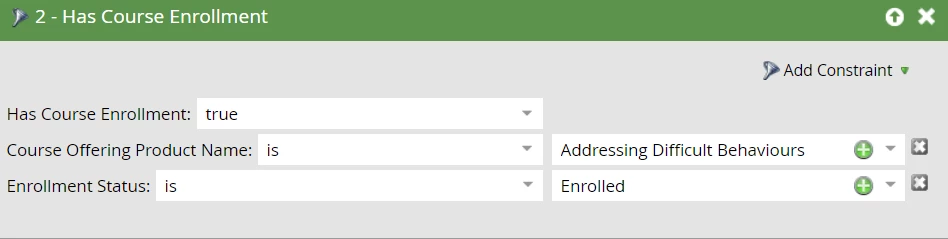
Thanks


This post is no longer active and is closed to new replies. Need help? Start a new post to ask your question.

1 reply

SanfordWhiteman
New Participant
April 5, 2020

Please highlight any posted code so it's readable. Then we'll continue.


Maria_Riley1
New Participant
April 6, 2020

Thanks, 

changes made, 

cheers, 

Maria

SanfordWhiteman
New Participant
April 6, 2020

To start with, your naming convention is off. The size() of a List is... the actual size.  If you want to reference the last index then your variable should reflect that.


You should also be using the $math.sub method, since the subtraction - operator is not actually supported (it only works in your case because the parser sometimes lets it through; it will not work if you use $a-$b without a space, for example).


So a more semantic & less fragile version of your code is:


#set( $lastIndex = $math.sub($Course_Enrollment__cList.size(),1) ) #set( $lastCourse = $Course_Enrollment__cList.get($lastIndex) ) $!lastCourse.Course_Offering_Product_Name__c


Now, to the question of output.  You should only be testing Velocity-powered emails using either [a] preview-by-list or [b] a real email, never a sample. The sample can have little to no resemblance to the real-life result. Similarly, you need to check in both Batch and Trigger campaigns (if you might use both to send the same email) as the results can and will differ!

To debug this further, you should begin by outputting the entire $Course_Enrollment__cList in an email. Prematurely suppressing a possibly-null property (with the $!) makes things much harder to track down.