Missing hint text in Internet Explorer 9 when using two forms | Community
Skip to main content
pavel_plachky
New Participant
February 4, 2016
Solved

Missing hint text in Internet Explorer 9 when using two forms

  • February 4, 2016
  • 2 replies
  • 2805 views

I need to create a page with two forms. One form is used for Contact Us and the other one for Resource Download. I am using the hint text feature for field labels. It works fine except in IE9, where only one of the forms contains hint text. Here is a stripped down example:

Test Landing Page with Two Forms

IE9 renders the hint text in only one of the forms and leaves blank fields in the other one. It seems to be random which one. Here is an example:
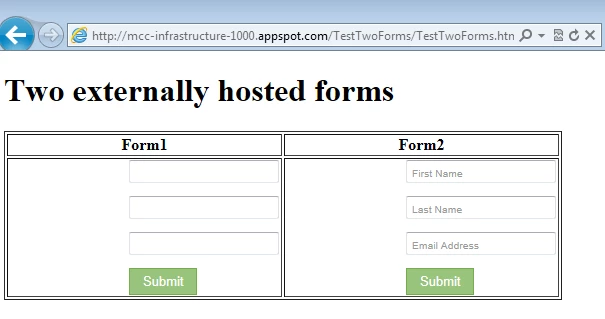
In more recent browser such as IE11, the results look as they should:
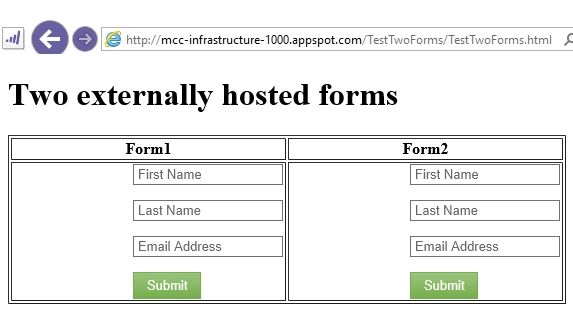
Upon investigating this I found that IE11 supports the hint text (a.k.a. placeholders) natively while IE9 does not and Marketo uses a JS library to simulate the desired behavior. Did anybody else encounter this issue and if so, were you able to solve it?

This post is no longer active and is closed to new replies. Need help? Start a new post to ask your question.
Best answer by SanfordWhiteman

Ugh.  I figured out how to do it.  DMed you the solution.  It's actually pretty short, but unpretty.

2 replies

SanfordWhiteman
SanfordWhitemanAccepted solution
New Participant
February 4, 2016

Ugh.  I figured out how to do it.  DMed you the solution.  It's actually pretty short, but unpretty.

August 4, 2016

Can you let me know how you got this to work? I tried using another placeholder script, but the text just shows up for a second and then disappears. It works for other non-Marketo form fields, just not the Marketo one.

Josh_Hill13
New Participant
February 4, 2016

Are you using Forms 1.0 or 2.0 here?

Marketo doesn't support IE9 anymore, so you'll clearly have to code this yourself. @Sanford Whiteman​ probably has solutions floating around the threads if you search.

SanfordWhiteman
New Participant
February 4, 2016

Sheesh @Josh Hill​ you must really hate me.

This one's a real bear b/c the placeholder polyfill (compatibility layer for old browsers) is part of the standalone Modernizr library​ a third-party library, and it's not completely Marketo Forms-aware.  I'm tracking down where the problem is but it's tougher than the usual forms prob (and less rewarding to get IE8-9 working!).  @Pavel Plachky​ I'll write back when I have something.

Josh_Hill13
New Participant
February 4, 2016

I definitely don't hate you, @Sanford Whiteman​!

I thought you could point them in the right direction....you don't have to fix it for them unless you want to.