Missing State in RCA Reporting | Community
Skip to main content
March 18, 2016
Solved

Missing State in RCA Reporting

  • March 18, 2016
  • 1 reply
  • 2104 views

I run Account Activity reports for my sales team that use the Program Success Report in RCA, and for a couple of our reps, I have to add some additional filtering to get their leads to show.

One of the filters I use in this report is the "Billing State" and upon adding the states that one rep is responsible for, I found that one in particular is missing (whether full name or state code) - Wyoming. Is there a reason that this state wouldn't be included in the selection list? There is no other "State" option to filter by in this report.
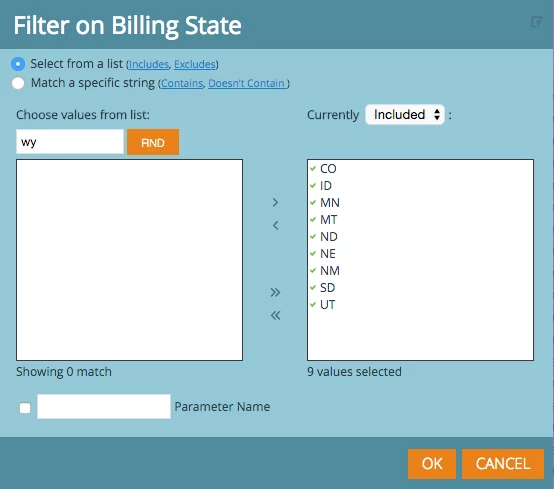
I checked our database in SFDC and we have data that has Wyoming as the state (again, either listed in full or as the state code).

Does anyone have any insight as to why this is happening and/or how to fix it?

Appreciate any feedback as always,

Michelle

This post is no longer active and is closed to new replies. Need help? Start a new post to ask your question.
Best answer by Josh_Hill13

It's also possible that if the Leads are not Members or Success in any Program, the system won't have a value for all of the States. Those leads would only appear in the Leads Analysis Report.

1 reply

Josh_Hill13
New Participant
March 18, 2016

It's possible no records actually have this value.

But if you use Match from specific string, you can add whatever you want.

Josh_Hill13
Josh_Hill13Accepted solution
New Participant
March 18, 2016

It's also possible that if the Leads are not Members or Success in any Program, the system won't have a value for all of the States. Those leads would only appear in the Leads Analysis Report.
