mktoImgWidth not working in 2.0 email templates | Community
Skip to main content
July 29, 2016
Solved

mktoImgWidth not working in 2.0 email templates

  • July 29, 2016
  • 4 replies
  • 4966 views

Hello,

I'm currently struggling with the new Editor v2.0 image inclusion methods.

I am using the div method. As per the syntax page, I am using the following markup:

<div class="mktoImg" id="article-image" mktoName="Article Image" mktoImgLink="" mktoImgSrc="http://placehold.it/210x150/" mktoImgWidth="210"> 

     <a style="text-decoration:none;color:#0563c1;"><img style="border-width:0;height:auto;display:block;width:100%;max-width:210px;" /></a>

</div>

When I use my template and add an image, it ignores mktoImgWidth.

They wrong dimensions appear in the Dimensions fields when I upload the new image:
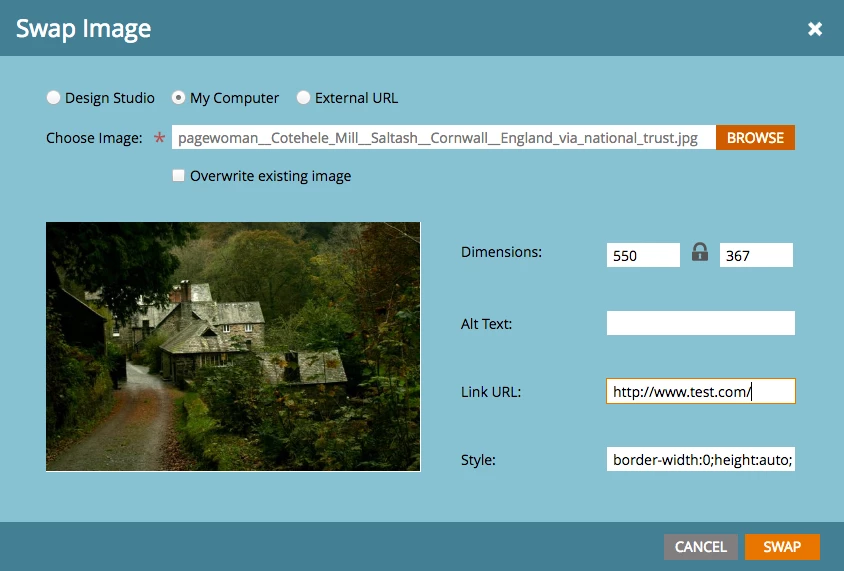
Then when I inspect the code on the preview, this is how it has turned out (asset URL edited for brevity):

<div class="mktoImg" id="article-image" style="margin-top:0;margin-bottom:0;margin-right:0;margin-left:0;">

<a style="text-decoration:none;color:#0563c1;" href="http://www.test.com/" target="_blank">

<img style="border-width:0;height:auto;display:block;width:100%;max-width:210px;" src="/index.php/lpTemplate/proxyAsset?idx=xxx" width="550" height="367">

</a>

</div>

As you can see, it's generating width="550", and there is a fixed pixel height set on the image which I do not want.

I have tried setting up images using variables instead, but this is no longer viable since I discovered that any variable used in a module is global. I am trying to create article modules that users can duplicate to add as many news items as they like; this obviously doesn't work if they all have the same image.

Any help much appreciated!

This post is no longer active and is closed to new replies. Need help? Start a new post to ask your question.
Best answer by Justin_Cooperm2

This is a very important fix. Although we always put image placeholders in our templates that indicate the exact dimensions that a user should replace them with, these are often ignored or users are unsure what the parameters mean. As soon as these image dimensions are modified it completely throws off the responsiveness of an email, and its easy for a user to accidentally do.

Happy to hear that you are making some changes soon. Are you able to give us some insight into when we can expect these changes to happen so we can in turn communicate those dates to our Marketo clients?

Thanks.


We're working on this functionality now, I expect < 1 month.

4 replies

Justin_Cooperm2
New Participant
September 8, 2016

https://docs.marketo.com/display/DOCS/Release+Notes%3A+Summer+%2716

After the upcoming release, you can use mktoLockImgSize to lock "height" and "width" properties of the <img> in an image element. Likewise, you can use mktoLockImgStyle to lock the "style" property of the <img> in the image element.

Justin_Cooperm2
New Participant
August 22, 2016

Yes, we're implementing it. don't worry.

August 22, 2016

Amazing! That's so exciting.

Thanks so much, Justin

Justin_Cooperm2
New Participant
July 29, 2016

Hi Nicole,

You should take the hardcoded width:100% out of your style attribute. We can't override that by setting the "width" attribute of the <img>

that will always win over the "width" attribute. Make sense?

August 1, 2016

Hi Justin,

Thanks heaps for chiming in. When I remove the width:100% from the CSS, it doesn't seem to make a difference; the finalised code that the editor spits out still has ​width="550"​ in the HTML when I use the same image which is physically 550px wide.

I would have thought if I have mktoImgWidth="210" then the generated HTML should be ​width="210"​.

Is this not the intended result?

(As a sidenote, I'm trying to achieve fluid-hybrid images, which is why they are all set to 100% wide with a max-width in the CSS.)

Thanks,

Nicole

Justin_Cooperm2
New Participant
August 1, 2016

Ok, I understand what you're saying now. So, mktImgWidth will make the generate <img> element's width 210 (as in your example), but only for the default image you've specified in the template. If the user then adds another image through the Email Editor, it will override that value. Of course, inline CSS will still be applied if you've done that...but you can't currently control height and width attributes on the <img> after a user has selected a diff image.

We're going to make some changes to this soon so that you can specify a height and width and indicate the user should not be able to modify it. We'll also add a flag in the template syntax for you to specify whether the user should be able to modify the "Style" attribute from the image dialog as well.

In the meantime, can you just instruct your users to pick an image within a certain range that works with your templates? This is the same for our starter templates as well. In some cases, if you pick a very large image the images won't render nicely due to the same issue you're describing.

Grégoire_Miche2
New Participant
July 29, 2016

Hi Nicole,

We have experienced the same issue.

I think it's a bug, or it only works if you do not add the img within the div in your template. @Justin Cooperman​, can you confirm or let us know what we are missing?

This only matters for Outlook though, and the fact that it wold not be responsive on Outlook is not really a problem.

Also, from Justin's comment here, module level variable values is something Marketo is working on.

You may find a few things of interest here: Email editor 2.0 is leaving room for a v2.1

-Greg

July 29, 2016

Hi Grégoire,

Thanks for chiming in. For us Outlook is a non-negotiable client; it is still ranked the 5th most popular email client, so certainly not something to be ignored just yet.

It's not that emails can't be responsive in Outlook, it's that they won't render correctly at all in Outlook with this bug. It sounds like you already know this, but Outlook ignores any CSS widths for images and will only respect the html width="x" attribute. Without it, absolutely every image that a client adds to their template is going to display in Outlook at their native dimensions, which invariably means humungous images at all different sizes. Certainly not a good look.

Thanks for the link on module level variables — that's excellent news. Looking forward to that in the Summer release.

Cheers,
Nicole

Grégoire_Miche2
New Participant
July 29, 2016

Hi Nicole,

I am not writing Outlook should be ignored, I am saying that the width / height attributes are used only by outlook and that they will be automatically setup from the image real size so that the image is rendered without distorsion. You just have to tell the user to set up the width at 210 and the height will be computed correctly, provided the ratio is locked.

For other email clients, theses attributes are ignored as you wrote, provided you have a CSS setting that overrides it.

Anyway, we always provide email templates with dummy images that display the expected dimensions and we always train the user to comply with these dimensions.

There is, IMHO, another point that is in fact more disturbing and that you comment reveals: the fact that we cannot limit the dimensions of the image to force the users to insert the images at the right dimensions. See this:

-Greg