MSI Ignores Unsubscribe?? | Community
Skip to main content
ChristinaZuniga
New Participant
December 6, 2016
Solved

MSI Ignores Unsubscribe??

  • December 6, 2016
  • 4 replies
  • 5177 views

When I implemented MSI, I did a test and found that it honored unsubscribes in my system, so I felt confident rolling it out to sales. That was under the old Email Editor 1.0.

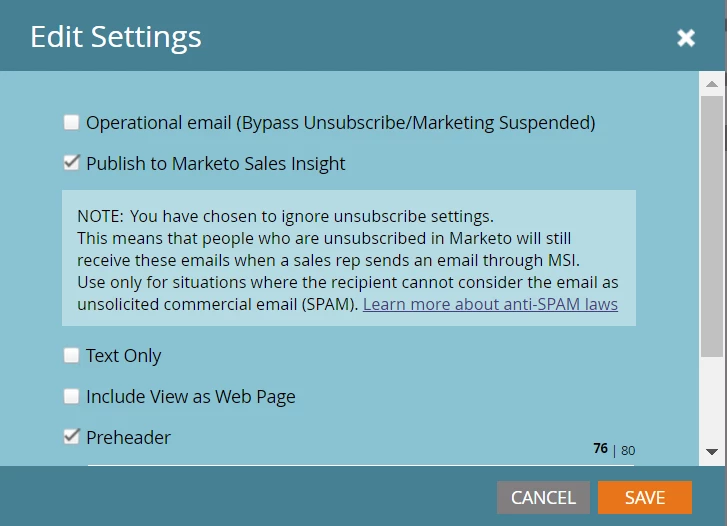
I'm adding a new email to MSI after moving to Email Editor 2.0 and went to publish to MSI and got this notification. Note that Operational Email wasn't selected, so does this mean that MSI does NOT honor unsubscribes?

This post is no longer active and is closed to new replies. Need help? Start a new post to ask your question.
Best answer by Grégoire_Miche2

Hi Christina,

I ran a few tests to assess how this is really working. Here are my findings

1/ The setting in the admin only have effect on the unsubscribe link if:

  • You are using unsubscribe default settings (admin -> email)
  • your email template has NO {{system.unsubscribeLink}} token

In any other case, the settings in admin->sales insight has NO effect on the unsub link.

2/ the setting also has a second behavior: it enables to send an email to an unsubscribed lead or not. The unsub lead will only be sent the email if the admin setting is set to "Hide Unsubscribe Footer" for the appropriate email category.

IMHO, the way the admin setting is designed is confusing. We should on one end set the behavior of the unsub footer and SEPARATELY define whether or not we authorize sending any of these 3 types of emails to an unsubscribed lead. All the more so as most of the templates at hand with the email editor v2 have some unsub footer modules.

-Greg

4 replies

Conor_Fitzpatri
New Participant
December 7, 2016

Just tested it with your settings and it did not send to an opted out lead. The "you have chosen to ignore unsubscribe settings" warning should really be removed from the email settings menu if you have "show unsubscribe footer" enabled in the MSI admin.

ChristinaZuniga
New Participant
December 7, 2016

I tested with one of my opted out records and the email didn't send, so I assume my settings are correct to honor opt outs.

Conor_Fitzpatri
New Participant
December 6, 2016

Hi Christina,

In my experience, I do recall that MSI ignores unsubscribes (we use a separate program to send sales email now). The only way around this is if your reps use MSI to add them to a Marketo Campaign (that in turn sends an email).

I don't remember getting that notification when checking Publish to MSI in the past, but it is definitely there now.

Grégoire_Miche2
New Participant
December 6, 2016

Hi Christina,

In the admin -> sales insight, at the bottom, you will see a settings section.

If you press the "edit button", you will access this dialog:

Can you provide a screenshot about how your's is set up?

-Greg

ChristinaZuniga
New Participant
December 6, 2016

Hi @Grégoire Michel​, yes here are my settings:

Grégoire_Miche2
Grégoire_Miche2Accepted solution
New Participant
December 6, 2016

Hi Christina,

I ran a few tests to assess how this is really working. Here are my findings

1/ The setting in the admin only have effect on the unsubscribe link if:

  • You are using unsubscribe default settings (admin -> email)
  • your email template has NO {{system.unsubscribeLink}} token

In any other case, the settings in admin->sales insight has NO effect on the unsub link.

2/ the setting also has a second behavior: it enables to send an email to an unsubscribed lead or not. The unsub lead will only be sent the email if the admin setting is set to "Hide Unsubscribe Footer" for the appropriate email category.

IMHO, the way the admin setting is designed is confusing. We should on one end set the behavior of the unsub footer and SEPARATELY define whether or not we authorize sending any of these 3 types of emails to an unsubscribed lead. All the more so as most of the templates at hand with the email editor v2 have some unsub footer modules.

-Greg