Multiple choice values in "Add Choice" to flow | Community
Skip to main content
New Participant
January 20, 2017
Solved

Multiple choice values in "Add Choice" to flow

  • January 20, 2017
  • 1 reply
  • 7923 views

Hello - I'm looking for an opportunity to condense the number of "Choices" in my Send Alert flow step. We have over 100 Sub-Topics in our form. Many of the sub-topics, however, are to be sent to the same email address.

Is there a way to include more than 1 choice value (step 3) in the Add Choice fields? 

TIA,

Erica

This post is no longer active and is closed to new replies. Need help? Start a new post to ask your question.
Best answer by Dan_Stevens_

Interesting. Retrying now...........


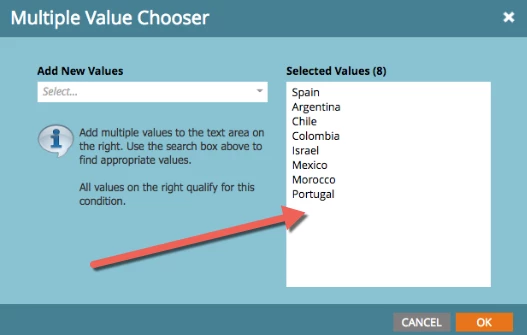
You can only manually enter them in the large open area (don't try to "add new values" on the left.  Also, once you hit OK, you may see the dreaded red squiggly lines in the value field for the flow step choice.  If that happens, just click the green "+" icon again to open this window and simply hit OK.  Don't ask... ;-)

1 reply

Jim_Thao7
New Participant
January 20, 2017

Click the + button and add values

EricaDo4Author
New Participant
January 20, 2017

Sub-topics are new, no forms submitted with them yet so they are not in the add values options. Typing them in...but that's not my question or issue.

What I'm trying to avoid is having 100 individual choice options to the flow.

Choice 1

If sub-topic is Sub-topic#1

Send email to email@address.com

Choice 2

If sub-topic is sub-topic#2

Send email to email@address.com

CAN the sub-topics be combined in one choice flow step?

Choice 1

If sub-topic contains sub-topic#1, sub-topic#2

Send email to email@address.com

Dan_Stevens_
New Participant
January 20, 2017

Like Jim said, just manually add them in using the green "+" icon.