Multiple nurtures setup | Community
Skip to main content
Level 2
November 29, 2024
Solved

Multiple nurtures setup

Hi,


I have a doubt regarding nurture setup. Currently, I have more than three nurtures running with the leads receiving communication from each nurture once a week. How to ensure that a lead is in only one nurture at a given time and enters the next nurture once the content in the 1st is exhausted? Also, is there a way to set a priority/order in which lead runs through the multiple nurtures i.e can we decide which nurture it should go through 1st, 2nd, and so on?


uditmathur
uditmathurAccepted solution
Community Manager
November 29, 2024

Hi @shreyaresilinc ,

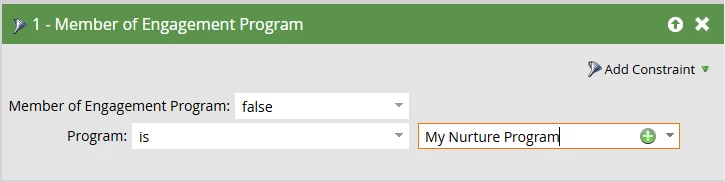
To answer this you can use "Member of Engagement Program" filter in your smart list of the campaign you are using to add leads & select the other two programs.


To answer this,

Yes you can define the order by adding leads to the program 1st in your order & not to the following programs. Once they have exhausted the content from the 1st program you can than change their program to the next in line through a separate campaign. 


Word of caution here, exhausted content should not be used as the trigger for transition as this clearly indicates that your leads are not engaging to content & have not shown interest in your product/ service.

Leads should always be transitioned based on their definite action taking with your content & have shown intent of engaging.


Hope this helps. 😊 

6 replies

Kristof-2
Level 4
November 30, 2024

Hey @shreyaresilinc,


to automatically move people to a next priority nurture, you can for example create and additional last stream in each nurture that will gather people who exhausted this nurture + engaged somehow there. Then, you can create a simple a "traffic controller" that will move them to the next priority nurture based on the trigger "Engagement program stream changes" to stream "exhausted + engaged" and in the flow step add them to a new nurture. 

To make sure that you are adding any incoming people to just one nurture, you can set a hierarchy of your nurtures and add them to the 1st one, and based on the above traffic controller they will move further. Also, alternatively, you can use a smart list filter "Not was added to engagement program" to make sure a person wasn't added to any other nurtures.

Translate
Level 2
December 4, 2024

Thank for the suggestions!

Translate
Zoe_Forman
Community Manager
January 10, 2025

Hi @shreyaresilinc 

How are your nurture programs performing now?

I echo both @uditmathur and @kristof-2 suggestions.

Member of a program and a nurture controller are the best solutions to ensure a person is only in one nurture at a time but also that there is a clear nurture journey for each person - move to the next nurture based on a transition rule or exhausted content.

Translate
uditmathur
Community Manager
November 29, 2024

Hi @shreyaresilinc ,

Can you clarify if you have 3 separate engagement program or have 3 streams in an engagement program?

Translate
Level 2
November 29, 2024

I have set up 3 separate engagement programs.

Translate
uditmathur
uditmathurAccepted solution
Community Manager
November 29, 2024

Hi @shreyaresilinc ,

To answer this you can use "Member of Engagement Program" filter in your smart list of the campaign you are using to add leads & select the other two programs.


To answer this,

Yes you can define the order by adding leads to the program 1st in your order & not to the following programs. Once they have exhausted the content from the 1st program you can than change their program to the next in line through a separate campaign. 


Word of caution here, exhausted content should not be used as the trigger for transition as this clearly indicates that your leads are not engaging to content & have not shown interest in your product/ service.

Leads should always be transitioned based on their definite action taking with your content & have shown intent of engaging.


Hope this helps. 😊 

Translate