Multiple Versions of One MSI Email Being Created. Why? | Community
Skip to main content
Spencer_Philli1
New Participant
November 6, 2018
Solved

Multiple Versions of One MSI Email Being Created. Why?

  • November 6, 2018
  • 1 reply
  • 3280 views

Hello,

I have created one MSI email that sales is using to reach out to a group of people. Marketing would like to follow up with that group.

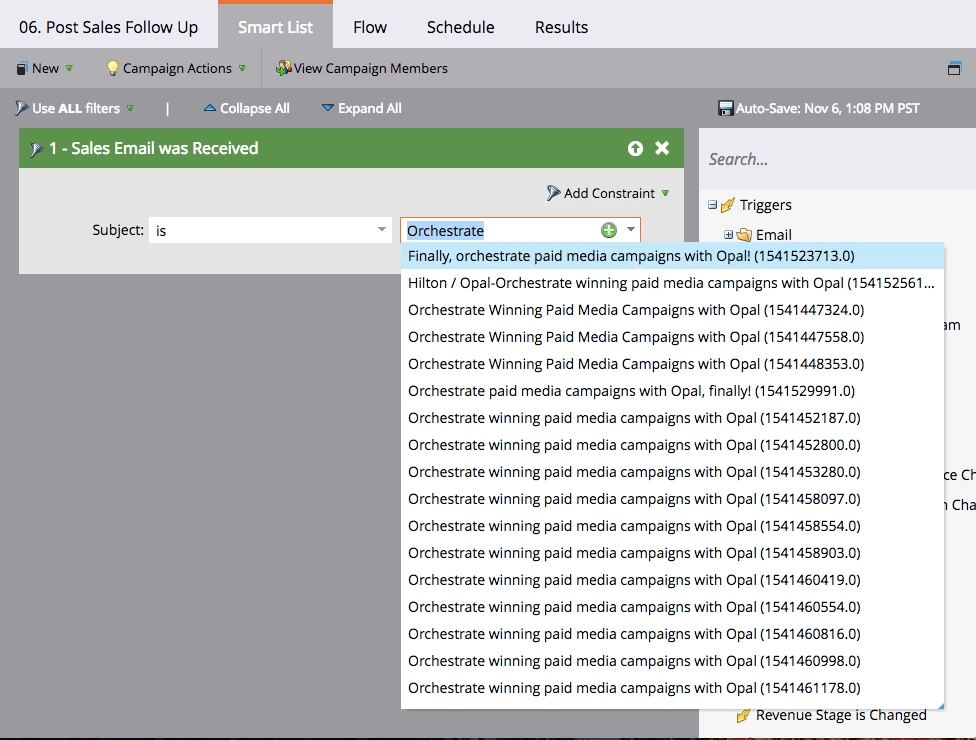
I had planned to define my Smart List by using the filter of "Sales Email Was Received" and then entering the Subject of my MSI email. However, when I go to enter the email Marketo is showing me one email for every MSI email sent out of SFDC. Marketo Support could not answer me as to why a new email was being created with each send. Support suggested that I just choose all emails to capture everyone who was sent an MSI email. However, when I do that, the Smart List yields zero people.

Does anyone have any ideas or solutions how I can follow up with the people who were sent the MSI email and why Marketo is treating each send like a distinct email?

Below is a screenshot of the drop down with every variation of the one email.
Thank you!

This post is no longer active and is closed to new replies. Need help? Start a new post to ask your question.
Best answer by Denise_Greenb12

Hi Spencer,

Glad you found a solution! I'm curious what you mean by Subject Line starts with didn't work. I also just noticed you were originally using "Was Received" and am guessing "Was Sent" would be a better choice since the email sending platform can't definitively identify all the successful recipients.

If you can get it to work, I prefer the Subject Line starts with (or contains) solution because it makes more understandable reading for a human.

Best,

Denise

1 reply

Denise_Greenb12
New Participant
November 6, 2018

Hi Spencer,

I'm not sure as to the "why" but you could use subject "starts with" instead of subject "is" to solve the problem of defining the people to receive the follow-up.

Best,

Denise

Spencer_Philli1
New Participant
November 6, 2018

Hi Denise,

Thank you for the suggestion. I tried that and it did not work. However, I believe I have found a work around. I added the constraint of Template ID and that seemed to do to trick if anyone else is curious.

Still would like to know why Marketo is generating a "new" email for every SFDC MSI send. If anyone knows I would like to hear.

Denise_Greenb12
Denise_Greenb12Accepted solution
New Participant
November 6, 2018

Hi Spencer,

Glad you found a solution! I'm curious what you mean by Subject Line starts with didn't work. I also just noticed you were originally using "Was Received" and am guessing "Was Sent" would be a better choice since the email sending platform can't definitively identify all the successful recipients.

If you can get it to work, I prefer the Subject Line starts with (or contains) solution because it makes more understandable reading for a human.

Best,

Denise