Munchkin API & Smart List Triggers | Community
Skip to main content
November 13, 2016
Solved

Munchkin API & Smart List Triggers

  • November 13, 2016
  • 1 reply
  • 3359 views

The majority of lead data that is delivered to our client's Marketo instances is via the Munchkin API. When we first received training from the local Marketo trainer and talked about the API and the best way to go about things they suggested the best way to fire triggers for smart lists for leads delivered by the Munchkin API was the following:

+++++++++++++++++++++++++++++++++++++++++++++++++++++++++++++++++++++++++++++

1. Create a program

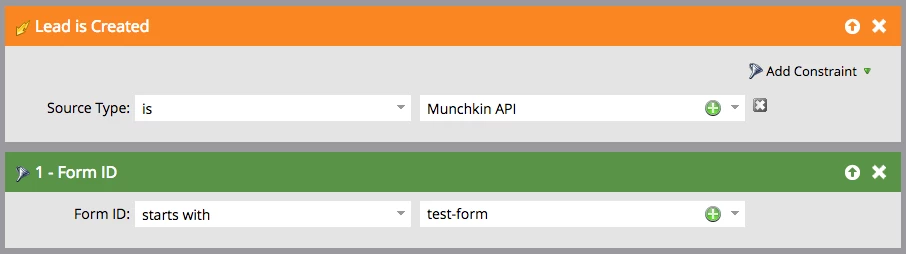
2. Create a smart campaign for a new lead with the following smart list parameters:
3. Create the flow steps for that "new lead" smart campaign

4. Clone the smart campaign for "new leads" and rename it to "existing leads" and use the following smart list parameters:

We would then use the following javascript code to get the lead information into Marketo using the Munchkin API. The $.now() in the "formID" attribute is used to trigger the "data value changes" for existing leads at is sends over a unix timestamp so Marketo sees it as a change in that value.
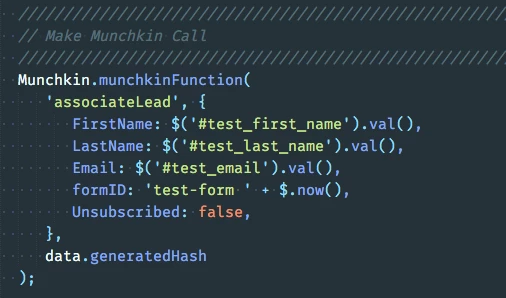
This method works fine but it seems like a lot of duplicate effort. We have to make a smart campaign for new leads and a smart campaign for existing leads. And if the flow steps need to change we have to update them in both new & existing smart campaign flows.

+++++++++++++++++++++++++++++++++++++++++++++++++++++++++++++++++++++++++++++

So, we thought, what about the following revised method? It seems to be achieving the same trigger results for both new and existing leads but we can do it with a single smart campaign for both new and existing leads.

1. Create a program

2. Create a smart campaign with the following smart list parameters:

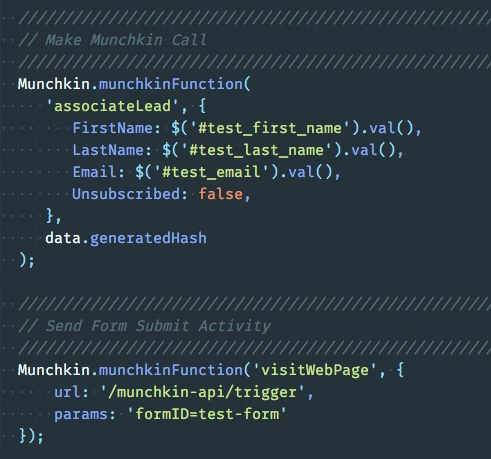
We would then use the following javascript code to get the lead information into Marketo using the Munchkin API. This associates the lead for new and existing leads and we send a "virtual page view" with the "visitWebPage" method that we can then use for our trigger.
+++++++++++++++++++++++++++++++++++++++++++++++++++++++++++++++++++++++++++++

Are there flaws in the revised method or is there a better way to do it?

This post is no longer active and is closed to new replies. Need help? Start a new post to ask your question.
Best answer by SanfordWhiteman

The major flaw in the revised method is that you've doubled the number of network requests in exchange for a little help with SC organization. That can be an uneven tradeoff.  Why couldn't the the Smart Campaigns already be combined and then use Add Choice - Data Value Changed to choose between flow options?

Pulling back a bit, why aren't you using the Forms API, if you're always executing associateLead in the context of a form?  The Munchkin API is versatile in the sense that it still fits if you learn the lead's identity via means other than form fillout (like a CMS/extranet/ecommerce session or even OAuth login).  But if they're filing out a form, the Forms API is a better fit.

1 reply

SanfordWhiteman
SanfordWhitemanAccepted solution
New Participant
November 13, 2016

The major flaw in the revised method is that you've doubled the number of network requests in exchange for a little help with SC organization. That can be an uneven tradeoff.  Why couldn't the the Smart Campaigns already be combined and then use Add Choice - Data Value Changed to choose between flow options?

Pulling back a bit, why aren't you using the Forms API, if you're always executing associateLead in the context of a form?  The Munchkin API is versatile in the sense that it still fits if you learn the lead's identity via means other than form fillout (like a CMS/extranet/ecommerce session or even OAuth login).  But if they're filing out a form, the Forms API is a better fit.

November 13, 2016

Sanford Whiteman

"Why couldn't the the Smart Campaigns already be combined and then use Add Choice - Data Value Changed to choose between flow options?"

Can you elaborate on this. How are you suggesting to combine the two smart campaigns - can you provide the smart list parameters you would implement. We found that "data value changed" only worked for an existing lead, not a new one. We're trying to create a smart list with triggers that work for a new lead or an existing lead.

"Why aren't you using the Forms API"

The forms we are creating for clients need to do more than just send data to Marketo. So we find for our workflow it is more efficient to us the Munchkin API.

SanfordWhiteman
New Participant
November 13, 2016

We found that "data value changed" only worked for an existing lead, not a new one. We're trying to create a smart list with triggers that work for a new lead or an existing lead.

I understand that. Both Data Value Changes and Lead is Created triggers can be used in the same SC.  Triggers are always connected with an implicit boolean OR.

The forms we are creating for clients need to do more than just send data to Marketo. So we find for our workflow it is more efficient to us the Munchkin API.

The Munchkin API as you're using it is just upserting four Marketo fields, keying on Email. This can be done using a Forms API submit, and you don't have to spend another roundtrip retrieving the Munchkin security hash. It means you get a real Filled Out Form activity in Marketo as well. Calling the Forms API doesn't mean you can't do whatever else you want to do with your form as well (i.e. posting to another server).