Munchkin Tracking Clicks but Not Webpage Visits | Community
Skip to main content
New Participant
July 27, 2020
Question

Munchkin Tracking Clicks but Not Webpage Visits

  • July 27, 2020
  • 3 replies
  • 5468 views

Hello,


We are using asynchronous munchkin tracking on our external site Telnyx.com using Google Tag Manager. The initial page view is being tracked but subsequent page views are not being sent to Marketo. However, "Clicked linked on Webpage" activities are registered as I navigate the site.


N.B. I have read the discussion posts about why GTM should not be used for applying munchkin tracking but for our application, we are willing to accept the small percentage chance of losing a few visits.



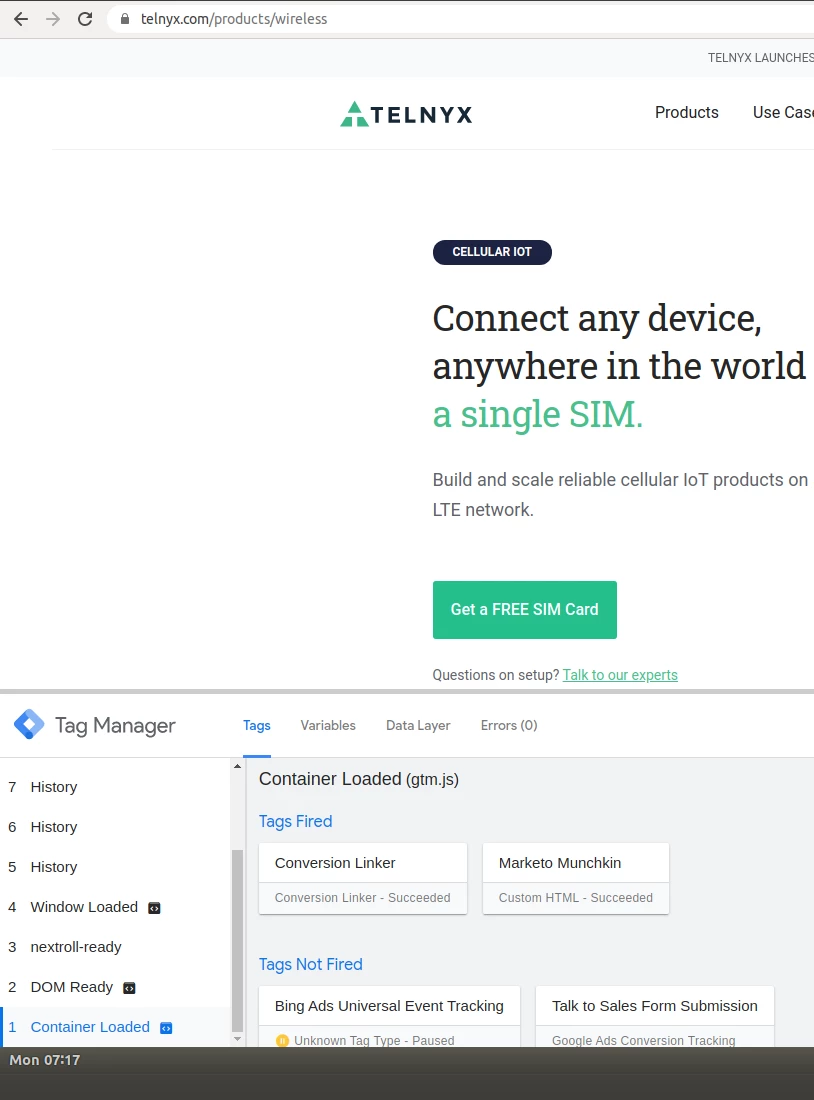
I believe the issue is because our site uses React to transition between webpages and there is no new page load event (see image below). I can get the Munchkin code to fire on the history events but these result in "Clicked Link on Web Page" events instead of the desired visit web page. 


Does anyone have suggestions for how we can correctly get web page visits for our site? e.g. by modifying munchkin code etc


This post is no longer active and is closed to new replies. Need help? Start a new post to ask your question.

3 replies

TyronPrAuthor
New Participant
August 20, 2020

Huge shoutout to @sanfordwhiteman for his help on this.


In order to replace the click link events with visit web page events the following code needs to be placed in a tag within GTM that fires on a "Page View" trigger.


I am happy to help with the GTM integration if anyone has questions on this.


<script type="text/javascript"> (function(){ Array.from(document.links) .filter(function(link){ return link.hostname == "example.com"; // your same-origin links only }) .forEach(function(link){ // turn off default Click Link link.className += " mchNoDecorate"; // turn on custom Visit Web Page link.addEventListener("click", syntheticVisitWebPage); }); function syntheticVisitWebPage(e){ Munchkin.munchkinFunction("visitWebPage", { url : this.protocol + "//" + this.hostname + this.pathname + this.hash, params : this.search.substring(1) }); } })(); </script>


SanfordWhiteman
New Participant
July 27, 2020

If you're already capturing the history state changes, then just fire a Munchkin visit as opposed to a click:

Munchkin.munchkinFunction("visitWebPage");


Also, firing (synchronous) clickLink click events for same-page clicks is bad for performance. Should definitely be using visitWebPage even for things that feel like clicks.

TyronPrAuthor
New Participant
August 6, 2020

Hi Sanford,


On history state changes, this is the munchkin code that is firing. There are no references to clicks link or visits webpage. How should this code be modified?


<script type="text/javascript"> (function() { var didInit = false; function initMunchkin() { if(didInit === false) { didInit = true; Munchkin.init('###-XXX-###'); } } var s = document.createElement('script'); s.type = 'text/javascript'; s.async = true; s.src='//munchkin.marketo.net/munchkin.js'; s.onreadystatechange = function() { if (this.readyState == 'complete' || this.readyState == 'loaded') { initMunchkin(); } }; s.onload = initMunchkin; document.getElementsByTagName('head')[0].appendChild(s); })(); </script>


SanfordWhiteman
New Participant
August 7, 2020

On history state changes, this is the munchkin code that is firing.


According to your screenshot, that's the Munchkin embed code (i.e. injecting scripts and logging the initial pageview) and it's runing on the Initial Pageview only. Not on history changes.

Oz_Platero
New Participant
July 27, 2020

Hello @tyronpr ,


Have you tried to set up a custom event trigger in GTM?
Example someone clicks a button on a page to navigate to somewhere else.
https://support.google.com/tagmanager/answer/7679219?hl=en


thank you