Mysterious Copy in Alert Emails in iPhone Inbox
Whenever I receive an Alert email from one of my client Marketo instances, this or similar copy appears in the inbox preview - and I can't figure out where it's coming from:
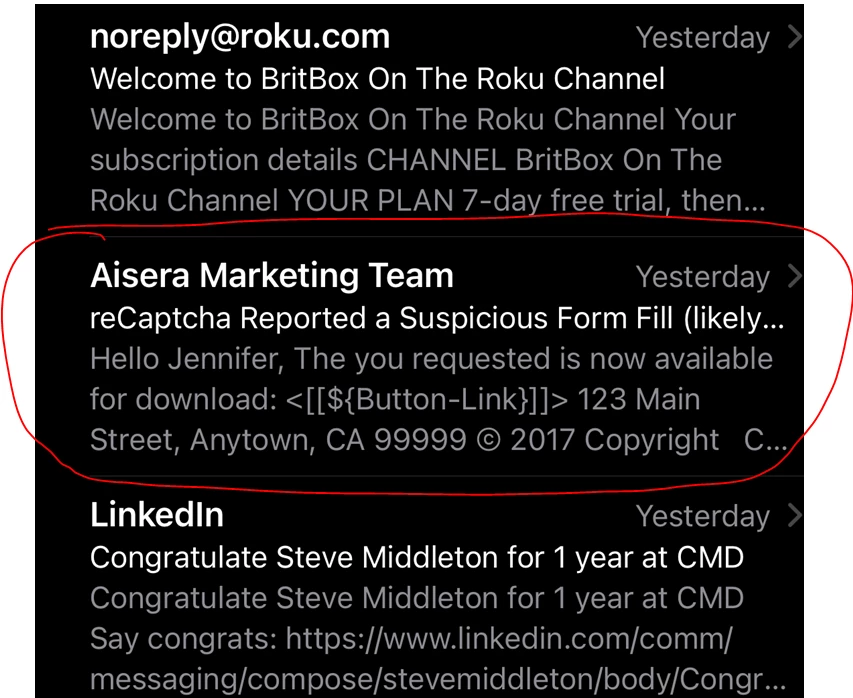
The name "Jennifer" is being populated by a {{lead.First Name}} token. So that part varies. It seems to be coming from the email template but I can only find pieces of it in the template. For example, the first name token is there but not the "you requested is now available to download." And I can see the "123 Main Street...." in the template.
1) The Email Preheader is unchecked
2) The Email Footer is the real company email address
3) I don't see the preview in Outlook or Google Mail - only in my iPhone inbox.
It doesn't have too much of an impact as far as I can tell - because I only see this with Alerts. I haven't seen it in any "real" emails.
Can anyone explain why it would show up ONLY in iPhone previews and give me a clue to what to look for in the email template? I'm not an HTML coder.
I searched for "requested" in the template code but it's not there.
I searched for "{{" in the template and found only one instance - in this section:
<table class="mktoModule" mktoActive="true" mktoAddByDefault="true" id="FreeText" style="-webkit-text-size-adjust: 100%; -ms-text-size-adjust: 100%; mso-table-lspace: 0pt; mso-table-rspace: 0pt; border-spacing: 0; border-collapse: collapse;" align="center" border="0" cellpadding="0" cellspacing="0" width="100%" mktoname="Free Text">
<tr>
<td bgcolor="${FreeText-BgColor}" style="background-color:${FreeText-BgColor}">
<table class="inner_table" style="width: 600px; margin: 0 auto; text-align: center; border-collapse: collapse;" align="center" border="0" cellpadding="0" cellspacing="0" width="600">
<!--Extra space-->
<tbody>
<tr>
<td style="line-height: 1px; font-size: 1px;" height="${FreeText-top-space}"> </td>
</tr>
<tr>
<td style="font-size:14px; color:${TextColor}; font-family:${TextFontFamily}; mso-line-height-rule: exactly; line-height:20px;text-align:left;" valign="top">
<div id="FreeTextContent" class="mktoText" mktoname="FreeTextContent">
<div>Hello {{lead.First Name:default=Friend}},<br /><br />Lorem Ipsum Dolor Amet Consetur.Nunc in urna eu massa iaculis viverra id nec nulla vtim quis ultricies.Cassa vitae dignissim ligula ded congue et quam sit amet conuat Lorem Ipsum Dolor Amet Consetur.Nunc in urna eu massa iaculis viverra id nec nulla vtim quis ultricies.Cassa vitae dignissim ligula ded congue et quam sit amet conuat</div>
</div>
Thanks for any ideas!