Need Custom CSS to Alter Specific Form Field, not just the Field Type | Community
Skip to main content
New Participant
September 8, 2016
Solved

Need Custom CSS to Alter Specific Form Field, not just the Field Type

  • September 8, 2016
  • 1 reply
  • 6223 views

Hi all,

I'm using the following custom CSS code to split my long list of values (classified as a checkboxes field type) into 3 columns on one of my forms...
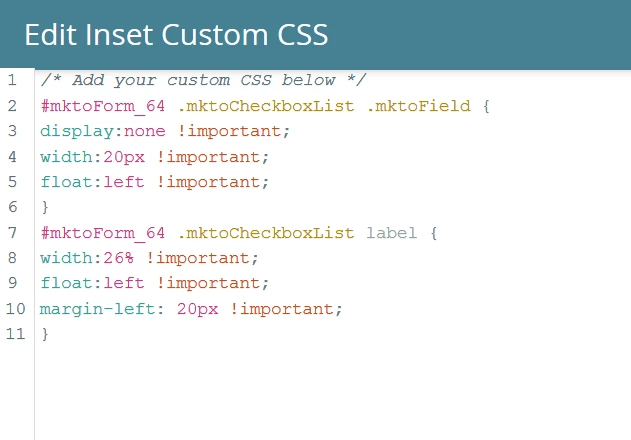
This code works great, but I'm now adding another Field that's under the same field type category (i.e. checkboxes) and this code is also splitting the new list of values into 3 columns, which I don't want (Screenshot below).
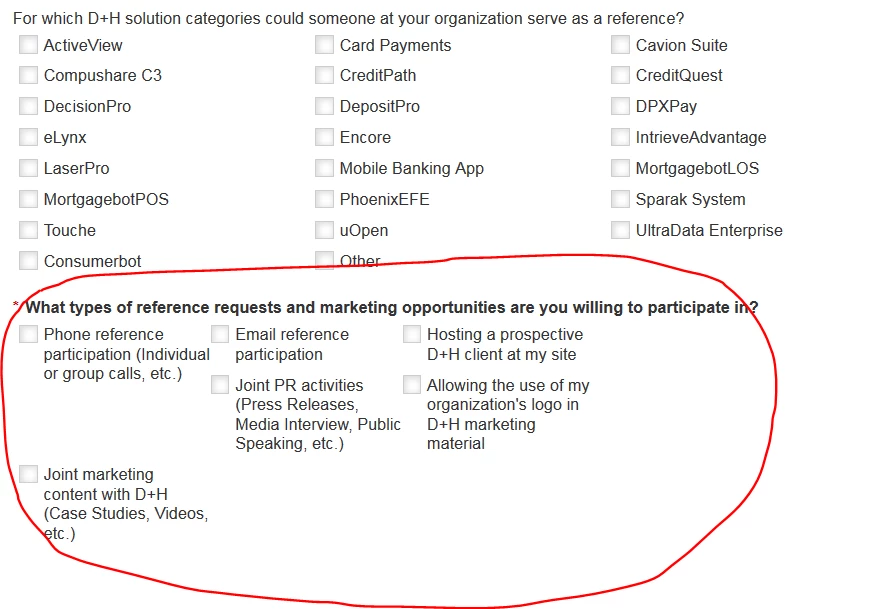
Please post sample code you think might solve or if there is a simpler workaround for this please let me know!

Any help is appreciated!  Thanks!

-Tom

Best answer by SanfordWhiteman

Here's a link to landing page: info.dh.com/GCProgram-Registration.html

I haven't approved my latest edits to the form yet so you won't see the new field on the page.


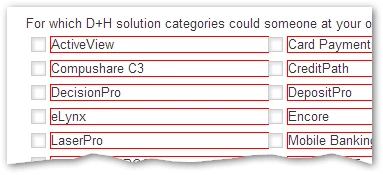
The current set of checkboxes is .mktoFormRow:nth-of-type(6). Thus with

.mktoFormRow:nth-of-type(6) .mktoCheckboxList LABEL {

  outline: 1px solid red;

}

you get

1 reply

SanfordWhiteman
New Participant
September 8, 2016

The key is to tag all your .mktoFormRow and .mktoFormCol elements with the names of your fields.  I posted the JS helper fn for that a few times (should add it to my blog).  As a quick-and-(very)-dirty fix for your form is it currently stands, do:

.mktoFormRow:nth-of-type(3) .mktoCheckboxList .mktoField

.mktoFormRow:nth-of-type(3) .mktoCheckboxList label

Where (3) is the position of the checkboxes field on your form that you do want to restyle (i.e. First Name may be (1), Email (2), etc.).

This kind of styling is very fragile as it will change if you change field order, but it'll work in a pinch.

New Participant
September 9, 2016

The position meaning the row it's in? The new field is in the seventh row so I replaced "3" with "7" and previewed the form but it didn't seem to change layout.

Tom Kerlin
SanfordWhiteman
New Participant
September 10, 2016

Post a link to the form.  You may be skipping a row without realizing it.