Need help changing value from 100.0 to 100.00 using Velocity Script | Community
Skip to main content
June 23, 2017
Solved

Need help changing value from 100.0 to 100.00 using Velocity Script

  • June 23, 2017
  • 1 reply
  • 3301 views

Hello Community!

I am tasked with finding out how to add an additional decimal to a value for a numerical token as well as a comma to indicate "thousands". For example, we have a token called {{lead.DBC Balance}} that pulls in how many "savings credits" a person has in their account. Most of our members show as having between "0" and "1000's" of credits; however, some show numbers such as 850.0 or 12500, etc., with only one decimal place after the period and none of them displaying a comma to indicate "thousands" of credits.

My question is whether I can use Velocity Script to 1. Add a 1/100's decimal place, e.g., instead of just showing 850.0 we would like to show 850.00  & 2. Be able to add a comma indicating thousands, e.g., instead of showing 12500, be able to show, 12,500 or 2,000, etc.

Thank you for your help in advance!

Laura Kimball

This post is no longer active and is closed to new replies. Need help? Start a new post to ask your question.
Best answer by SanfordWhiteman

This is my first time using Velocity Script....Which VS editor do you recommend I use?

There's only one. (Within Marketo, I mean.)

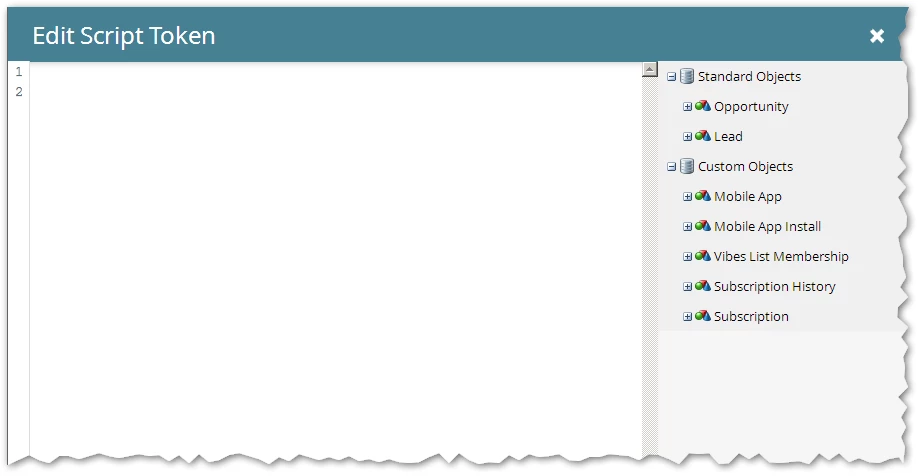
When you add an Email Script token (a.k.a. Velocity token) this is your editor. Note the tree on the right-hand side, where you check off fields that you want use in the Velocity context.

Then you include the name of the Velocity token in your email, i.e. {{my.velocityToken}}.

1 reply

SanfordWhiteman
New Participant
June 24, 2017

${number.format(",${esc.h}${esc.h}0.00",$lead.DBCBalance)}

Make sure to check off your DBC Balance field in the right-hand tree of Script Editor.  Also, I'm assuming the API/VTL name (which can't have spaces, so Marketo always converts it) is $lead.DBCBalance but you can drag the field into the Script Ed "canvas" to be sure.

June 26, 2017

Thank you Sanford!

This is my first time using Velocity Script....Which VS editor do you recommend I use?

Laura

SanfordWhiteman
SanfordWhitemanAccepted solution
New Participant
June 26, 2017

This is my first time using Velocity Script....Which VS editor do you recommend I use?

There's only one. (Within Marketo, I mean.)

When you add an Email Script token (a.k.a. Velocity token) this is your editor. Note the tree on the right-hand side, where you check off fields that you want use in the Velocity context.

Then you include the name of the Velocity token in your email, i.e. {{my.velocityToken}}.