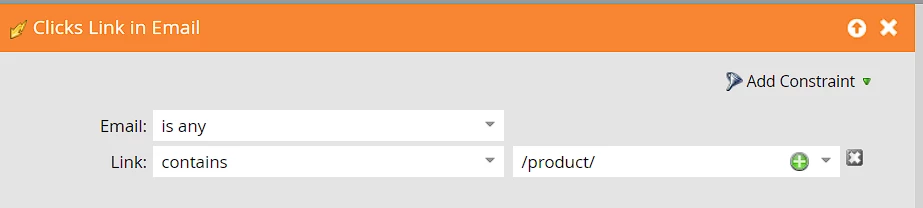
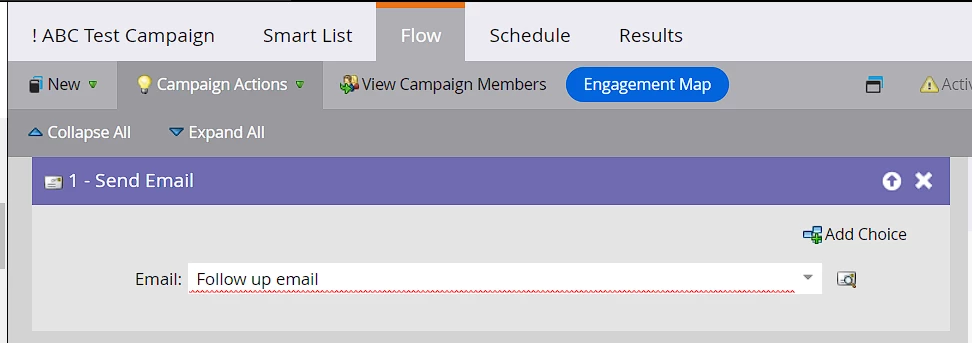
@rgallegos, this is simple: you can create a trigger campaign with the Clicks Link in Email trigger, add the constraints for Email (this will be the email(s) on which you want to listen for clicks) if applicable, and the Link (you can mention the Link contains "/products/"). You could add any additional filter(s) to the campaign's smart list if required. In the campaign flow, use the Send Email flow step and select the follow-up email asset in it. Now, you can display the link that triggered this campaign (i.e., the one with "/products/" in it) using the {{trigger.Link}} token in the email. The link token would display the link that triggered the campaign flow. Marketo has several other trigger tokens (documented here) that you can use wherever required.
Smart List
Flow:
In general, sending emails or performing actions based on mere email clicks might not be the best idea, as there are chances that the original click would have been done by email scanners or bots and not by a genuine human. Sending emails based on an action that a person might have never taken might not be the best idea.
