Need Help Using a Webhook to push leads into Cvent using their SOAP API | Community
Skip to main content
March 30, 2018
Solved

Need Help Using a Webhook to push leads into Cvent using their SOAP API

  • March 30, 2018
  • 1 reply
  • 5779 views

Hello!

Our Marketo & Cvent instances are already integrated, with Cvent being able to push leads to us via a triggered campaign using a Web Service API call. However, we would like to have all registration forms and what not on the Marketo side, so we can control campaign flow, and then push the registrants back into Cvent.

From the documentation I saw on Cvent, it looked like this would be something I could do with their SOAP API user, using a Marketo webhook. I was then provided info for their API user: an account, an Account, an API Username, and an API Password, along with their server URL.

That said, I'm new at webhooks, and I'm not sure I'm constructing it correctly...in that I know I'm not using it correctly, but I have no idea what I'm doing wrong. I set up the webhook like so:

URL: api.cvent.com/soap/xxxxxxx.ASMX?xxxx

Request Type: Post

Template: Account=accountName&Key=accountPassword&fieldX={{lead.fieldX}}&fieldY={{lead.fieldY}}&fieldZ={{lead.fieldZ}}

Request Token Encoding: JSON

Response Type: XML

I know this isn't right, but I modeled it off of another Webhook I saw, which is how I got 'account=xxx&Key=xxx'. But I don't really have a key provided, just the username and password, which, my understanding is, that I'll only have a key provided once I have a successful login?

Just to show you how not right it is, I ran a triggered campaign to call the webhook, and I get the following error, which I find very amusing:

<?xml version="1.0" encoding="utf-8"?><soap:Envelope xmlns:soap="w3.org/2003/05/soap-envelope" xmlns:xsi="w3.org/2001/XMLSchema-instance" xmlns:xsd="w3.org/2001/XMLSchema"><soap:Body><soap:Fault><soap:Code><soap:Value>soap:Receiver</soap:Value></soap:Code><soap:Reason><soap:Text xml:lang="en">Server was unable to process request. ---&gt; Data at the root level is invalid. Line 1, position 1.</soap:Text></soap:Reason><soap:Detail /></soap:Fault></soap:Body></soap:Envelope>


So, dear community members, would you be able to help me figure out what I need to do to construct this?

And, if my approach is 100% not right, do any of you have ideas on how to push lead updates into Cvent from Marketo?

Thanks!
This post is no longer active and is closed to new replies. Need help? Start a new post to ask your question.
Best answer by SanfordWhiteman

Gotcha. How would that be structured (or, at least, could you point me in the right direction to research)? I've been given a copy of Fiddler to handle requests, but I'm not sure if that's something that will prove useful or not.


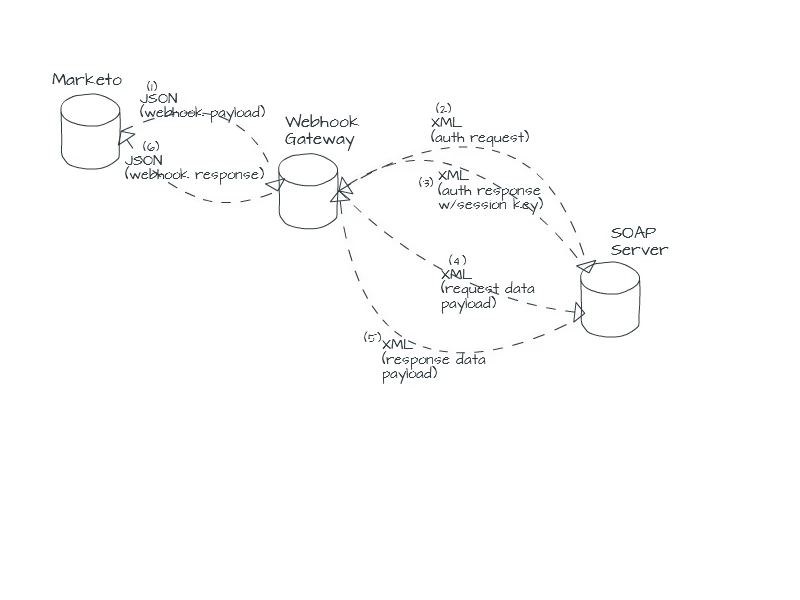
A simplified diagram is below.  Note the entire process takes place while the webhook connection (1) is still open -- you connect to the gateway, the gateway does SOAP stuff including the auth layer, then passes the response back to Marketo (in your case probably just a success/failure response since you're pushing via SOAP).

You could use XML for the webhook payloads as well but JSON is way easier to type, so since you're not forced to use XML there I would use JSON.

1 reply

SanfordWhiteman
New Participant
March 30, 2018

Hi Alex,

Yes, that definitely is not a SOAP payload. SOAP uses XML (for both request and response).

Are you positive that this API is suitable for webhooks? Does it have a separate authentication step? If so, it would have to be gatewayed via another intermediate webhook. Where's the documentation?

March 30, 2018

Hi Sanford!

Yeah, I'm more used to working with REST APIs (you've actually helped me answer a bunch of questions with those when I was at another company ), so I'm still getting familiar on how SOAP is different.

There apparently *is* a separate authentication step, though I don't know how to make it work with the webhook.

Unfortunately, I have documentation, but I can't attach or send from my office due to security constraints. However, I can copy/paste the relevant bit from the Cvent documentation:

Use the Login call to log in to the Cvent server and start a client session. A client application must log in and obtain a

CventSessionHeader and server URL before making any other API calls. If you are not sure what your API credentials are,

contact your account manager.

Basic Steps

1. A client application invokes the Login call, passing in the Cvent account number, username, and password.

2. Upon calling, the Web service authenticates the login, and verifies if the request is coming from any of predefined

IP addresses. You can set up your list of allowed IP addresses. To do this, log into your Cvent account and go to

Admin > Integrations > SOAP API Usage and click Edit next to your API username.

3. If authentication is successful, the Login call returns the CventSessionHeader for the session and the URL that

should be used to make all subsequent API calls for that session.

Note: Sessions automatically expire one hour after the session was created.

4. After logging in, a client application needs to set the CventSessionHeader in the SOAP header so the Cvent Web

service can validate subsequent requests for this session. Then specify the server URL as the target server for

subsequent service requests.

Note: Development tools differ in the way you specify session headers and server URLs. For more information, see

the documentation for your particular development tool.

General Syntax

LoginResult = cventapi.Login(string AccountNumber, string UserName, string Password)

So my question to you now is...what do I need to do to get through this login step?

Note, I just installed Postman, hopefully that'll make this a little easier...

SanfordWhiteman
New Participant
March 30, 2018

You won't be able to call this API as a webhook directly. You'll need an intermediate webhook to do the auth, followed by the data request, then return the response to Marketo.