Need help w/JS for Marketo Form
Hello,
This should be simple enough, but, alas, not for me. I have tried figuring out the correct JS code but am failing miserably.
I've embedded a form on this landing page: https://promos.ovstravel.com/redweek-retail-agent-trigger-page.html
What I'd like to happen is that when either "Yes" or "No" is selected for "Is the member a Property Owner" field, I want the other checkbox to remain unchecked. What I'm seeing now is that both boxes can be checked.
Additionally, the field below that (Agent Trigger Email To Be Sent) is dependent on the field above, and I don't want those dependencies to be affected. For example, I made it so that if "Yes" is selected for Property Owner, the "RedWeek Agent Sweepstakes Email to Owner" will be shown, and if "No" is selected, the "RedWeek Agent Sweepstakes Email to Non-Owner" will be shown. And, if neither "Yes" nor "No" are selected, both emails will be shown.
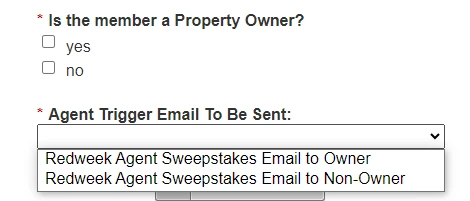
Can someone please share the code framework I should use to make this happen?
Thank you,
LK
