Need Help with Alignment of Footer Boiler Plate
Hi everyone,
Appreciate any advice anyone can give. The footer boiler plates of our emails render strangely in Gmail and it seems like an alignment issue but I'm not HTML-savvy enough to really know. Our templates are typically designed with a max-width of 600px and although it renders fine in Outlook, in Gmail, the footer boiler plate doesn't center-align with the template if the browser window is wide. Is this something that can be fixed by adjusting a max-width settings somewhere?
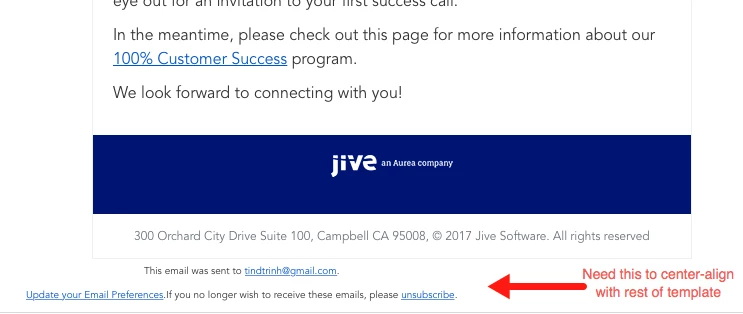
Below is the HTML for our Unsubscribe in Marketo Admin:
<tr>
<td align="center" style="width:100%; max-width: 600px; text-align:center; margin-right:auto; margin-left: auto;">
<p align="center" style="font-family:avenir; font-size:10px; text-align:center;">This email was sent to {{lead.Email Address}}.<br /> <a href="jivesoftware.com/email-preference-center/">Update your Email Preferences</a>.</br>If you no longer wish to receive these emails, please <a href="%mkt_opt_out_prefix%unsubscribe-email-preference-update.html?mkt_unsubscribe=1&mkt_tok=##MKT_TOK##">unsubscribe</a>.</p>
</tr>
</td>
Below is the actual code:
<!DOCTYPE html PUBLIC "-//W3C//DTD XHTML 1.0 Transitional//EN" "w3.org/TR/xhtml1/DTD/xhtml1-transitional.dtd">
<html xmlns="w3.org/1999/xhtml">
<head>
<meta name="ROBOTS" content="NOINDEX, NOFOLLOW" />
<meta http-equiv="Content-Type" content="text/html; charset=utf-8" />
<!--[if !mso]><!-->
<meta http-equiv="X-UA-Compatible" content="IE=edge" />
<!--<![endif]-->
<meta name="viewport" content="width=device-width, initial-scale=1.0" />
<title></title>
<style type="text/css">
body {
Margin: 0;
padding: 0;
min-width: 100%;
background-color: #FFFFFF;
}
table {
border-spacing: 0;
font-family: avenir !important;
color: #333333;
line-height: 24px !important;
}
td {
padding: 0;
font-family: avenir !important;
line-height: 24px !important;
}
img {
border: 0;
}
.wrapper {
width: 100%;
table-layout: fixed;
-webkit-text-size-adjust: 100%;
-ms-text-size-adjust: 100%;
}
.webkit {
max-width: 600px;
}
.outer {
margin: 0 auto;
width: 100%;
max-width: 600px;
}
.full-width-image img {
width: 100%;
max-width: 600px;
height: auto;
}
.inner {
padding: 20px;
}
p {
Margin: 0;
color: #333333;
font-family: avenir !important;
line-height: 24px !important;
}
li {
color: #333333;
font-family: avenir !important;
line-height: 24px !important;
}
a {
color: #5a2bad;
text-decoration: underline;
font-family: avenir !important;
}
.h1 {
font-size: 22px;
font-weight: bold;
Margin-bottom: 18px;
color: #687079;
}
.h2 {
font-size: 18px;
font-weight: bold;
Margin-bottom: 12px;
color: #687079;
}
.one-column .contents {
text-align: center;
}
.one-column p {
font-size: 16px;
Margin-bottom: 10px;
}
.one-column li {
font-size: 16px;
color: #687079;
}
.one-column .h1 {
font-size: 30px;
font-weight: bold;
color: #5A2BAD;
}
.one-column .h2 {
font-size: 16px;
Margin-bottom: 12px;
color: #5A2BAD;
}
.white {
color: #FFFFFF !important;
}
.left {
text-align: left !important;
}
.copyright {
font-size: 12px !important;
}
.center {
text-align: center !important;
}
#speakers p {
text-align: left;
}
.border-gray {
border: 1px solid #EEEEEE;
}
</style>
</head>
<body style="Margin:0; padding-top:0; padding-bottom:0; padding-right:0; padding-left:0; min-width:100%; background-color:#FFFFFF; ">
<div class="mktEditable" id="preheadcopy" style="color: #333333; text-align: center" mktoname="preheadcopy">
<p><span size="1" face="sans-serif" style="font-family: sans-serif; font-size: xx-small;">100% Customer Success - View as a <a href="content.jivesoftware.com/index.php/email/emailWebview" style="color: #021677;">web page</a></span></p>
</div>
<!-- HIDDEN TEXT -->
<div style="display:none;font-size:1px;color:#333333;line-height:1px;max-height:0px;max-width:0px;opacity:0;overflow:hidden;">
<!-- Event info -->
</div>
<center class="wrapper mktEditable" id="whole-email" style="width:100%; table-layout:fixed; -webkit-text-size-adjust:100%; -ms-text-size-adjust:100%; " mktoname="whole-email">
<div class="webkit" style="max-width: 600px;">
<table class="outer" align="center" width="100%" style="border-spacing: 0; font-family: sans-serif; color: #333333; width: 100%; max-width: 600px; margin: 0 auto 0 auto;">
<tbody>
<tr>
<td style="padding: 0;"></td>
<td width="600" class="border-gray" style="padding: 0; border: 1px solid #EEEEEE;">
<!-- BANNER -->
<table style="border-spacing: 0; font-family: sans-serif; color: #333333;">
<tbody>
<tr>
<td class="full-width-image" id="banner" style="padding: 0;" mktoname="banner"> <p><img src="content.jivesoftware.com/rs/174-ZGE-941/images/em-hdr-aurea-success-meeting-170720.png" alt="You're invited!" width="600" constrain="true" imagepreview="false" /></p> </td>
</tr>
</tbody>
</table>
<table style="border-spacing: 0; font-family: sans-serif; color: #333333;">
<!-- HEADLINE -->
<tbody>
<tr>
<td class="one-column" style="padding: 0;">
<table width="100%" style="border-spacing: 0; font-family: sans-serif; color: #333333;">
</table> </td>
</tr>
<!-- MAIN CONTENT STARTS HERE -->
<tr>
<td class="one-column" style="padding: 0;">
<table width="100%" style="border-spacing: 0; font-family: sans-serif; color: #333333;">
<tbody>
<tr>
<td class="inner" id="main" align="center" style="padding: 20px;" mktoname="main"> <p style="line-height: 120%; font-family: sans-serif; margin: 0px 0px 10px; color: #333333; font-size: 16px; text-align: left;">Thanks for attending our webinar earlier this month, <a href="community.jivesoftware.com/login.jspa?referer=https://community.jivesoftware.com/videos/12338" target="_blank">Aurea's Acquisition of Jive - What it Means to You</a>!</p> <p style="line-height: 120%; font-family: sans-serif; margin: 0px 0px 10px; color: #333333; font-size: 16px; text-align: left;">We appreciate your interest in our customer success program and would love to share more on this topic with you. In the coming weeks, please keep an eye out for an invitation to your first success call.</p><p style="line-height: 120%; font-family: sans-serif; margin: 0px 0px 10px; color: #333333; font-size: 16px; text-align: left;">In the meantime, please check out this page for more information about our <a href="aurea.com/client-success/" target="_blank">100% Customer Success</a> program.</p>
<p style="line-height: 120%; font-family: sans-serif; margin: 0px 0px 10px; color: #333333; font-size: 16px; text-align: left;">We look forward to connecting with you!</p>
</td>
</tr>
</tbody>
</table> </td>
</tr>
<!-- COLOR BAR -->
<tr>
<td class="one-column" style="padding: 0;">
<table width="100%" bgcolor="#021677" style="border-spacing: 0; font-family: sans-serif; color: #333333;">
<tbody>
<tr>
<td class="inner contents white" id="color-bar" style="color: #ffffff !important; text-align: center; padding: 20px;" mktoname="color-bar"> <p><img src="content.jivesoftware.com/rs/174-ZGE-941/images/JiveAureaLogoLockup_Simple_White.png" alt="Jive Software Logo" style="border-width: 0;"></p></td>
</tr>
</tbody>
</table> </td>
</tr>
<tr>
<td class="one-column" style="padding: 0;">
<table width="100%" style="border-spacing: 0; font-family: sans-serif; color: #333333;">
<tbody>
<tr>
<td class="inner contents" style="text-align: center; padding: 0px;"> <p class="copyright" style="margin: 0; color: #687079; font-size: 12px !important; margin-bottom: 10px;">{{my.footer}}</p> </td>
</tr>
</tbody>
</table> </td>
</tr>
</tbody>
</table> </td>
<td style="padding: 0;"></td>
</tr>
</tbody>
</table>
</div>
</center>
</body>
</html>