Need help with CSS syntax for specific form fields | Community
Skip to main content
Ajay_Parikh1
New Participant
April 15, 2019
Solved

Need help with CSS syntax for specific form fields

  • April 15, 2019
  • 1 reply
  • 4397 views

I am trying to format this form so that:

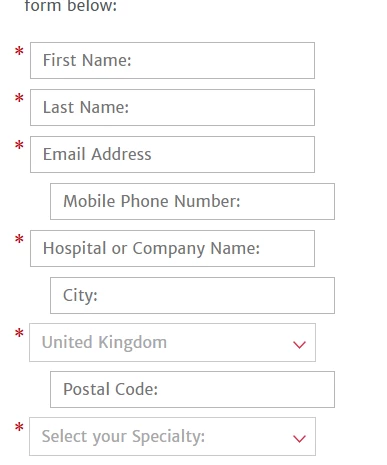
1) On mobile, the form fields align properly:

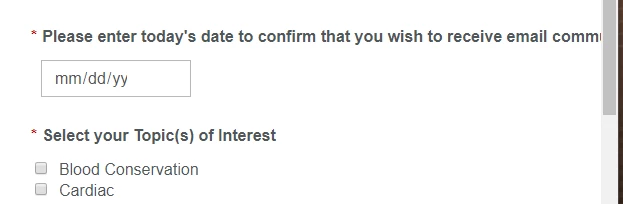
2) The labels for the last 2 fields don't overlap the the field entry box / check boxes.

Can someone please tell me how to fix the gap issue?

My form can be found here: https://info.edwards.com/Early-Resuscitation-in-Sepsis.html

Thank you.

This post is no longer active and is closed to new replies. Need help? Start a new post to ask your question.
Best answer by Bryan_Epstein

​Please let me know if the below code works for you.

1) On mobile, the form fields align properly:

You are having this issue because the Mobile Phone Number, City and Postal Codes are not required fields. This can be fixed by modifying the following style.

/* You will adjust the width: 10% to width: 11px; */

@media only screen and (max-width: 480px) {

.mktoForm .mktoFormCol .mktoLabel {

text-align: left;

width: 11px !important;

}

}

2) The labels for the last 2 fields don't overlap the the field entry box / check boxes.

This can be fixed by modifying the following style below.

.mktoForm .mktoRequiredField label.mktoLabel {

width: auto !important;

}

There is also text that overflows, which can be fixed using the code below:

form.mktoForm label.mktoLabel {

white-space: inherit !important;

width: auto 1important;

}
One other thing that I noticed is that the radio button list was not inline with the asterisk. I fixed that below.
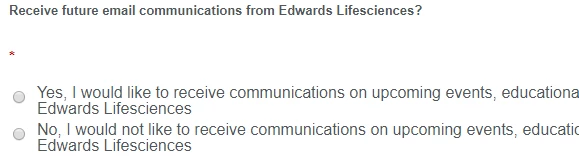
/* This will bring the radio list inline with the asterisk */

@media only screen and (max-width: 991px) {

.mktoForm .mktoRadioList {

width: 95% !important;

float:left;

}

}

1 reply

Bryan_Epstein
Bryan_EpsteinAccepted solution
New Participant
April 16, 2019

​Please let me know if the below code works for you.

1) On mobile, the form fields align properly:

You are having this issue because the Mobile Phone Number, City and Postal Codes are not required fields. This can be fixed by modifying the following style.

/* You will adjust the width: 10% to width: 11px; */

@media only screen and (max-width: 480px) {

.mktoForm .mktoFormCol .mktoLabel {

text-align: left;

width: 11px !important;

}

}

2) The labels for the last 2 fields don't overlap the the field entry box / check boxes.

This can be fixed by modifying the following style below.

.mktoForm .mktoRequiredField label.mktoLabel {

width: auto !important;

}

There is also text that overflows, which can be fixed using the code below:

form.mktoForm label.mktoLabel {

white-space: inherit !important;

width: auto 1important;

}

One other thing that I noticed is that the radio button list was not inline with the asterisk. I fixed that below.

/* This will bring the radio list inline with the asterisk */

@media only screen and (max-width: 991px) {

.mktoForm .mktoRadioList {

width: 95% !important;

float:left;

}

}
Ajay_Parikh1
New Participant
April 16, 2019

Hi Bryan,

Thanks for posting the CSS code so quickly. I really appreciate it.

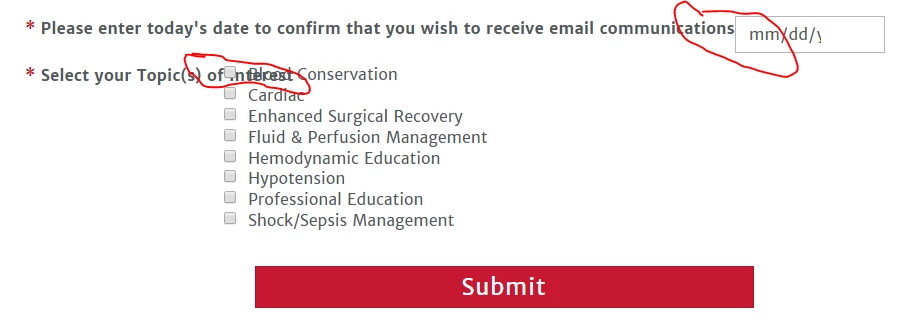
Unfortunately, I am still having the problem with field label text overlapping the checkboxes/date entry box on desktop (Edwards ISICEM Post Congress) - all seems to be resolved on mobile.

I've cleared my page cache several times (in case that was the issue...it was not).

I pasted in the 4 CSS snippets that you provided (only difference I corrected the "1important" to "!important" in your snippet 2b);

/* Fix alignment of fields/asterisks on mobile devices - changed width 10% to 11px */

@media only screen and (max-width: 480px) {

.mktoForm .mktoFormCol .mktoLabel {

text-align: left;

width: 11px !important;

}

/* This will bring the radio list inline with the asterisk */

@media only screen and (max-width: 991px) {

.mktoForm .mktoRadioList {

width: 95% !important;

float:left;

}

}
/* This will ensure the field label does not overlap the field entry/check boxes */

.mktoForm .mktoRequiredField label.mktoLabel {

width: auto !important;

}

/* This will ensure the field label text does not overflow */

form.mktoForm label.mktoLabel {

white-space: inherit !important;

width: auto !important;

}

Anything else that could be done to solve for those 2 field labels overlapping the fields without affecting all the rest of the form fields?

Thanks in advance for any additional insight.

-Ajay

Bryan_Epstein
New Participant
April 17, 2019

Ajay, it looks like you have some conflicting styles between the forms2.css and the custom.min.css file on your server, which appears to be causing these issues for you. You can always put these changes at the actual form level CSS within Marketo, which should over-ride those other two stylesheets. Best practice would be to keep those styles within the hosted stylesheets though.

One minor thing with Marketo LPs is that you don't actually need the .html at the end of your link. https://info.edwards.com/Early-Resuscitation-in-Sepsis will work for you to get to the page.