Need help with email UTMs | Community
Skip to main content
Milena_Volkova
New Participant
May 3, 2024
Question

Need help with email UTMs

  • May 3, 2024
  • 3 replies
  • 4002 views

Hi all. I inherited a Marketo instance where a lot of things were developed over the years by different people. I am now trying to make my UTMs work in email.

What we need to happen is: 

When someone clicks a link for webinar registration, record the following in custom fields (note: these custom fields are also used by the javascript that captures UTM parameters from a form fill): 

  • Source - Last: UTM Source = mkto
  • Source - Last: UTM Medium = email
  • Source - Last: UTM Campaign = nurture

Here's what's happening: 

By default all email clicks get these values (notice the fields are different; are they out of the box?): 

utm_source: mkto

utm_medium: email

I don't know where to change these fields to the ones I need, i.e., where in Marketo I can specify the custom fields (Source - Last: UTM Source etc.) to be used for email clicks. 

In our email template, there is also a way to set a Global Variable for UTM Campaign (again, NOT the field we are using; likewise, I don't know how to change what field Marketo should use for it); also, there is only UTM Campaign field in the Global Variables, not utm_source or utm_medium (I don't need those fields, anyway, I need to use my custom fields like Source - Last: UTM Source etc.).
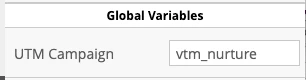
Alternatively, I can enter the full URL like company.com/asset_name/?utm_source=marketo&utm_medium=email&utm_campaign=nurture in the CTA button URL, but it's a lot easier to have the source and medium for all email clicks to be set automatically, and even if I enter that whole URL every time, it gets messed up. Marketo still wants to use the UTM Campaign field rather than the field I need (i.e., Source - Last: UTM Campaign). 

It looks like an external process (the javascript?) updates that field, but there is no reference to it in the UTM capture javascript. 

Sorry, this is so convoluted. Any help would be appreciated. 

3 replies

NiharikaGoyal
New Participant
May 6, 2024

Hi @Milena_Volkova 


Hope you are doing well.


I have checked the details that you have shared and as per my understanding you want to store the data for below URL to mentioned custom fields:

company.com/asset_name/?utm_source=marketo&utm_medium=email&utm_campaign=nurture 

  • Source - Last: UTM Source = marketo
  • Source - Last: UTM Medium = email
  • Source - Last: UTM Campaign = nurture

For this requirement if you have already JS on landing page then you have to adjust it with below approach: 

  1. Use JavaScript to Capture UTM Parameters: If you have JavaScript on your landing page that captures UTM parameters from the URL and saves them in the appropriate fields, ensure the script is set up to recognize the parameters and save them in the custom fields (Source - Last: UTM Source, Source - Last: UTM Medium, Source - Last: UTM Campaign) rather than any default fields.

Kindly check.


Thanks


SanfordWhiteman
New Participant
May 6, 2024

This is not a useful response as it adds nothing beyond the OP’s understanding.


Don’t use this community for engagement farming/SEO nor AI-generated content; do provide useful, original responses. If you have any questions, contact a moderator separately. Thank you.

SanfordWhiteman
New Participant
May 5, 2024

It looks like an external process (the javascript?) updates that field, but there is no reference to it in the UTM capture javascript. 


Let’s drill down into this part. If you look at the details of the Change Data Value, you’ll see exactly what made this change. Please show a ‘shot of the details.

Milena_Volkova
New Participant
May 6, 2024

HI @sanfordwhiteman thank you for your response. Is this what you are asking about? Sorry, the entire URL does not fit in. 


tusharwagh1
New Participant
May 4, 2024

Hi,

We can utilize UTM sources as hidden fields in Marketo Forms, such as 'utm_campaign,' as well as incorporate them into buttons, as you've mentioned: 'utm_campaign=campaign-name&utm_medium=email&utm_source=marketo&utm_term=na&utm_content=na.'

When used in hidden fields, all details will be tracked as the person fills out the form. Conversely, when employed in links, tracking will occur according to the webpage.

SanfordWhiteman
New Participant
May 4, 2024

@tusharwagh1 please be attentive to the experience level of other posters.


It’s clear here that @milena_volkova already understands the general purpose and usage of UTM query parameters. In fact, Milena mentions having a JS UTM tracking library already in place, so there’s no need to review the basics of UTMs.

tusharwagh1
New Participant
May 5, 2024

@sanfordwhiteman  Thank you for highlighting this. I'll make a note of it.