Need help with parsing json-string | Community
Skip to main content
New Participant
May 5, 2024
Solved

Need help with parsing json-string

  • May 5, 2024
  • 1 reply
  • 2095 views

I have stored a json-string in a lead field in marketo =>

 

{ "name": "Milan", "cm_name": "Master Manager", "signature": "Hello \"There\"", }


When I am trying to parse the json string using the following script =>

#if( $lead.emailVariables.isEmpty() ) #set( $lead.emailVariables = '{}' ) #end #set( $emailVariables = '#set( $emailVariables = ' + $lead.emailVariables + ' )' ) #evaluate( $emailVariables )
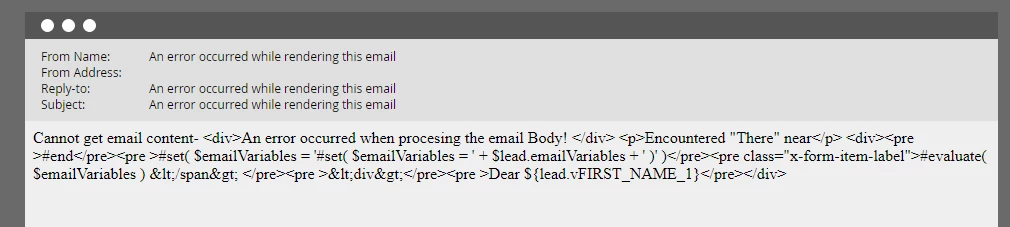

I am getting this error ->

Cannot get email content- <div>An error occurred when procesing the email Body! </div> <p>Encountered "There" near</p> <div><pre >#end</pre><pre >#set( $emailVariables = '#set( $emailVariables = ' + $lead.emailVariables + ' )' )</pre><pre class="x-form-item-label">#evaluate( $emailVariables ) &lt;/span&gt; </pre><pre >&lt;div&gt;</pre><pre >Dear ${lead.vFIRST_NAME_1}</pre></div>

 

This post is no longer active and is closed to new replies. Need help? Start a new post to ask your question.
Best answer by SanfordWhiteman

Velocity only supports long-form JSON Unicode escapes. It doesn’t support shortcuts like \" or \n. For the double quotes you use \u0022.

1 reply

SanfordWhiteman
SanfordWhitemanAccepted solution
New Participant
May 6, 2024

Velocity only supports long-form JSON Unicode escapes. It doesn’t support shortcuts like \" or \n. For the double quotes you use \u0022.

New Participant
May 6, 2024

Got it. Thanks for the help.

New Participant
May 21, 2024

hi

I have followed the same steps, but still no luck in parsing the JSON from my Custom Object.

My Custom Object field (Field Name: RData) has data like below


[ { "StuLast": "Abram", "StuFirst": "Easton", "Program": "UGD", "Subject": "MUSC", "Catalog": "10A", "Section": 90 }, { "StuLast": "StuLast2", "StuFirst": "StuFirst2", "Program": "UGD", "Subject": "Chemistry", "Catalog": "20B", "Section": 65 } ]


When I tried the following code in the Token to parse, I am getting an empty string


#set($data = ${registrar_cList.get(0).rData}) #if($data.isEmpty()) #set($data='{}') #end #set($parsedJson = '#set($parsedJson='+ $data+')') #evaluate($parsedJson) $parsedJson['subject']


My Custom object has data like 

[ { "StuLast": "Abram", "StuFirst": "Easton", "Program": "UGD", "Subject": "MUSC", "Catalog": "10A", "Section": 90 }, { "StuLast": "StuLast2", "StuFirst": "StuFirst2", "Program": "UGD", "Subject": "Chemistry", "Catalog": "20B", "Section": 65 } ]


When I tried the following code in the Token to parse, I am getting an empty string

#set($data = ${registrar_cList.get(0).rData}) #if($data.isEmpty()) #set($data='{}') #end #set($parsedJson = '#set($parsedJson='+ $data+')') #evaluate($parsedJson) $parsedJson['subject']


Note: I did upload the csv file into Marketo as  UTF-8 format when updating the Custom object.


My Goal is to display data from this Custom object field in an email.

Any help is appreciated.


thanks

-Sree