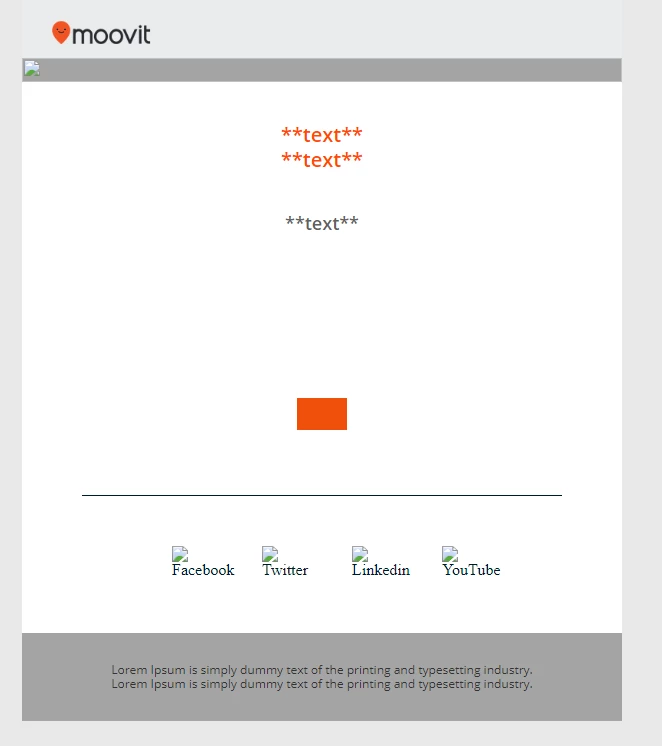
Need you help with create an Email Template which includes Module
Hey guys!
I want to create an email template which will include a few modules. I've tried anything, read any article, watch any video and NONE.
Please help me to finish the email template! I need you guys!
Thanks in advance for the help!
I've attached here the HTML:
<!doctype html>
<html xmlns="http://www.w3.org/1999/xhtml">
<head>
<!-- Marketo Variable Definitions -->
<meta id="Banner" class="mktoImg" mktoname="Banner">
<meta id="Banner_Img" class="mktoImg" mktoname="Banner_Img">
<meta id="Content1" class="mktoString" mktoname="Content1">
<meta id="Content2" class="mktoString" mktoname="Content2">
<meta id="Speaker1" class="mktoString" mktoname="Speaker1">
<meta id="SpeakerImg1" class="mktoString" mktoname="SpeakerImg1">
<meta id="Fullname1" class="mktoString" mktoname="Fullname1">
<meta id="JobTitle1" class="mktoString" mktoname="JobTitle1">
<meta id="FreeText1" class="mktoString" mktoname="FreeText1">
<meta id="Speaker2" class="mktoString" mktoname="Speaker2">
<meta id="SpeakerImg2" class="mktoString" mktoname="SpeakerImg2">
<meta id="Fullname2" class="mktoString" mktoname="Fullname2">
<meta id="JobTitle2" class="mktoString" mktoname="JobTitle2">
<meta id="FreeText2" class="mktoString" mktoname="FreeText2">
<meta id="Speaker3" class="mktoString" mktoname="Speaker3">
<meta id="SpeakerImg3" class="mktoString" mktoname="SpeakerImg3">
<meta id="Fullname3" class="mktoString" mktoname="Fullname3">
<meta id="JobTitle3" class="mktoString" mktoname="JobTitle3">
<meta id="FreeText3" class="mktoString" mktoname="FreeText3">
<meta id="PreCTA" class="mktoString" mktoname="PreCTA">
<meta id="PreCTAtitle" class="mktoString" mktoname="PreCTAtitle">
<meta id="CTA" class="mktoString" mktoname="CTA">
<meta id="ctaLink" class="mktoString" mktoname="ctaLink">
<meta id="ctaTitle" class="mktoString" mktoname="ctaTitle">
<meta id="utm_campaign" class="mktoString" mktoname="utm_campaign">
<meta id="Content-bottom" class="mktoString" mktoname="Content-bottom">
<meta id="Signature" class="mktoString" mktoname="signature">
<meta id="SignatureLine1" class="mktoString" mktoname="SignatureLine1">
<meta id="SignatureLine2" class="mktoString" mktoname="SignatureLine2">
<!-- Other Meta Tags -->
<meta http-equiv="Content-Type" content="text/html; charset=utf-8">
<meta name="viewport" content="width=device-width, initial-scale=1.0">
<title>Subject line</title>
<style type="text/css">
/* Style for Apple products and/or devices that recognize Media Queries and Webfonts */
@import url(http://fonts.googleapis.com/css?family=Open+Sans:300,600,400);
body {
width: 100% !important;
-webkit-text-size-adjust: 100%;
-ms-text-size-adjust: auto;
margin: 0 !important; /*android 4.4 left side fix*/
padding: 0;
}
div[style*="margin: 16px 0"] {
margin: 0 !important;
}
/*android 4.4 left side fix*/
table td {
border-collapse: collapse;
-ms-text-size-adjust: auto;
-webkit-text-size-adjust: auto;
}
table {
border-collapse: collapse;
mso-table-lspace: 0pt;
mso-table-rspace: 0pt;
margin: 0 auto;
}
img {
outline: none;
text-decoration: none;
border: none;
-ms-interpolation-mode: bicubic;
}
a img {
border: none;
}
p {
margin: 0px 0px !important;
}
@media only screen and (max-width: 600px) {
td[class=mobilestyle] {
font-size: 16px !important;
line-height: 20px !important;
}
td[class=mobilestyle] span[class=header] {
font-size: 18px !important;
}
table[class=table100] {
}
td[class=socialicon] {
padding-right: 7px !important;
}
td[class=socialicon] img {
width: 35px !important;
}
.threeCol {
width: 45% !important;
display: block !important;
margin: 5px auto !important;
}
h1 {
font-size:200%;
}
}
@media only screen and (max-width:400px) {
td[class=header] {
font-size: 12px !important;
}
td[class=footer] {
font-size: 10px !important;
}
img[class=logo] {
width: 96px !important;
}
}
/* Prevent Webkit and Windows Mobile platforms from changing default font sizes, while not breaking desktop design. */
</style>
<!--[if (gte mso 9)|(IE)]>
<style type="text/css">
/* Force outlook to fallback on Arial instead of Times Roman and removes extra spaces */
table {
border-collapse:collapse !important;
mso-table-lspace:0pt!important;
mso-table-rspace:0pt!important;
margin:0 auto;
}
h1,h2,h3,h4,h5,h6,p,a,span,td,strong {
font-family: Arial,Helvetica,Verdana,sans-serif !important;
}
</style>
<![endif]-->
</head>
<body style="background-color:#E9E9E9;" link="#001926">
<!--container for Microsoft Outlook-->
<!--[if (gte mso 9)|(IE)]>
<table width="600" align="center" cellpadding="0" cellspacing="0" border="0" bgcolor="#a4a4a4">
<tr>
<td class="mktoContainer" id="mktoContainer">
<![endif]-->
<!-- open wraper-->
<table width="100%" cellpadding="0" cellspacing="0" border="0" align="center" bgcolor="#E9E9E9">
<tbody>
<tr>
<td>
<table width="100%" style="max-width:600px;" align="center" cellspacing="0" cellpadding="0" border="0" bgcolor="#EAECED" class="table100">
<tr>
<!--Logo-->
<td width="100%" style="text-align:left;padding-top:20px;padding-bottom:10px;padding-left:10px;"> <img src="#" style="display:block; border:none; outline:none; text-decoration:none;max-width:138px; width:100%;" width="138"></td>
</tr>
</table>
<table class="table100 mktoModule" id="bannerarea" mktoname="mktoModule" width="100%" cellpadding="0" cellspacing="0" border="0" align="center" style="max-width:600px;">
<tr>
<!--Banner-->
<td valign="middle" width="100%" align="center" class="logo" style="max-width:600px;">
<div id="banner" class="mktoImg" mktoname="Banner">
<img border="0" style="display:block; border:none; outline:none; text-decoration:none;max-width:600px; width:100%;" width="600" src="${Banner_Img}">
</div> </td>
</tr>
</table>
<!--Content1-->
<table class="table100 mktoModule" id="content1-area" mktoname="content1-area" width="100%" style="max-width:600px;background:#ffffff;" align="center" cellspacing="0" cellpadding="0" border="0">
<tr>
<td style="padding-bottom:25px; padding-top:40px; color:#5f5f5f;" align="center" valign="middle">
<table width="85%" align="center" border="0" cellpadding="0" cellspacing="0">
<tr>
<td align="left" style="color:#5f5f5f; font-size:15px; font-family:'open sans', Arial, Helvetica, sans-serif; text-align:left;line-height:26px;" class="mobilestyle">
<div class="mktEditable" id="Content1" mktoname="Content1">
<h3 style="color:#FF4800;line-height:125%;font-family:'Open Sans', Arial, Helvetica, sans-serif;font-size:20px;font-weight:bold;margin-top:0;margin-bottom:3px;text-align:center;letter-spacing:normal;margin-right:0;margin-left:0;padding-top:0;padding-bottom:0;padding-left:0;padding-right:0;display:block;font-style:normal;"> **text** <br> **text** </h3>
</div> </td>
</tr>
</table> </td>
</tr>
</table>
<!--Content2-->
<table class="table100 mktoModule" id="content2" mktoname="content2"width="100%" style="max-width:600px;background:#ffffff;" align="center" cellspacing="0" cellpadding="0" border="0">
<tr >
<td style="padding-bottom:10px; padding-top:10px; color:#5f5f5f;" align="center" valign="middle">
<table width="85%" align="center" border="0" cellpadding="0" cellspacing="0">
<tbody>
<tr>
<td align="left" style="color:#5f5f5f; font-size:18px; font-family:'open sans', Arial, Helvetica, sans-serif; text-align:left;line-height:26px;" class="mobilestyle">
<div class="mktEditable" id="Content2" mktoname="Content2">
<p style="color:#5f5f5f;text-align:center; font-weight:600;"> **text** </p>
</div> </td>
</tr>
</tbody>
</table> </td>
</tr>
</table>
<!--Speakers-->
<table class="table100 mktoModule" id="Speakers" mktoname="Speakers" width="100%" style="max-width:600px;background:#ffffff;" align="center" cellspacing="0" cellpadding="0" border="0">
<tr >
<td style="padding-bottom:25px; padding-top:5px; color:#5f5f5f;" align="center" valign="middle">
<table width="85%" align="center" border="0" cellpadding="0" cellspacing="0">
<tbody>
<tr>
<td align="left" style="color:#5f5f5f; font-size:15px; font-family:'open sans', Arial, Helvetica, sans-serif; text-align:left;line-height:26px;text-align:center;padding:10px;" class="mobilestyle">
<table width="100%" align="center" border="0" cellpadding="0" cellspacing="0">
<tbody>
<tr>
<th align="left" valign="top" style="color:#5f5f5f; font-size:15px; font-family:'open sans', Arial, Helvetica, sans-serif; text-align:center;line-height:26px;width:33%; text-align:center;padding:15px;padding-bottom:10px;padding-top:10px;" class="threeCol">
<div class="mktEditable" id="MktSpeaker1" mktoname="Speaker1">
<img src="${SpeakerImg1}" width="120" border="0" style="display:block; border:none; outline:none; text-decoration:none;margin-left:auto; margin-right:auto;margin-bottom:5px; margin-top:5px;" alt="${Fullname1}" title="${Fullname1}">
<p style="font-weight:600;">${Fullname1}</p>
<p style="font-weight:400;">${JobTitle1}</p>
<p style="font-weight:400;">${FreeText1}</p>
</div> </th>
<th align="left" valign="top" style="color:#5f5f5f; font-size:15px; font-family:'open sans', Arial, Helvetica, sans-serif; text-align:center;line-height:26px;width:33%; text-align:center;padding:15px;padding-bottom:10px;padding-top:10px;" class="threeCol">
<div class="mktEditable" id="MktSpeaker2" mktoname="Speaker2">
<img src="${SpeakerImg2}" width="120" border="0" style="display:block; border:none; outline:none; text-decoration:none;margin-left:auto; margin-right:auto;margin-bottom:5px; margin-top:5px;" alt="${Fullname2}" title="${Fullname2}">
<p style="font-weight:600;">${Fullname2}</p>
<p style="font-weight:400;">${JobTitle2}</p>
<p style="font-weight:400;">${FreeText2}</p>
</div> </th>
<th align="left" valign="top" style="color:#5f5f5f; font-size:15px; font-family:'open sans', Arial, Helvetica, sans-serif; text-align:center;line-height:26px;width:33%; text-align:center;padding:15px;padding-bottom:10px;padding-top:10px;" class="threeCol">
<div class="mktEditable" id="MktSpeaker3" mktoname="Speaker3">
<img src="${SpeakerImg3}" width="120" border="0" style="display:block; border:none; outline:none; text-decoration:none;margin-left:auto; margin-right:auto; margin-bottom:5px; margin-top:5px;" alt="${Fullname3}" title="${Fullname3}">
<p style="font-weight:600;">${Fullname3}</p>
<p style="font-weight:400;">${JobTitle3}</p>
<p style="font-weight:400;">${FreeText3}</p>
</div> </th>
</tr>
</tbody>
</table> </td>
</tr>
</tbody>
</table> </td>
</tr>
</table>
<!--PreCTATitle-->
<table class="table100 mktoModule" id="PreTitle" mktoname="PreTitle" width="100%" style="max-width:600px;background:#ffffff;" align="center" cellspacing="0" cellpadding="0" border="0">
<tr >
<td style="padding-bottom:15px; padding-top:3%; color:#5f5f5f;" align="center" valign="middle">
<table width="85%" align="center" border="0" cellpadding="0" cellspacing="0">
<tbody>
<tr>
<td align="left" style="color:#5f5f5f; font-size:17px; font-family:'open sans', Arial, Helvetica, sans-serif; text-align:left;line-height:26px;" class="mobilestyle">
<div id="PreCTA" class="mktEditable" mktoname="PreCTA">
<p style="color:#5f5f5f;text-align:center;"> ${PreCTAtitle} </p>
</div> </td>
</tr>
</tbody>
</table> </td>
</tr>
</table>
<!--CTA-->
<table class="table100 mktoModule" id="CTA_Area" mktoname="CTA_Area" width="100%" style="max-width:600px;" bgcolor="#FFFFFF" cellpadding="0" cellspacing="0" border="0" align="center">
<tr >
<td style="padding-bottom:20px; padding-top:15px;" align="center" valign="middle">
<table width="auto" align="center" border="0" cellpadding="0" cellspacing="0">
<tbody>
<tr>
<td width="auto" align="center" valign="middle" style="background-color:#f0500c; font-size:17px; font-family:'open sans', Arial, Helvetica, sans-serif; text-align:center; color:#ffffff; font-weight: bold; padding-left:25px; padding-right:25px; padding-top:16px;padding-bottom:16px;">
<div id="CTA" class="mktEditable" mktoname="CTA">
<span style="color: #ffffff;"> <a style="color: #ffffff; text-align:center;text-decoration: none; font-weight:400;" href="${ctaLink}?utm_source=email&utm_medium=marketo&utm_campaign=${utm_campaign}" target="_blank">${ctaTitle}</a> </span>
</div> </td>
</tr>
</tbody>
</table> </td>
</tr>
</table>
<!--signature-->
<table class="table100 mktoModule" id="SignatureArea" mktoname="SignatureArea" width="100%" style="max-width:600px;" bgcolor="#FFFFFF" cellpadding="0" cellspacing="0" border="0" align="center">
<tr >
<td align="center" valign="middle" style="display:block;padding-bottom:30px;padding-top:15px;color:#5f5f5f;">
<table width="85%" align="center" border="0" cellpadding="0" cellspacing="0">
<tbody>
<tr>
<td width="100%" align="left" valign="middle" style="font-size:15px; font-family: 'open sans', Arial, Helvetica, sans-serif; text-align:center;line-height:26px;" class="mobilestyle">
<div id="Signature" class="mktoText" mktoname="Signature">
<p style="font-weight:600; font-size:16px;">${SignatureLine1}</p>
<p style="color:#5f5f5f;"> ${SignatureLine2} </p>
</div> </td>
</tr>
</tbody> </table> </td>
</tr>
</table>
<!--devider-->
<table class="table100 mktoModule" id="Devider" mktoname="Devider" width="100%" style="max-width:600px;" bgcolor="#ffffff" cellpadding="0" cellspacing="0" border="0" align="center">
<tr >
<td align="center" valign="middle" style="display:block;padding-bottom:45px;">
<table border="0" cellpadding="0" cellspacing="0" width="80%" style="font-weight:normal!important;">
<tbody>
<tr>
<td align="center" valign="top" style="border-top-width:1px;border-top-style:solid;border-top-color:#001926;font-weight:normal!important;"></td>
</tr>
</tbody>
</table> </td>
</tr>
</table>
<!--Social-->
<table width="100%" style="max-width:600px;" align="center" cellspacing="0" cellpadding="0" border="0" bgcolor="#ffffff" class="table100 ">
<tr >
<td width="100%" align="center" style="padding-bottom:50px;">
<table border="0" cellpadding="0%" cellspacing="0%" width="60%" style="max-width:100%;font-weight:normal!important;">
<tbody>
<tr>
<td align="center" style="font-weight:normal!important; padding:5px;" class="socialicon"> <a w href="#" target="_blank"> <img src="#" width="30" alt="Facebook" title="Facebook" style="border-width:0;height:auto;line-height:100%;-ms-interpolation-mode:bicubic;display:block;outline-style:none;text-decoration:none;"></a> </td>
<td align="center" style="font-weight:normal!important; padding:5px;" class="socialicon"> <a href="#" target="_blank"><img src="#" width="30" alt="Twitter" title="Twitter" style="border-width:0;height:auto;line-height:100%;-ms-interpolation-mode:bicubic;display:block;outline-style:none;text-decoration:none;"></a> </td>
<td align="center" style="font-weight:normal!important; padding:5px;" class="socialicon"> <a href="#" target="_blank"><img src="#" width="30" alt="Linkedin" title="Linkedin" style="border-width:0;height:auto;line-height:100%;-ms-interpolation-mode:bicubic;display:block;outline-style:none;text-decoration:none;"></a> </td>
<td align="center" style="font-weight:normal!important; padding:5px;" class="socialicon"> <a href="#" target="_blank"><img src="#" width="30" alt="YouTube" title="YouTube" style="border-width:0;height:auto;line-height:100%;-ms-interpolation-mode:bicubic;display:block;outline-style:none;text-decoration:none;"></a> </td>
</tr>
</tbody>
</table> </td>
</tr>
</table>
<!--optout-->
<table align="center" border="0" cellpadding="0" cellspacing="0" class="table100" style="max-width: 600px;" width="100%">
<tr>
<td class="footer" style="text-align: left; padding: 30px; padding-right: 0; padding-left: 0; color: #333333; font-family: 'open sans', Arial, Helvetica, sans-serif; font-size: 12px; line-height: 14px; font-weight: normal; text-align: center;" width="90%"> Lorem Ipsum is simply dummy text of the printing and typesetting industry. <br>Lorem Ipsum is simply dummy text of the printing and typesetting industry. </td>
</tr>
</table>
<!-- close wraper--> </td>
</tr>
</tbody>
</table>
<!-- close microsoft outlook container -->
<!--[if (gte mso 9)|(IE)]>
</td>
</tr>
</table>
<![endif]-->
</body>
</html>