No "link" data type option in custom field | Community
Skip to main content
New Participant
May 13, 2020
Solved

No "link" data type option in custom field

  • May 13, 2020
  • 2 replies
  • 3705 views

Hi All,

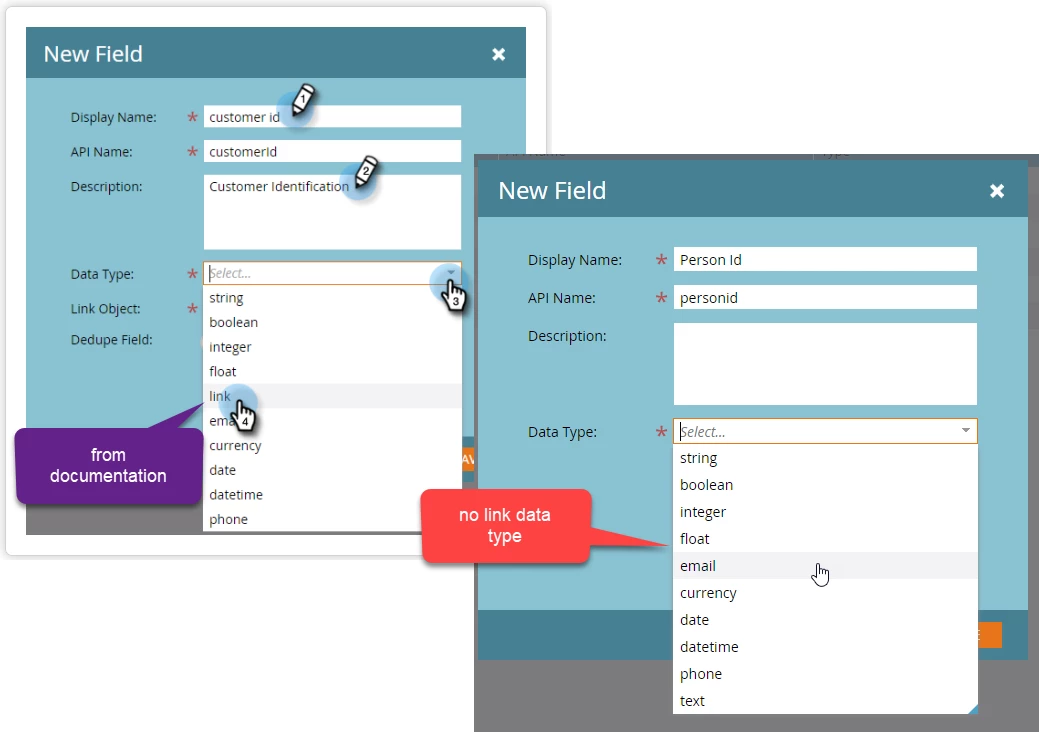
This issue I have is not having a "Link" data type option in the custom field. I would like to link lead to our custom object.
If you could see in the image below, the documentation has it but our instance doesn't, is there additional settings that needs to be setup before we have this option? 
This post is no longer active and is closed to new replies. Need help? Start a new post to ask your question.
Best answer by SanfordWhiteman

Most likely, you have already created and approved this object.


You can't go back and add the Link type field later. So delete it and start over and you'll see it's available.

2 replies

SanfordWhiteman
SanfordWhitemanAccepted solution
New Participant
May 13, 2020

Most likely, you have already created and approved this object.


You can't go back and add the Link type field later. So delete it and start over and you'll see it's available.

orchid001Author
New Participant
May 18, 2020

Hi @sanfordwhiteman ,

Thank you, it works now!

The custom object should "NOT" be approved before link data type shows.

SanfordWhiteman
New Participant
May 18, 2020

Correct!

Cory_Gabor1
New Participant
May 13, 2020

Hi @orchid001,


I assume it is, but I just want to confirm that the person id field is a string field. Only string field types are supported in the link field.


Here's another thread with a response to this issue. If this doesn't resolve your issue, can you add an additional screenshot of your custom object? 


Thanks,

Cory Gabor

Marketing Consultant 

LeadMD


SanfordWhiteman
New Participant
May 13, 2020

I assume it is, but I just want to confirm that the person id field is a string field. Only string field types are supported in the link field.


Mmm not so, even the standard Lead ID is an Integer.