Not able to add LeadSource standard SFDC field in Marketo Form | Community
Skip to main content
New Participant
January 25, 2023
Solved

Not able to add LeadSource standard SFDC field in Marketo Form

  • January 25, 2023
  • 2 replies
  • 3830 views

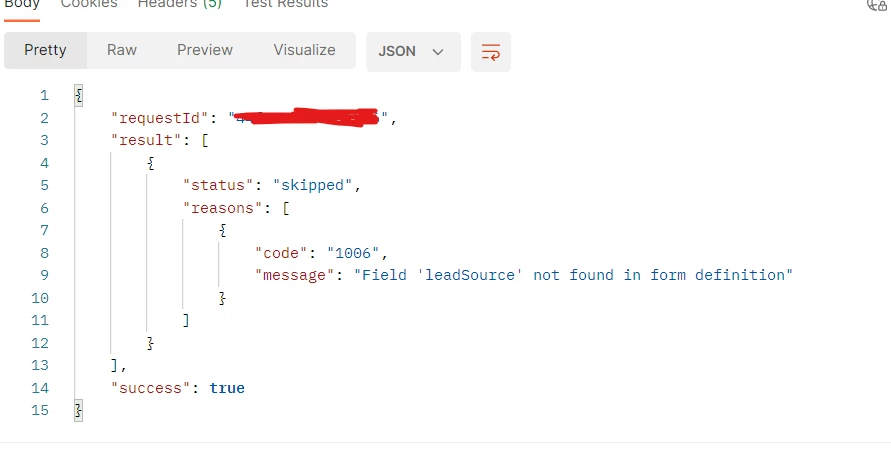
Using SubmitForm API to create person record. I downloaded all fields object and found Lead Source as listed in the Marketo Person record fields having "leadSource" as it's API name. But I am not able to add that field in the Marketo form on which data is getting submitted via API. As its not in form definition getting below error.


This post is no longer active and is closed to new replies. Need help? Start a new post to ask your question.
Best answer by Darshil_Shah1

Well, if you don’t have the Person Source field on the form in Marketo, then you’d encounter this error. Submit Form is an alternative for synchronizing leads to Marketo and is designed to provide functionality that is equivalent to a Marketo Form submission. It’s not an same as the create/update leads endpoint and your use-case sounds more suitable for the leads create/update POST endpoint instead of form submit endpoint. Unless of course, you want to log a filled out form activity in the person’s activity log that’d trigger campaigns listening for it. If that’s the case then you’d need to add all fields you’re including in payload in your Marketo form asset as well.

2 replies

SanfordWhiteman
New Participant
January 25, 2023

Is that field actually on the form in Form Editor?

Darshil_Shah1
Darshil_Shah1Accepted solution
Community Manager
January 25, 2023

Well, if you don’t have the Person Source field on the form in Marketo, then you’d encounter this error. Submit Form is an alternative for synchronizing leads to Marketo and is designed to provide functionality that is equivalent to a Marketo Form submission. It’s not an same as the create/update leads endpoint and your use-case sounds more suitable for the leads create/update POST endpoint instead of form submit endpoint. Unless of course, you want to log a filled out form activity in the person’s activity log that’d trigger campaigns listening for it. If that’s the case then you’d need to add all fields you’re including in payload in your Marketo form asset as well.

New Participant
January 26, 2023

Seems when we export field list from Marketo, in that the field name is listed as "Lead Source" but in actual on the form it is found as "Person Source".  I added Person Source and it worked with API name "leadSource".

Darshil_Shah1
Community Manager
January 26, 2023

The words “Lead/Leads” have been replaced with “Person/People”. While this change has been made to the friendly field names of the fields/and GUI in Marketo, they haven't updated the API names as that would break existing integrations for users.