Nurture Campaign Not Pulling Leads - Potential Issue with Criteria | Community
Skip to main content
New Participant
October 5, 2021
Question

Nurture Campaign Not Pulling Leads - Potential Issue with Criteria

  • October 5, 2021
  • 2 replies
  • 3530 views

Hi Marketo Community,


I have been trying to set up a nurture campaign but no matter what I do the program does not pull any of our booked leads. Our goal is to have our leads receive an email 7 days before their appointment as an email confirmation. We have successful nurture campaigns currently running and I followed them as a guide and overall changed the criteria for what we are looking to do.


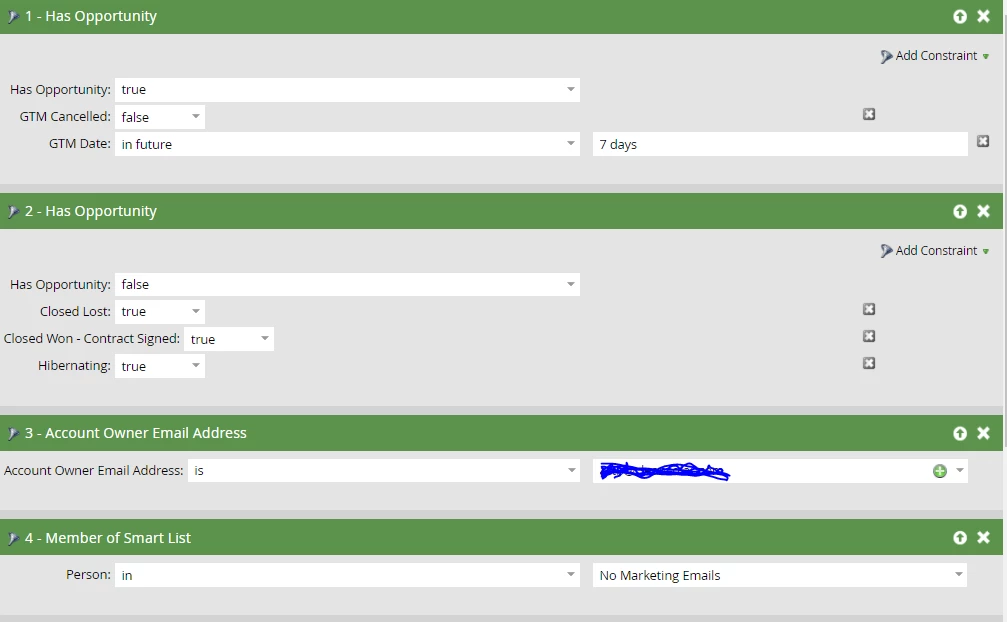
Additional information: There are two smart campaigns within the nurture campaign, one is for GoToMeeting appointments and the other is for email appointments. Both have same criteria just GTM or Email. Below pictures show GTM example for smart list and flow. The stream on the nurture campaign is also set up and turned on. 


I am assuming there might be something wrong with the criteria we set or I'm missing something all together. I have not previously set up a nurture campaign so any ideas would be helpful. Thank you!



This post is no longer active and is closed to new replies. Need help? Start a new post to ask your question.

2 replies

Katja_Keesom
Community Manager
October 6, 2021

Jo covered most of the questions your screen shots raised with me as well. Some other checks you can do:

  • Are the people actually member of your EP?
  • If so, what is their cadence?

It is possible that there is another smart campaign somewhere pausing them, which would make that they are actually in your program, but still not receiving anything.

New Participant
October 6, 2021

Hi Katja,


So this email program is not pulling anyone but are in Marketo and should be available to be in the email program based of the criteria I set.


I'm curious, how will their cadence affect them not showing in the nurture campaign? Is there a specific way you check for this, I'm looking into it now. 


I'm also currently looking into the other smart campaigns being the issue, great thought. We have not had issues like that before and since the opportunities we're trying to reach are very specific and we don't have anything currently running for these specific opportunities, I'm not sure if that is impacting this new campaign. 

Katja_Keesom
Community Manager
October 7, 2021

Hi Sara,


The first question is whether the people have become member of your engagement program. You can either check the results of your smart campaign or check the members tab of the program for that.

If they are member, but they are paused, they will simply not receive any emails. The cadence has one of two values, Normal or Paused. If you have a second smart campaign setting their cadence to Paused, having added them to your program will have no effect at all.

But I do believe that @jo_pitts1  is on to something. His suggestion of setting up a separate smart list and adding your criteria one by one and checking the audience for every step will help you narrow down the logic of how to combine your filters.

Jo_Pitts1
Community Manager
October 6, 2021

@sararoulston ,

looking at your screen grab, you've got two references to Opportunity.. one leading with true the other with false.


You've also asked for people who are in the No Marketing email list.  That seems weird?  Should it be not in?


What are the Boolean criteria you're using?  Is it Any, All, or Advanced?  

  • If it is All, it won't work
  • If it is Any, it'll include people you don't want included
  • and if it is advanced, it probably needs to be something like (1 or 2) and 3 and 4. 

But again, review 4 because it seems potentially inverted (maybe 'in' should be 'not in'?)


Cheers

Jo

New Participant
October 6, 2021

Hi Jo,


The "No Marketing Email" that was an oversight, normally it is "not in" "no marketing emails". I have fixed it, thanks for the catch!


As for the opportunity is false, we do not want any opportunities that are closed-lost, hibernating or closed-won as in our database they are considered an opportunity till they've signed, leading to us putting opportunity false but only for those instances (true).


Jo_Pitts1
Community Manager
October 6, 2021

@sararoulston ,

It is critical that we understand how you are evaluating your boolean criteria.  Can you please share this bit here in your smart list.