Nurture program setup for a welcome drip | Community
Skip to main content
New Participant
November 30, 2020
Solved

Nurture program setup for a welcome drip

  • November 30, 2020
  • 1 reply
  • 3027 views

I'm building a welcome email series with 5 emails sent to the subscriber over the course of several weeks.  I'm using a nurture program because we will likely add or remove content in the somewhat near future (and I've read that's the best approach), but I'm going to use multiple streams so the cadence can be based on wait steps instead of set days of casts (as a single stream would require).  So when someone signs up for our marketing emails, I want to immediately send them Email 1 (which would be in Stream 1), then wait X number of days, move to Stream 2 and send Email 2, wait Y number of days, move to Stream 3 and send Email 3...etc etc.


My questions:

1. What are all the triggers and/or filters I will need to make sure everyone moves through each stream and receives all 5 emails (no matter if they opened/clicked, didn't open/click, exhausted, etc)?  Instead of using the transition rules on the streams, I plan to set up Smart Lists in a separate folder contained within the program.


2. What is the most reliable way to properly exit members from the nurture program so they can continue on to our normal weekly promotional emails?


Thanks!
This post is no longer active and is closed to new replies. Need help? Start a new post to ask your question.
Best answer by AbhinavSa2

Hi Megan,

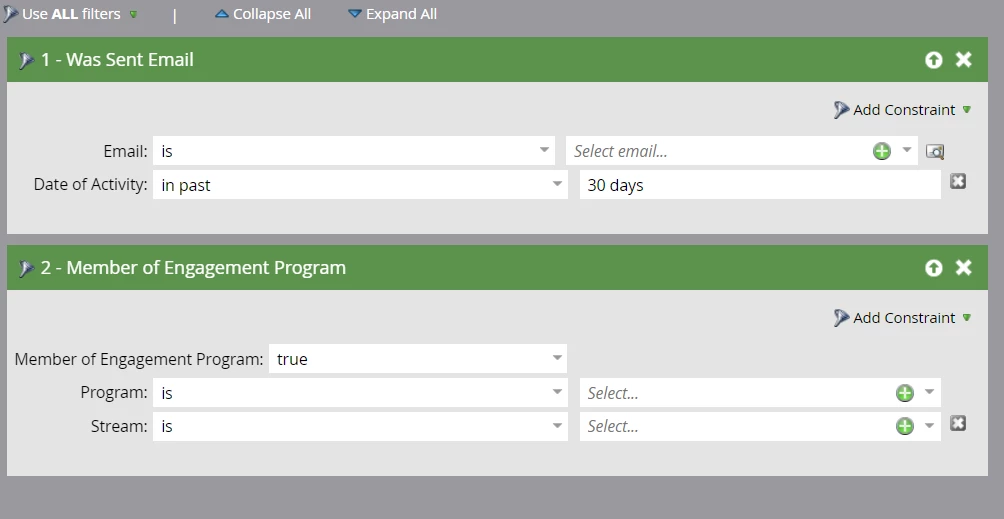
For your first query: You can use transition rules or smart campaign to move from one stream to another. Use below filter in smart list 

Email was sent -> email name 

AND

Member of engagement Program-> Program name -> stream 1

Flow:

Change engagement program stream 2 (And so on for other streams)


For your second query: Lets suppose your last stream is X and last email name is Y

Create a smart campaign as per below

Smart list

member of engagement program -> program name -> stream name x

AND

Was sent email Y

Flow: Change Engagement program cadence ->Pause


1 reply

AbhinavSa2Accepted solution
Employee
December 1, 2020

Hi Megan,

For your first query: You can use transition rules or smart campaign to move from one stream to another. Use below filter in smart list 

Email was sent -> email name 

AND

Member of engagement Program-> Program name -> stream 1

Flow:

Change engagement program stream 2 (And so on for other streams)


For your second query: Lets suppose your last stream is X and last email name is Y

Create a smart campaign as per below

Smart list

member of engagement program -> program name -> stream name x

AND

Was sent email Y

Flow: Change Engagement program cadence ->Pause


New Participant
December 2, 2020

@abhinavsa2 Thank you!!