Opt-In Check Box & Rich Text alignment issue
I see a few discussions on this topic but nothing is working for me. I am trying to line up the Checkbox with the Rich text in our Forms, but I am running into issues.
- The Opt-In is a Checkbox and the copy is Rich Text. (I tried using Checkboxes- but the hyperlink for the Privacy Policy does not work).
- The ultimate goal is to have the Checkbox aligned to the Left and the Rich Text to right
Any guidance or assistance will be so helpful.
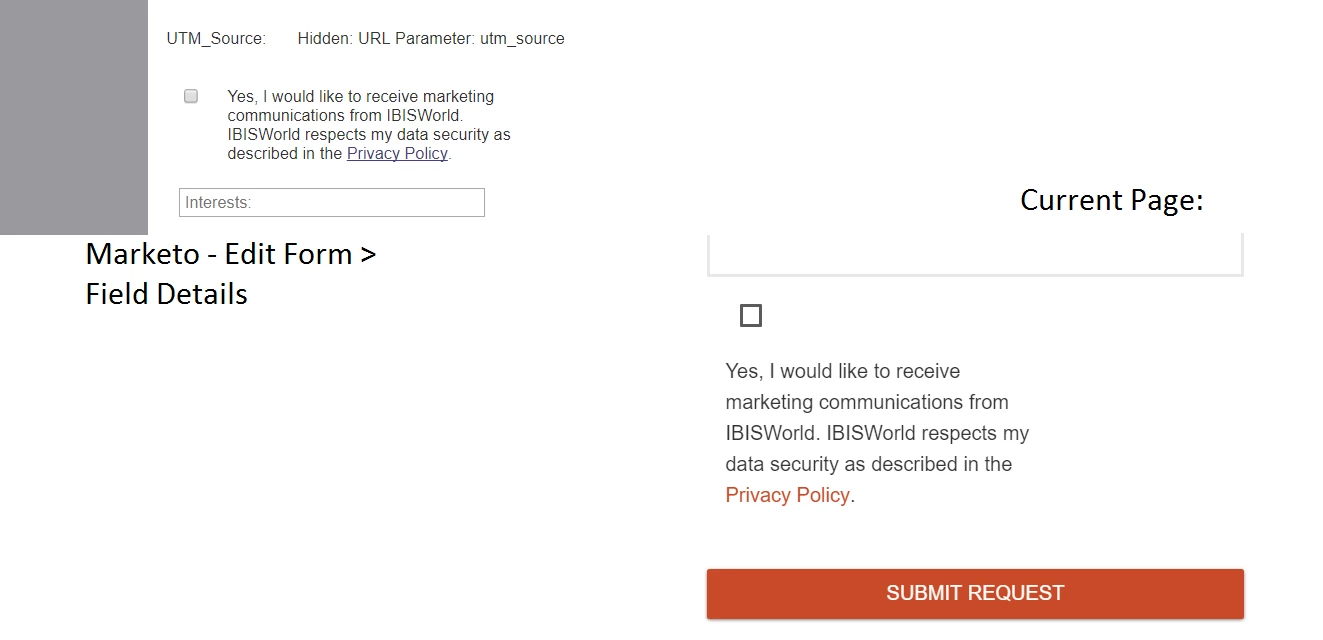
Below is the current CSS that we are using:
::placeholder { /* Chrome, Firefox, Opera, Safari 10.1+ */
color: #A0A0A0;
opacity: 1; /* Firefox */
}
:-ms-input-placeholder { /* Internet Explorer 10-11 */
color: #A0A0A0;
}
::-ms-input-placeholder { /* Microsoft Edge */
color: #A0A0A0;
}
.mktoForm input[type=text],
.mktoForm input[type=url],
.mktoForm input[type=email],
.mktoForm input[type=tel],
.mktoForm input[type=number],
.mktoForm input[type=date],
.mktoForm select.mktoField,
.mktoForm textarea.mktoField {
-webkit-appearance: none;
background-color: #FFFFFF;
line-height: 30px;
color: #666666;
border: 2px solid #e7e7e7;
-webkit-border-radius: 0px;
-moz-border-radius: 0px;
border-radius: 0px;
padding: 0.1em 0.2em;
box-shadow: inset 0px 0px 0px 0px #ddd;
min-height: 1.5em;
font-family: 'Helvetica';
font-size: 15px;
font-weight: 300;
padding-left: 10px;
}
select
{
color: #A0A0A0 !important;
}
option
{
color: #000;
}
option:first-child
{
color: #A0A0A0 !important;
}
option:not(::first-child)
{
color: #000 !important;
}
.mktoButton {
height: auto;
position: relative;
z-index: 100;
background-color: #C94927 !important;
border: none;
box-shadow: 0 1px 3px rgba(0,0,0,0.5);
border-radius: 2px;
color: #FFFFFF;
font-size: 16px;
font-weight: 300;
line-height: 20px;
min-width: 140px;
padding: 10px 15px;
text-align: center;
text-transform: uppercase;
border:0 !important;
}
.mktoButton:active {
box-shadow: none !important;
-webkit-box-shadow: none !important;
}
.mktoButton:hover {
background-color: #e4551f !important;
color: #ffffff !important;
}
.mktoButton:focus {
color: #ffffff !important;
}
.mktoForm .mktoRequiredField .mktoAsterix {
display: none!important;
}
.mktoForm .mktoOffset {
float: left;
height:0 !important;
width:10px;
}
.mktoForm .mktoGutter {
float: unset;
height: unset;
width: 0px;
}
input:not([type]):focus:not([readonly]), input[type=text]:focus:not([readonly]), input[type=password]:focus:not([readonly]), input[type=email]:focus:not([readonly]), input[type=url]:focus:not([readonly]), input[type=time]:focus:not([readonly]), input[type=date]:focus:not([readonly]), input[type=datetime]:focus:not([readonly]), input[type=datetime-local]:focus:not([readonly]), input[type=tel]:focus:not([readonly]), input[type=number]:focus:not([readonly]), input[type=search]:focus:not([readonly]), textarea.materialize-textarea:focus:not([readonly]) {
border-bottom: 2px solid #e7e7e7 !important;
box-shadow: none !important;
}
input:focus,
select:focus,
textarea:focus{
outline: none;
}
/* responsive */
.mktoForm {
width:100% !important;
}
.mktoFormRow, .mktoFieldWrap, .mktoFormCol, .mktoButtonRow {
width:100%;
}
.mktoForm input[type=url],
.mktoForm input[type=text],
.mktoForm input[type=date],
.mktoForm input[type=tel],
.mktoForm input[type=email],
.mktoForm input[type=number],
.mktoForm select.mktoField,
.mktoButton {
width:100% !important;
height: 40px !important;
}
.mktoForm textarea.mktoField {
width:100% !important;
height: 120px !important;
}
.mktoButtonRow {
text-align:center !important;
width:100% !important;
}
.mktoButtonWrap {
margin-left:0 !important;
}
input[name="FirstName"],
input[name="LastName"],
input[name="Company"]{
text-transform: capitalize;
}
#interestshp, label[for=interestshp] {display:none !important;}
input[type="checkbox"]
{
vertical-align:middle;
}