Opt-in field checkbox on Form
Hello, i have struggled long time with this and nothing has yet worked smoothly:
We have 3 ways to double-opt-in for Newsletter:
- Direct opt in form on website (works fine)
- OptinMonster form (works fine)
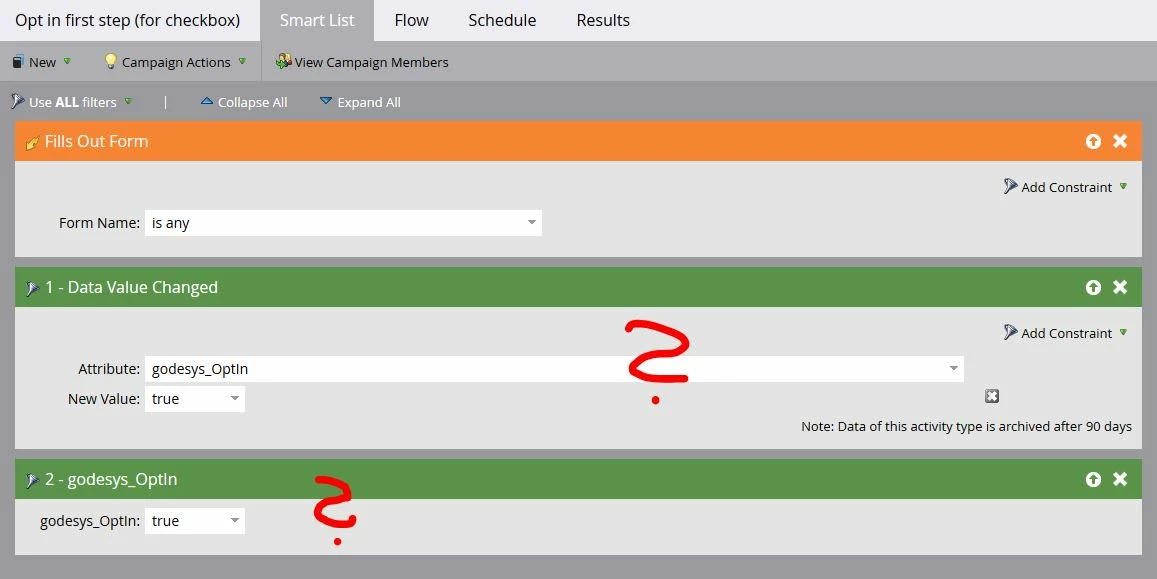
- Custom field "opt in" (checkbox) below any other form (using its own campaign). Here is the problem:
When i add a trigger "fills out any form" and then a filter "data value changed" - "opt in" field set to "true", it still will fire the campaign even if the field wasn´t checked.
Should i use a trigger "data value changes" instead? But then it would also do it when i merge leads or manually edit the lead, right?
If i select a filter with only the custom field "opt in" = "true" then it would just run the campaign if an already opted in user fills out the form, right?
How are you doing it? What am i missing?
I´ve checked several posts but haven´t found this specific problem.
thanks for any suggestions!
Michael