outlook mobile app makes styling different | Community
Skip to main content
New Participant
August 17, 2020
Question

outlook mobile app makes styling different

  • August 17, 2020
  • 1 reply
  • 2466 views

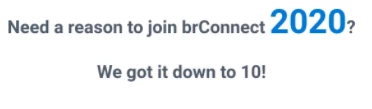
The top image is taken from the marketo editor, it is how I want my title to look. But when I open the sample mail in the outlook app the styling completely changes (see below image). No matter how I change the css the title keeps changing styles. Does anyone know how to fix this?



This post is no longer active and is closed to new replies. Need help? Start a new post to ask your question.

1 reply

Chris_Wilcox
New Participant
August 18, 2020

Total guess, there are probably some media queries setup in your CSS, and whatever classes your content are assigned are changing when the screen size shifts to mobile. Pretty impossible to diagnose without the actual code of the email itself.

New Participant
August 19, 2020

I checked the CSS but there were no media queries. I should add that this problem only occurs on the outlook mobile app, any other apps like the iphone mail app and the gmail app it works fine on. For some reason outlook sees the number "2020" as a phone number, hence the blue color and underline but for some reason the whole title changes.


Thanks for the fast reply Chris!


Chris_Wilcox
New Participant
August 19, 2020

Hmm ok I'm just thinking I wonder if you could put some inline CSS with something like text-decoration:"None" and whether or not that would override the outlook mobile apps auto-detect for what it would expect to be a phone number or not. I'm not an HTML/CSS expect by any means but something where you explicitly code the class/style of those numbers might help to correct? Just an idea!