Outlook Preview Pane - Counts as Open? | Community
Skip to main content
Ayan_Talukder
New Participant
March 10, 2016
Solved

Outlook Preview Pane - Counts as Open?

  • March 10, 2016
  • 3 replies
  • 15653 views

Not entirely a Marketo question, but was curious how Marketo reads emails that are "read" when viewed in the Preview Pane in Outlook.

Does an "Open" count when an someone has an email marked as read / viewed in the Preview Pane? Couldn't find an answer online that verified this, so I wanted to see how Marketo handles this.

I assume links clicked from the Preview Pane get counted, but does that skew the Click to Open % if the Preview Pane does not count? I read somewhere inputting a 1 x 1 tracking pixel / web  beacon inserted into an email can help verify the true open number. Any validity to this?

Thanks in advance!

Best answer by Dan_Stevens_

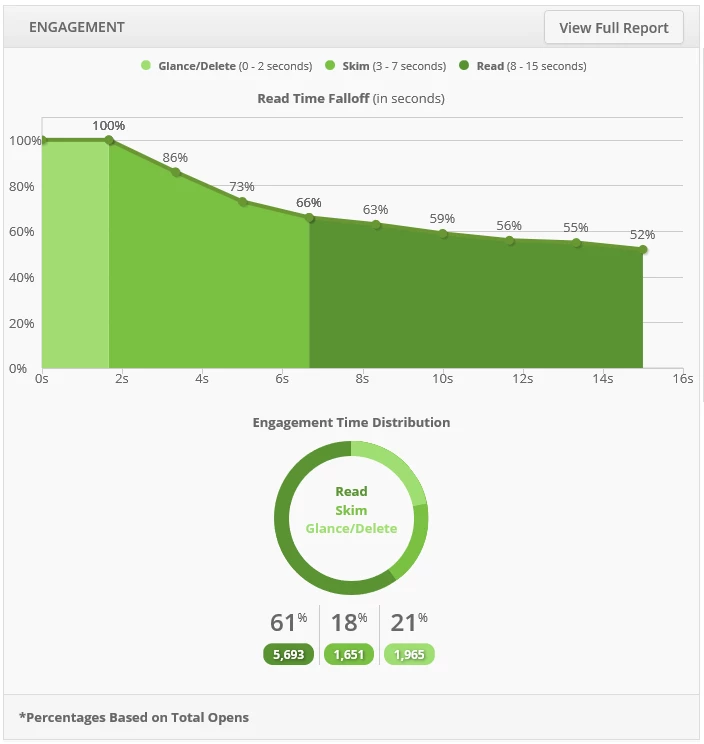
Any time an email - when images are turned on in an email client - contains a hidden tracking pixel and has the opportunity to ping the originating server (Marketo), it will be tracked as an open.  So yes, viewing the email in a preview pane will count as an open.  Which is why "opens" aren't a very reliable metric.  An email that someone deletes - but still has time to render quickly in the preview pane - will be counted as an open.  Which is why I would love to see a report like this available in Marketo someday - where it breaks down the types of opens by the length the email is being viewed:

3 replies

Dan_Stevens_
Dan_Stevens_Accepted solution
New Participant
March 10, 2016

Any time an email - when images are turned on in an email client - contains a hidden tracking pixel and has the opportunity to ping the originating server (Marketo), it will be tracked as an open.  So yes, viewing the email in a preview pane will count as an open.  Which is why "opens" aren't a very reliable metric.  An email that someone deletes - but still has time to render quickly in the preview pane - will be counted as an open.  Which is why I would love to see a report like this available in Marketo someday - where it breaks down the types of opens by the length the email is being viewed:

March 10, 2016

Second this!

Justin_Cooperm2
New Participant
March 10, 2016

Are you referring to the "reading pane"?

If so, this absolutely will count as an open if the email is rendered in the reading pane. There is no correlation to Outlook's "mark read after x seconds" feature. All that matters is whether the email itself was ever rendered.

Kristina_Campo2
New Participant
November 30, 2017

Hi, Justin -

I'm getting lots of questions about this lately. Folks are dismissing our open rates because many people use the reading page to "scan" emails.

Just to I'm clear - will emails rendered in the reading pane ALWAYS trigger an open? Or is it only emails that download images? At our firm, lots of people have images set to not download automatically.We use Outlook 2010 .

Thank you.

k

Dan_Stevens_
New Participant
November 30, 2017

For the email to trigger an "open" in the Outlook preview pane, images must be turned on.  Now if someone clicks a trackable link in an email (where images are turned off), that too will trigger an "open".  Which is the behavior for all plain-text mails.  The reasoning is, if someone clicks a link in an email, they also opened it.  Now of course this too is unreliable given the number of link scanners we're seeing on our emails.  These have become very problematic for some time now and add to the difficulty in providing accurate email results.

March 10, 2016

Preview pane is not counted as an open