
People Missing from Wait Step (Requested Campaign) | Community
Skip to main content
Matt_De_Palm
New Participant
April 20, 2018
Solved

People Missing from Wait Step (Requested Campaign)

  • April 20, 2018
  • 2 replies
  • 3939 views

Hi All,

I put together a drip campaign for my organization but I'm having trouble confirming the presence of people in a wait step.  Program flow below:

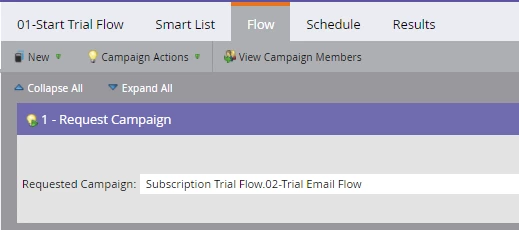
Campaign 01 runs every morning at 5am and Requests Campaign 02 in the flow step.
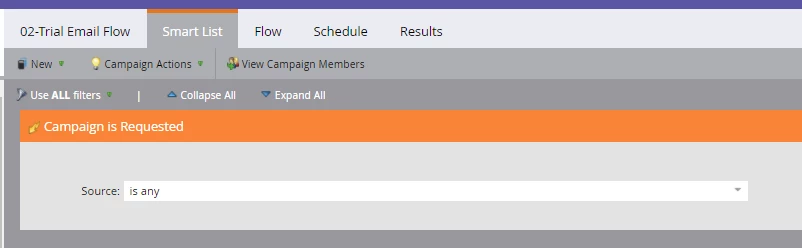
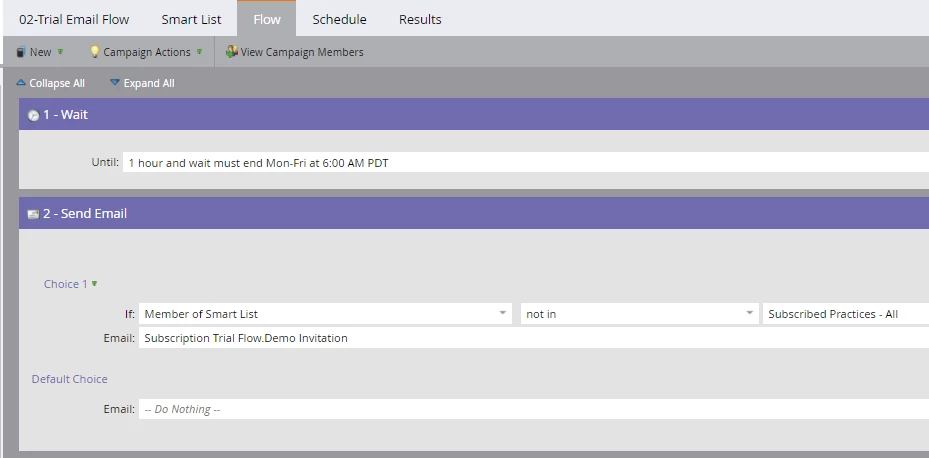
Campaign 02 has trigger for "Campaign is Requested, Source is 'Any'", and the flow has a one hour wait step that must end M-F 6am before sending the email.
My main issue:

I activated the campaigns on a Friday at 12noon and 52 people immediately qualified for Campaign 01.  Per the program setup, that means that 52 people should have a campaign requested (confirmed that this happened), they should be members of Campaign B and they should be in the wait step of Campaign 02 until Monday at 6am.  However, there are currently no people in the wait step and no members in the program. 

Am I missing something here?  Your assistance is greatly appreciated.

Thanks!

-Matt

This post is no longer active and is closed to new replies. Need help? Start a new post to ask your question.
Best answer by Grégoire_Miche2

HI again Matt,

wait steps leave no trace in activity logs and results tabs.

the campaign B summary screen should show 52 in the "leads in wait step", that you can click to have it refreshed. You can also create a smart list with a "member of smart campaign in campaign B" filter.

Finally, in these situations, I tend to create a static list in parallel and start campaign B with and "add to list", so that I have a trace.

-Greg

2 replies

Matt_De_Palm
New Participant
May 16, 2018

Thanks for the responses!  This campaign has been running successfully since activation :-)

Grégoire_Miche2
New Participant
May 17, 2018

Hi Matt,

Then please mark the question as answered for future reference.

-Greg

Grégoire_Miche2
New Participant
April 20, 2018

Hi Matt,

your assumptions are correct. A few things can prevent it from working correctly:

  • Check campaign B is active
  • Check campaign B qualification rules. Anything else than every time might prevent people from entering it.

Also, check campaign A result tab. It should show the 52 request campaign acitvities. Otherwise, the problem is with campaign A.

and remember that "request campaign" flow steps make for low priority campaigns.

-Greg

Matt_De_Palm
New Participant
April 20, 2018

Hi Greg,

Thanks for the speedy response!

  1. Campaign B was activated 10 minutes before Campaign A started running
  2. It was the first run so no contacts should have been unqualified from running through Campaign B
  3. Campaign A results tab shows that Campaign B was requested for each member.
Grégoire_Miche2
Grégoire_Miche2Accepted solution
New Participant
April 20, 2018

HI again Matt,

wait steps leave no trace in activity logs and results tabs.

the campaign B summary screen should show 52 in the "leads in wait step", that you can click to have it refreshed. You can also create a smart list with a "member of smart campaign in campaign B" filter.

Finally, in these situations, I tend to create a static list in parallel and start campaign B with and "add to list", so that I have a trace.

-Greg