Populate Custom Lead Record via Typeform Survey | Community
Skip to main content
Spencer_Philli1
New Participant
January 13, 2018
Solved

Populate Custom Lead Record via Typeform Survey

  • January 13, 2018
  • 1 reply
  • 4016 views

Hello Marketing Nation,

Preface:

I am trying to reverse engineer something and am stumped. This was built by an agency that is no longer working with the company, prior to me coming on board.

Background:

We have a Typeform survey on our site. When someone completes the survey they are emailed their results. Those results are also appended to their lead/person record in Marketo.

Some of these custom fields are not populating, however.

I, for the life of me, can not ascertain where and how Marketo knows to pull and populate the Typeform survey data from our website.

Marketo and Typeform are not "talking" to each other - Marketo is pulling data from our website directly. There is no direct integration between these two systems.

There are no webhooks, and no Zapier integration.

There is nothing on the Marketo form that gates the entry to the survey that would capture the Typeform data.

There is nothing in the smart campaign that sends people their email after completing the survey that would inform Marketo to capture the Typeform data and append to the lead record.

Please see screenshots below:

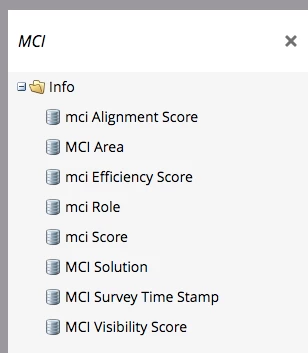
1. Custom fields in field management
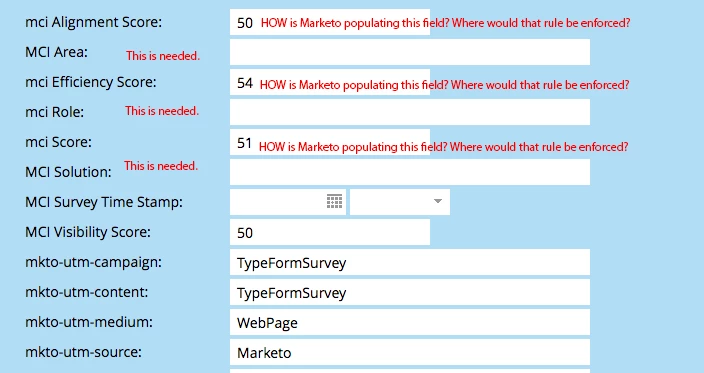
2. The custom fields in the lead/person record - I'm trying to identify how the populated fields were pulled in to populate the remaining, empty fields.
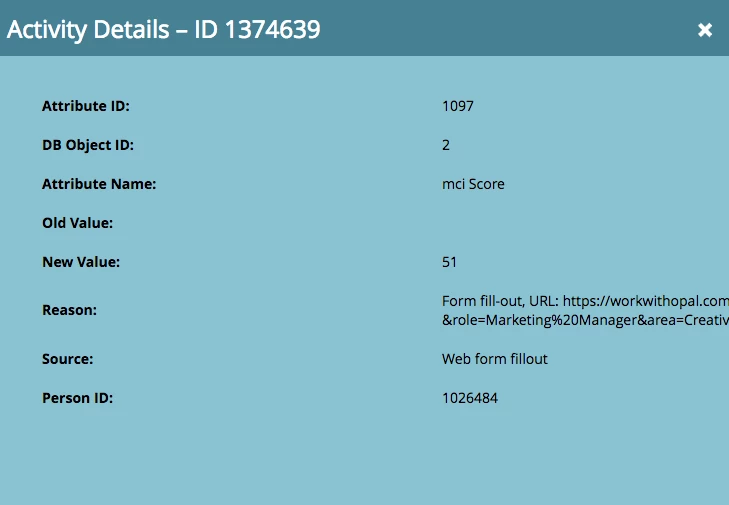
3. In looking at the activity activity details it seems that Marketo is pulling the numbers from the URL itself...:
Any ideas on where and how Marketo decides to correctly pull and populate this Typeform data without being connected to Typeform is greatly appreciated.

Based on that, I can replicate for the unpopulated fields.

Thank you,

Spencer
This post is no longer active and is closed to new replies. Need help? Start a new post to ask your question.
Best answer by SanfordWhiteman

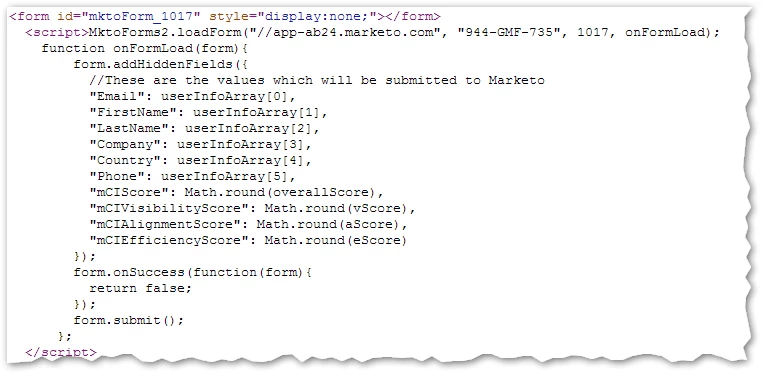
There's a hidden Marketo form post on workwithopal.com/mci/mci-score, using URL parameters forwarded from the TypeForm results.

1 reply

SanfordWhiteman
SanfordWhitemanAccepted solution
New Participant
January 13, 2018

There's a hidden Marketo form post on workwithopal.com/mci/mci-score, using URL parameters forwarded from the TypeForm results.

Spencer_Philli1
New Participant
January 13, 2018

Sanford, I can't thank you enough. Seriously, thank you!

So, it turns out the connection IS associated with the hidden form at the end of the experience after all, albeit via the code on that page.

I was stumped because, in Marketo, the only field on the form is the hidden lead source...There aren't any form fields related to the Typeform data. Rather, to you point, it's the code on the URL requesting the info from Typeform!

Thank you,

Spencer

SanfordWhiteman
New Participant
January 13, 2018

Right, great thing about addHiddenFields is that you don't need to put anything in Form Editor first... drawback is you have to know where the code is at.

P.S. I wouldn't have coded it like this -- all the userArray[] stuff is way too fragile as it relies on a specific order of URL parameters instead of names. (Technically, yes, the query string *can* be regarded as having an order -- the characters are in order, of course! -- but almost no one uses it that way.)