Populating Content on Webpage Using Tokens in URL
Hi Community,
In many of our emails, we add tokens to our URLs to populate data on external landing pages.
One example is a URL that includes date tokens.
When clicked, the URL will direct to the landing page. Within seconds, the Check-In and Check-Out date fields should be populated, as shown below:
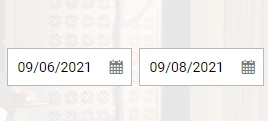
The one caveat is the contact must be logged into the site for the data to be populated.
I believe if the contact is not logged in that the data will populate after they logged in. However, I am having trouble verifying this.
From an execution perspective, this works as follows:
1. The tokens are added to the URL link as shown below in red:
http://{{company.SorClubWebAddress:default=www.vacationowners.net}}/rentals/?latitude=39.07420731&longitude=21.82431221&city=154&citytext=Athens%2C%20Greece&arrdate={{lead.FutureDate56Days}}&depdate={{lead.FutureDate58Days}}&utm_medium=email&utm_term=multi-travel-hotel&utm_content={{system.date}}&utm_campaign=EUR-multi-travel&Promo=EUR-multi-travel-hotel-{{system.date}}
2. There are two separate campaigns:
In Campaign 1, a campaign is requested and the email with the URL is sent out.
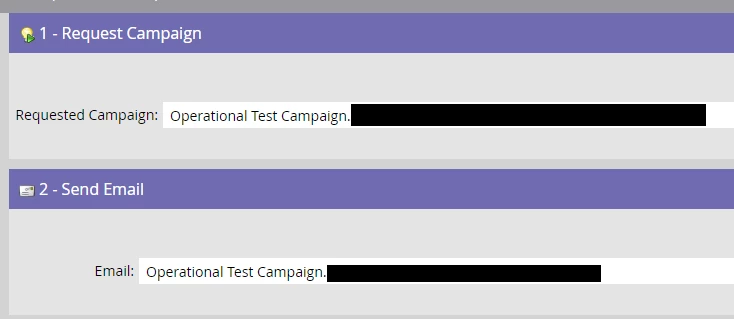
3. In Campaign 2 (the Requested Campaign), two data value changes happen on the contact record. The first updates the {{lead.FutureDate56Days}}; the second updates the {{lead.FutureDate58Days}}.
The purpose of these data value updates is to enable the populating of the Arrival and Departure dates on the webpage to 56 days from today's date {{system.date}}and 58 days from today's date, respectively, when the contact clicks on the URL.
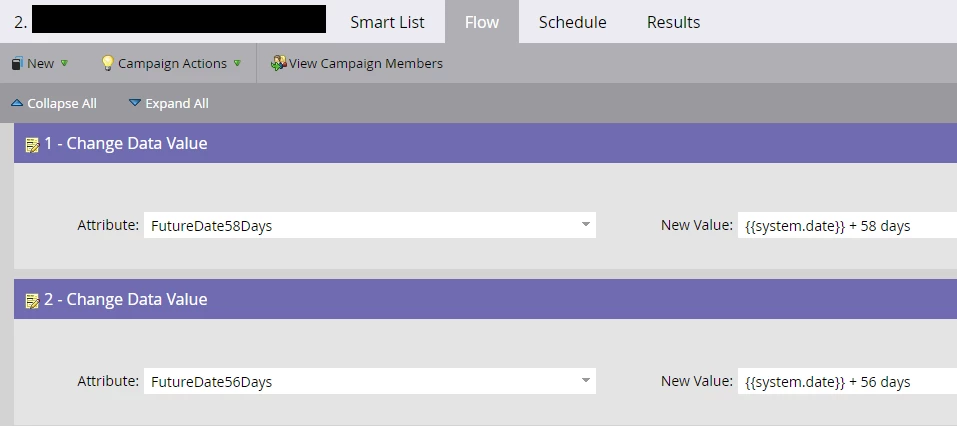
To test the functionality of these tokens, I created a test account on the webpage and logged into the account. I also ran my test account through both campaigns and confirmed that both the FutureDate56Days and FutureDate58Days fields were updated with the correct info (as shown below).

The issue that I am having is that neither the Arrival nor the Departure fields on the webpage are being populated with the data that should be pushed in via the tokens. However, the link is pointing to the correct location that has been hardcoded for each link in the email, e.g., the city and country coded as Athens, Greece below:
http://{{company.SorClubWebAddress:default=www.vacationowners.net}}/rentals/?latitude=39.07420731&longitude=21.82431221&city=154&citytext=Athens%2C%20Greece&arrdate={{lead.FutureDate56Days}}&depdate={{lead.FutureDate58Days}}&utm_medium=email&utm_term=multi-travel-hotel&utm_content={{system.date}}&utm_campaign=EUR-multi-travel&Promo=EUR-multi-travel-hotel-{{system.date}}
Further, when I look at the URL after clicking on the link in my email (see below), you can see that the arrdate and depdate parameters have no data added, whereas the utm_content and Promo parameters have pulled in the {{system.date}} info.
https://www.vacationowners.net/rentals/?latitude=7.8618&longitude=98.3494&city=5086&citytext=Phuket%2C%20Thailand&arrdate=&depdate=&utm_medium=email&utm_term=multi-travel-hotel&utm_content=Jul%2012,%202021&utm_campaign=EUR-multi-travel&Promo=EUR-multi-travel-hotel-Jul%2012,%202021&mkt_tok=MzkyLVdRUS02MjAAAAF-O12ZGFjWoTSVFpBMksKUAC1S9u4dwBkQBluRfa6o1jYkeiAHe1cI9pQdzmch5j8Ci8jI11lPU-gaT0s7mO4aAqlTSPbH1HGsmRbZFLtKUjtKTg
Does anyone have any ideas why the arrdate and depdate fields are not populated when I test the email links?
Thank you,
LK