Preference Center / Unsubscribe Checkbox Auto-fill | Community
Skip to main content
New Participant
August 8, 2023
Solved

Preference Center / Unsubscribe Checkbox Auto-fill

  • August 8, 2023
  • 1 reply
  • 5048 views

Hello!

We are creating forms and landing pages in Marketo for our unsubscribe and preference center.

Our "Unsubscribed" field for the lead is a checkbox in Marketo and on our form and it is auto-filling correctly from the lead Unsubscribed value and retaining the value from the lead each time we visit the form from the link.

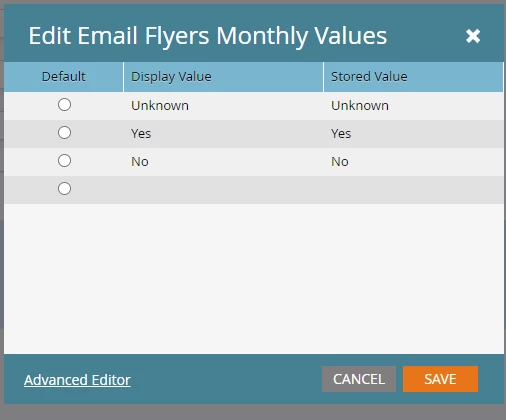
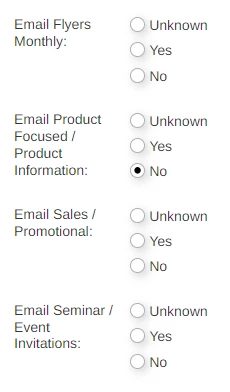
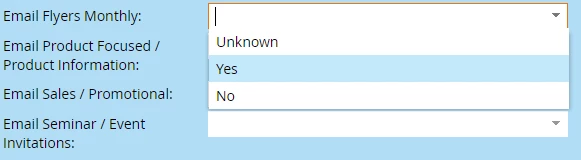
We have other categories of emails we ask users to set their preference for. Yes/No/Unknown in Marketo but we want to display them as a checkbox on the form (unchecked=no and checked=yes, unknown hidden)

When a user updates the checkbox on the form, the correct value flows to the lead in Marketo but when accessing the form a 2nd or 3rd time from an unsub link in our email, the value is not auto-filling to the right value that is in Marketo, always gets set to unchecked (No). We have auto-fill enabled on the three levels but not sure what we are doing wrong and want to know how we can get the checkbox to auto-fill to the correct value. Thank you!

 

Best answer by SanfordWhiteman

Thanks @crystal_pacheco 


I verified the data on a test lead and here is an example of what the values are for our four categories. Unknown, Yes, No

Those are the same values and same case I've used in the form for display value and stored value


But still do not auto-fill correctly or at all in some cases


I just tested your page with my email address (which is already in your database) and had no problem with Pre-Fill of any of those 4 fields, switching the values from Yes to No to Unknown for all.


There’s something wrong with your test setup.

1 reply

Jo_Pitts1
Community Manager
August 8, 2023

@jeffrey_tolhurs ,

silly question.  Are the checked/unchecked values in the checkbox the same as are being returned from the lead?  I know they should be, but just wanted to check.


Cheers

Jo

New Participant
August 8, 2023

@jo_pitts1 The checked/unchecked values in the checkbox are actually not the same as what's on the lead. They are simply all set to yes.

Thanks

SanfordWhiteman
New Participant
August 8, 2023

We're missing some info here. What is the datatype of the field you're trying to use as a tri-state (yes/no/unknown)? You can't use a Boolean for that. Even though it's nullable in the db, false and null have the same meaning on forms.


It's also not clear how you expect to hide a field if that same field has a certain value. Visibility Rules don't work that way.