Prevent default Header and Footer being added to an Email | Community
Skip to main content
New Participant
April 25, 2016
Solved

Prevent default Header and Footer being added to an Email

  • April 25, 2016
  • 2 replies
  • 3405 views

Hello,

We have a Marketo email, when we test it, default header and footer is getting added to it automatically.

May I know how to prevent this from being added? Initially, thought it was adding as per the code in Email Template. But then, it is not from template. It is being added from Email Default setting in Admin section.

Thanks

Anand
Best answer by Grégoire_Miche2

Hi Anand,

Various points here:

  • If you want to do it for one specific email: The default "views as web page" can be deactivated in the email properties. (edit the email, then email actions-> properties). The footer with the default unsubscribe link will also be remove if you declare the email as a Operational
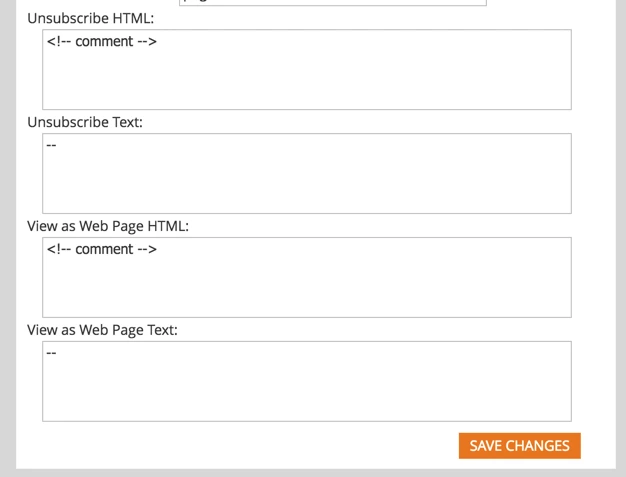
  • If you want to deactivate them forever (meaning you are handling it in your templates), you will have to go to admin -> email and set it up as follow (you should rather copy and paste the default values in a text file somewhere, incase you want to reverse to the default setting):

-Greg

2 replies

September 20, 2017

Hey Grégoire,

Is there any way to do it on a single case basis that doesn't require making an email operational?

Thanks,

Eoin

Michael_Sogunro
New Participant
May 15, 2019

Hi Eoin Lyons - were you able to figure out how to exclude the footer on a single case bais? I'm having trouble with that now. 

Grégoire_Miche2
Grégoire_Miche2Accepted solution
New Participant
April 25, 2016

Hi Anand,

Various points here:

  • If you want to do it for one specific email: The default "views as web page" can be deactivated in the email properties. (edit the email, then email actions-> properties). The footer with the default unsubscribe link will also be remove if you declare the email as a Operational
  • If you want to deactivate them forever (meaning you are handling it in your templates), you will have to go to admin -> email and set it up as follow (you should rather copy and paste the default values in a text file somewhere, incase you want to reverse to the default setting):

-Greg

Grégoire_Miche2
New Participant
April 25, 2016

And also, vote here:

-Greg