Preview an unapproved LP | Community
Skip to main content
New Participant
May 4, 2022
Solved

Preview an unapproved LP

  • May 4, 2022
  • 3 replies
  • 2608 views

I am trying to share edits to a LP with a colleague that does not have Marketo access. I have not approved the page because we can't push it live until it's reviewed. How can I share the edits without approving? The URL shows the approved version.
This post is no longer active and is closed to new replies. Need help? Start a new post to ask your question.
Best answer by ajavinash

@knelson 
You can share the LP without approving with below steps:
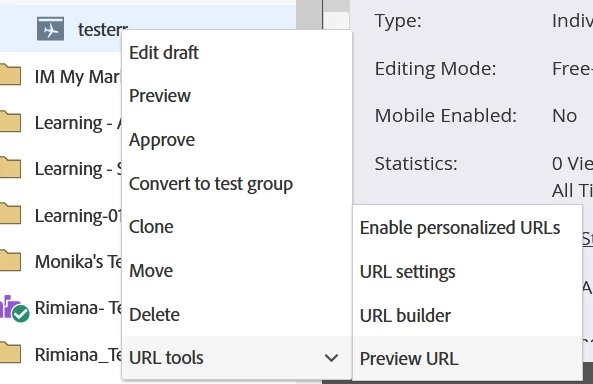
Right click on Landing page -> URL Tools -> Select Preview URL from drop down :

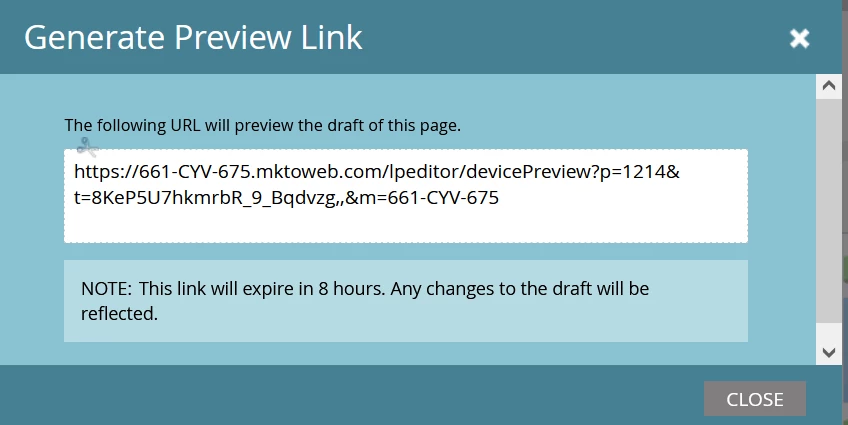
you can share the preview link with anyone who dont have Marketo Access but link will expire in 8 hrs.


Thanks and regards,
Avinash

3 replies

New Participant
May 5, 2022

Hi @knelson 

LP can be shared without approving with below steps:
Right click on Landing page -> URL Tools -> Select Preview URL from drop down 


ajavinashAccepted solution
New Participant
May 4, 2022

@knelson 
You can share the LP without approving with below steps:
Right click on Landing page -> URL Tools -> Select Preview URL from drop down :

you can share the preview link with anyone who dont have Marketo Access but link will expire in 8 hrs.


Thanks and regards,
Avinash

KnelsonAuthor
New Participant
May 4, 2022

Thank you !!

Darshil_Shah1
Community Manager
May 4, 2022

You can generate the preview URL by going to LP > Landing Page Actions > URL Tools > Generate Preview URL, and share the preview URL from the dialog. The URL will be good for 8 hrs. from the time of generation. 🙂


KnelsonAuthor
New Participant
May 4, 2022

Thank you !! 🙂